JVM memory layout
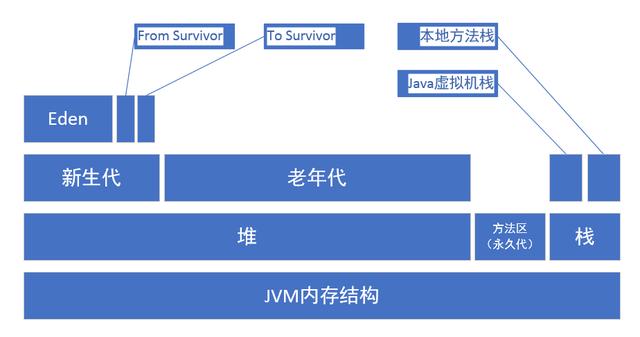
The JVM memory model can be divided into three major areas:
- Heap memory
- Method area
- Stack memory
Stack memory can be further split into the Java Virtual Machine Stack and the Native Method Stack. Heap memory is divided into the young generation and the old generation, and the young generation is further broken down into Eden, From Survivor, and To Survivor.
Part of JVM memory is shared across threads, mainly the Java heap and the method area. The rest is thread-private, including the JVM stack, native method stack, and the small but essential program counter register.
Heap
The Java heap is the largest memory region managed by the JVM. It is shared by all threads and created when the virtual machine starts. In practice, object instances created with new are stored here.
The heap exists primarily to hold object instances, and nearly all objects are allocated in this area.
It is typically split into two parts:
- Young generation
- Old generation
When people talk about Java garbage collection, they are usually referring to collection activity in the heap. The young generation can be divided more precisely into:
- Eden
- From Survivor
- To Survivor
In the following diagram, Perm refers to the permanent generation. However, it is important to note that the permanent generation is not considered part of the heap itself, and starting with JDK 1.8, it was removed.
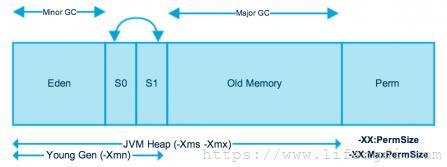
By default, the ratio between the young generation and the old generation is 1:2. This can be adjusted with -XX:NewRatio.
Also by default, the ratio of Eden : From : To is 8 : 1 : 1, configurable with -XX:SurvivorRatio. In other words:
- Eden takes up 8/10 of the young generation
- From Survivor takes 1/10
- To Survivor takes 1/10
Method area
The method area is also commonly called the permanent generation in older JVM discussions. It stores class metadata loaded by the virtual machine, constants, and static variables. This area is shared among threads.
In HotSpot JVM versions before JDK 8, this storage area was known as PermGen. It occupied a continuous region of heap space, and its maximum size could be configured at startup with -XX:MaxPermSize. The default value was 64 MB, or 85 MB on a 64-bit JVM.
With JDK 8, PermGen no longer exists. Class metadata still exists, but it is no longer stored in a contiguous heap region. Instead, it was moved to native memory in an area called Metaspace.
Settings related to the method area or permanent generation
-XX:PermSize=64MB minimum size, initial allocation
-XX:MaxPermSize=256MB maximum allowed allocation, expanded as needed
XX:+CMSClassUnloadingEnabled -XX:+CMSPermGenSweepingEnabled set garbage not to be reclaimed
Default sizes:
- Under the
-serveroption, the defaultMaxPermSizeis64m - Under the
-clientoption, the defaultMaxPermSizeis32m
JVM stack
The Java Virtual Machine Stack is thread-private, and its lifecycle matches the thread. When a thread is created, its JVM stack is created as well.
Each time a Java method executes, a stack frame is created. These frames are pushed onto and popped from the JVM stack as methods are called and returned.
A stack frame contains several parts, including:
- Local variable table
- Operand stack
- Dynamic linking
- Method return information
People often say that “variables are stored on the stack,” but that is not entirely precise. A better statement is that local variables are stored in the local variable table of the JVM stack frame.
For Java’s eight primitive types, local variable values are stored directly in the local variable table. For reference types, only the reference address to the object is stored there.
Native method stack
The Native Method Stack is very similar in purpose to the JVM stack. The difference is that the JVM stack serves Java methods executed as bytecode, while the native method stack serves native methods used by the virtual machine.
Program counter register
The program counter register records the location currently being executed by a thread. By changing the counter value, the JVM determines the next instruction to run. Loops, branches, method jumps, exception handling, and thread resumption all depend on this register.
Java multithreading is implemented by switching threads in turn and assigning CPU execution time slices. To ensure each thread can resume at the correct execution point after a switch, every thread needs its own independent program counter. That is why it is thread-private.
Direct memory
Direct memory is not part of the JVM runtime memory areas defined by the Java Virtual Machine specification, nor is it part of virtual machine memory in the usual sense.
It became more relevant with the introduction of NIO in JDK 1.4, which added a channel-and-buffer-based I/O model. Through native methods, NIO can allocate off-heap memory directly. That off-heap memory is native system memory, so it does not consume heap space.
JVM memory parameter settings
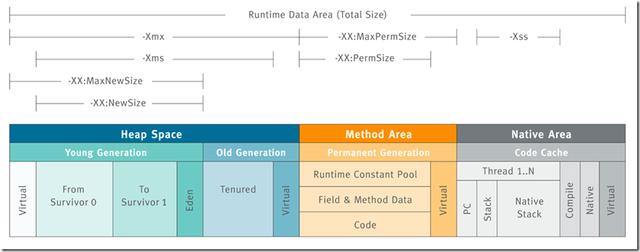
-Xms设置堆的最小空间大小。
-Xmx设置堆的最大空间大小。
-Xmn:设置年轻代大小
-XX:NewSize设置新生代最小空间大小。
-XX:MaxNewSize设置新生代最大空间大小。
-XX:PermSize设置永久代最小空间大小。
-XX:MaxPermSize设置永久代最大空间大小。
-Xss设置每个线程的堆栈大小
-XX:+UseParallelGC:选择垃圾收集器为并行收集器。此配置仅对年轻代有效。即上述配置下,年轻代使用并发收集,而年老代仍旧使用串行收集。
-XX:ParallelGCThreads=20:配置并行收集器的线程数,即:同时多少个线程一起进行垃圾回收。此值最好配置与处理器数目相等。
The parameters above cover the most commonly adjusted memory boundaries and GC options:
-Xmssets the minimum heap size-Xmxsets the maximum heap size-Xmnsets the young generation size-XX:NewSizeand-XX:MaxNewSizedefine the lower and upper limits of the young generation-XX:PermSizeand-XX:MaxPermSizeapply to the permanent generation in older JVMs-Xsscontrols the stack size per thread-XX:+UseParallelGCenables the parallel collector for the young generation-XX:ParallelGCThreadssets how many threads participate in parallel garbage collection, ideally matching the number of processors
A typical JVM configuration example
java-Xmx3550m-Xms3550m-Xmn2g-Xss128k
-XX:ParallelGCThreads=20
-XX:+UseConcMarkSweepGC-XX:+UseParNewGC
-Xmx3550m: sets the maximum available JVM memory to 3550 MB.
-Xms3550m: sets the initial JVM memory to 3550 MB. This is often set equal to -Xmx so the JVM does not need to repeatedly resize memory after each garbage collection cycle.
-Xmn2g: sets the young generation size to 2 GB. The total heap size is generally understood as:
heap = young generation + old generation + permanent generation
Since the permanent generation is often fixed at 64 MB, increasing the young generation usually reduces the size available to the old generation. This setting has a noticeable impact on performance, and one common recommendation is to set it to about 3/8 of the entire heap.
-Xss128k: sets the stack size per thread. Since JDK 5.0, the default thread stack size has typically been 1 MB; earlier it was 256 KB. This value should be adjusted according to the memory needs of the application’s threads. On the same physical machine, reducing this value allows more threads to be created. However, the operating system still limits how many threads a process can have, so the number cannot grow without bound. In practice, the limit is often around 3000–5000.
Detailed explanation of common JVM options
-XX:CMSInitiatingPermOccupancyFraction:当永久区占用率达到这一百分比时,启动CMS回收
-XX:CMSInitiatingOccupancyFraction:设置CMS收集器在老年代空间被使用多少后触发
-XX:+CMSClassUnloadingEnabled:允许对类元数据进行回收
-XX:CMSFullGCsBeforeCompaction:设定进行多少次CMS垃圾回收后,进行一次内存压缩
-XX:NewRatio:新生代和老年代的比
-XX:ParallelCMSThreads:设定CMS的线程数量
-XX:ParallelGCThreads:设置用于垃圾回收的线程数
-XX:SurvivorRatio:设置eden区大小和survivior区大小的比例
-XX:+UseParNewGC:在新生代使用并行收集器
-XX:+UseParallelGC :新生代使用并行回收收集器
-XX:+UseParallelOldGC:老年代使用并行回收收集器
-XX:+UseSerialGC:在新生代和老年代使用串行收集器
-XX:+UseConcMarkSweepGC:新生代使用并行收集器,老年代使用CMS+串行收集器
-XX:+UseCMSCompactAtFullCollection:设置CMS收集器在完成垃圾收集后是否要进行一次内存碎片的整理
-XX:UseCMSInitiatingOccupancyOnly:表示只在到达阀值的时候,才进行CMS回收

// 以下是常用参数
-Xms:设置堆的最小空间大小。
-Xmx:设置堆的最大空间大小。
-XX:NewSize设置新生代最小空间大小。
-XX:MaxNewSize设置新生代最大空间大小。
-XX:PermSize设置永久代最小空间大小。
-XX:MaxPermSize设置永久代最大空间大小。
-Xss:设置每个线程的堆栈大小

-XX:NewRatio:设置年轻代和年老代的比值。如:为3,表示年轻代与年老代比值为1:3,年轻代占整个年轻代年老代和的1/4

-XX:SurvivorRatio:年轻代中Eden区与两个Survivor区的比值。注意Survivor区有两个。如:3,表示Eden:Survivor=3:2,一个Survivor区占整个年轻代的1/5
A few of these are especially important when tuning GC behavior:
-XX:CMSInitiatingPermOccupancyFractionstarts CMS collection when permanent generation usage reaches a given percentage-XX:CMSInitiatingOccupancyFractiondefines how full the old generation must be before CMS is triggered-XX:+CMSClassUnloadingEnabledallows class metadata to be reclaimed-XX:CMSFullGCsBeforeCompactionspecifies how many CMS cycles should occur before a compaction pass is performed-XX:NewRatiocontrols the ratio between the young and old generations-XX:ParallelCMSThreadssets the number of CMS threads-XX:ParallelGCThreadssets the number of garbage collection worker threads-XX:SurvivorRatiocontrols the size relationship between Eden and Survivor spaces-XX:+UseParNewGCuses a parallel collector for the young generation-XX:+UseParallelGCenables the parallel scavenging collector for the young generation-XX:+UseParallelOldGCenables a parallel collector for the old generation-XX:+UseSerialGCuses the serial collector in both young and old generations-XX:+UseConcMarkSweepGCuses a parallel collector in the young generation and CMS plus serial behavior in the old generation-XX:+UseCMSCompactAtFullCollectiondetermines whether CMS should compact memory after a full collection to reduce fragmentation-XX:UseCMSInitiatingOccupancyOnlymeans CMS starts only when the configured threshold is reached
For generation sizing:
-XX:NewRatio=3means the ratio of young to old generation is 1:3, so the young generation accounts for 1/4 of the combined young and old generations-XX:SurvivorRatio=3means the Eden-to-Survivor relationship is 3:2 when both Survivor spaces are considered together, and a single Survivor space occupies 1/5 of the young generation
Although many of these settings appeared frequently in older JVM tuning guides, their actual usefulness depends heavily on the JDK version, collector in use, and workload characteristics. The structural concepts behind them, however, remain essential for understanding how JVM memory is organized and tuned.