Once the requirements are clear enough and the product's channels and pages have been mapped out, the next question is not simply what to build. It is whether the idea can survive contact with an actual interface. Prototyping is how that question gets tested. It forces a more concrete level of thought: what appears on each page, how it is arranged, and what happens when someone uses it. It also gives the product manager something tangible to put in front of designers, engineers, and decision-makers. A written description can be interpreted in many ways; a wireframe narrows the gap between what was meant and what was understood. After the prototype is ready, the product can be presented in a way that is far more direct than abstract text, so the team and the boss can see the product intent instead of guessing at it.
Prototyping turns structured requirements into a framework. That is why prototypes are often called wireframes. There are many ways to produce them and a long list of tools: Axure RP, Balsamiq Mockups, UIDesigner, and others.
At this point the work is no longer just brainstorming. You need to look closely at every element on a page and at the properties of those elements. Take a button. It is not enough to label it Register. You have to think about what it does and what feedback it produces on both the front end and the back end. After a user clicks Register, the first step might be checking whether the entered information is valid. If it is not, the interface needs to show an error. If it is, the system checks with the backend whether the same information already exists. If it does, the user gets a message. If it does not, the process moves to the next step and registration succeeds. Then there is the post-success question: should the page redirect, or should a layer appear asking the user to complete their profile? Those details can wait for the requirements document. At the wireframe stage, the job is to show the elements themselves and their basic arrangement.
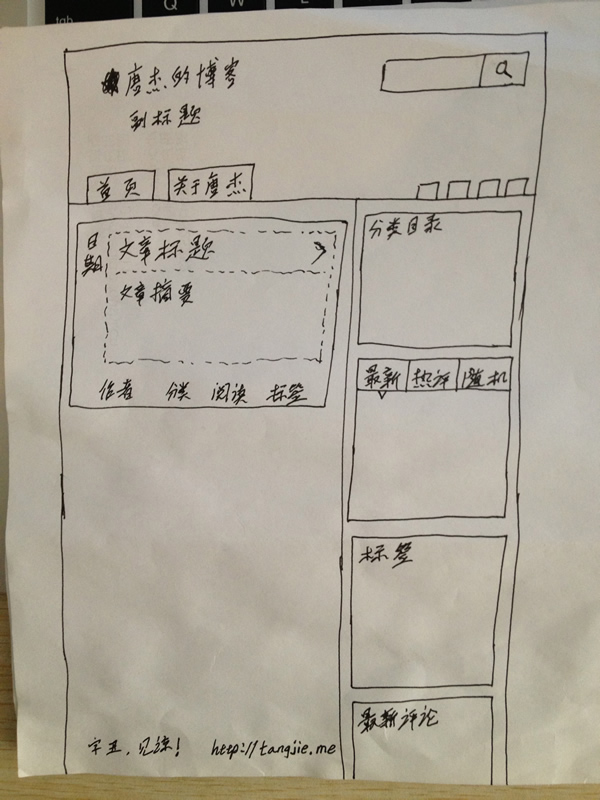
Prototypes are usually made in one of three ways: hand-drawn, grayscale, or interactive. They are not stages in a fixed sequence; they are different methods, and the right choice depends on the product and the team. For speed, I strongly recommend starting with a hand-drawn version on paper. Sketch the product, talk through it, and test whether the idea holds up. Once the approach is validated, use software to go deeper if your habits or team process call for it.
Hand-drawn prototypes
Because a prototype is also a wireframe, drawing by hand is the simplest and fastest way to outline a product. It is efficient in early validation, easy to discuss and restructure, and well suited to agile teams that need a quick prototype.
Grayscale prototypes
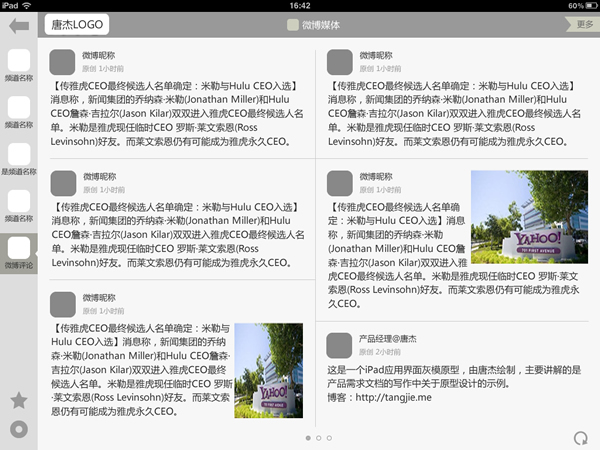
Grayscale prototypes are produced in graphic design software, most commonly Photoshop and Fireworks. Compared with a sketch, a grayscale prototype is cleaner and more polished, and it works well for formal presentations, including PPT walkthroughs. It can also be called a flat prototype. If you do not use graphic software, you can build one in Axure RP. Compared with an interactive prototype, a grayscale prototype simply lacks interaction; it presents requirements as a wireframe structure and makes them more regular and visually direct.

Interactive prototypes
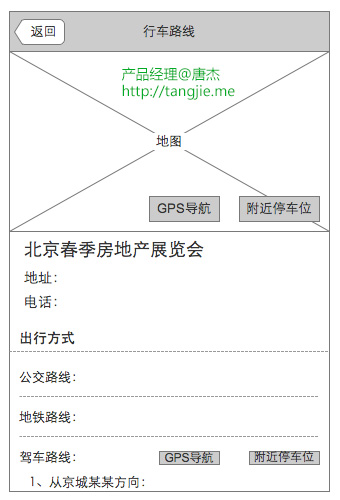
Interactive prototypes are built with prototyping software, most often Axure RP. They usually come before the product requirements document and are an important step in working out the product manager's ideas. A prototype made in Axure RP or similar software can represent functional and interaction requirements almost as they will appear in the real product, so it is sometimes called a product demo. Normally an interactive prototype is discussed and confirmed by the product manager and an interaction designer, then built by the interaction designer. In practice, many companies do not have an interaction designer, so the product manager ends up doing this work.
For a product manager, the point of a prototype is not to produce a beautiful artifact. It is to think through the solution carefully, test whether it is feasible, and present the product in a way that an audience can understand. Abstract verbal descriptions invite confusion and divergent interpretations. A prototype gives everyone a shared reference. It also helps keep execution aligned with the requirements and expectations set at the beginning. That is why the product manager's prototype does not need to be highly polished. If the people looking at it can follow it, it has done its job. In many cases, a hand-drawn prototype is the most efficient option.