What this project is
Reader is the server and desktop/web version of the Android app 阅读3. It turns the familiar mobile web-novel reading workflow into a browser-based service that can be self-hosted on a VPS.
The project is open source on GitHub and can be deployed with Docker. The backend uses Kotlin + Spring Boot + Vert.x + Coroutine, while the frontend is built with Vue.js + Element.
GitHub project:
https://github.com/hectorqin/reader
Main features
The web version keeps most of the functions people expect from the Android reader:
- Fully open source on GitHub and free to use
- Docker deployment, usually quick to set up
- Bookshelf management
- Book search
- Book discovery / library browsing
- Online reading
- Mobile-friendly layout
- Source switching
- Multiple page-turning styles
- Gesture support
- Custom themes
- Custom styles
- WebDAV sync
- Text replacement and filtering
- Text-to-speech, supported only by some browsers; on mobile it may stop after the screen locks
- Backup and restore of user configuration
- Manga support
- Audio support
- Book source availability checks
- Import of local
TXT,EPUB, andUMDbooks - Book grouping
- RSS subscription
- Scheduled bookshelf updates
- Concurrent book search
- Local book repository
Current limitations
There are a few important restrictions:
- Some book sources that rely on
Javascriptmay fail.cookieandcachefunctions are not supported. - Book sources that depend on
webvieware not supported. - Login-required book sources are not supported.
A note on usage and responsibility
Reader is a tool for searching online literature and offering a convenient trial-reading experience. When a book is searched, the book title is submitted as a keyword to third-party literature websites. The returned content belongs to those third-party sites and is not controlled by the tool itself.
Search results do not imply endorsement of the third-party pages, their content, or their positions. Users should evaluate and bear the risks of using search results themselves. The tool does not guarantee that third-party search results will meet expectations, remain uninterrupted, or be safe, accurate, timely, or lawful.
The project encourages readers to discover good works and their legitimate providers, and recommends supporting正版 books where possible. If a rights holder believes linked third-party content may infringe their rights, they should submit proper written notice and supporting proof so that the relevant links can be handled according to law.
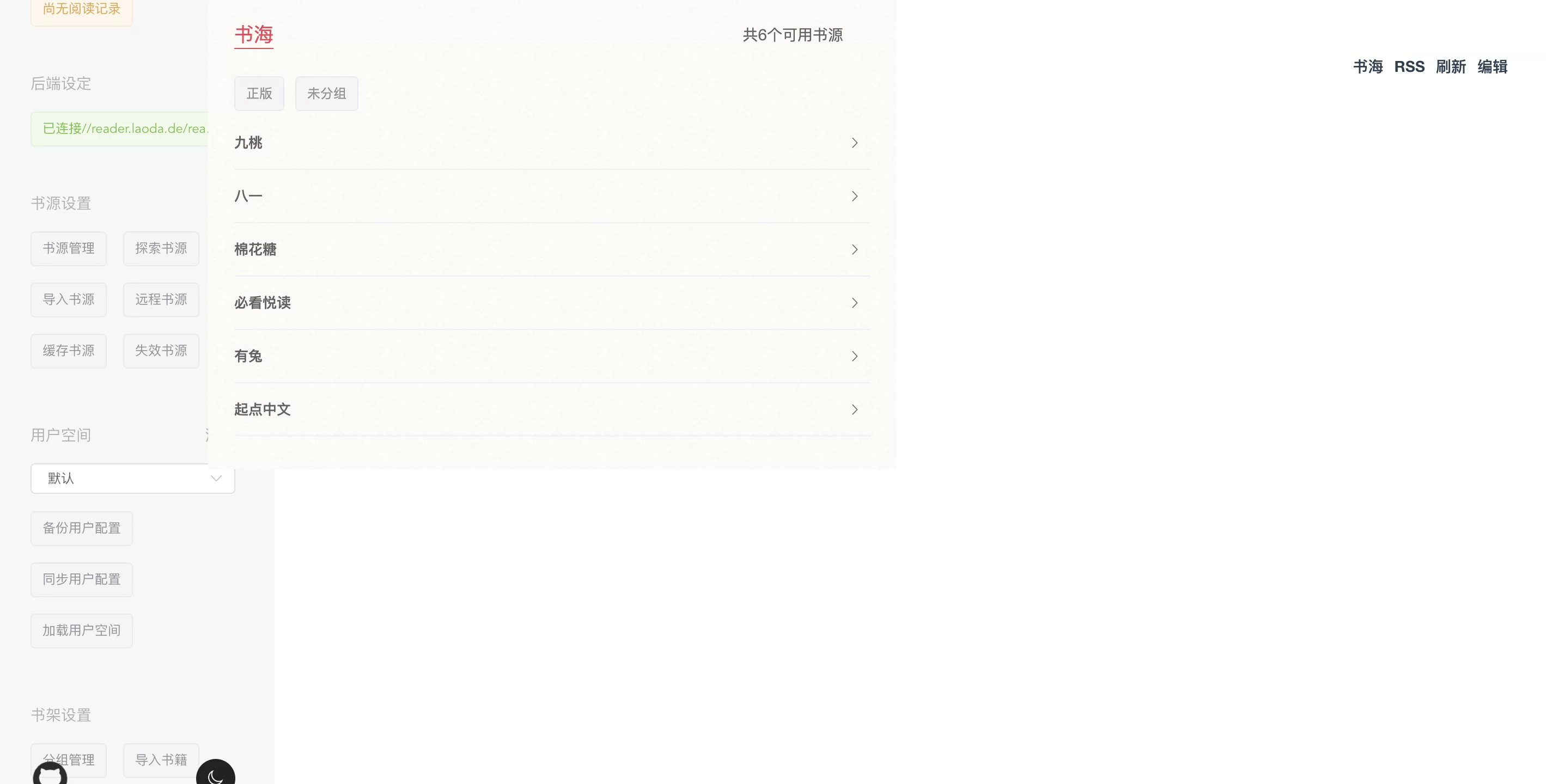
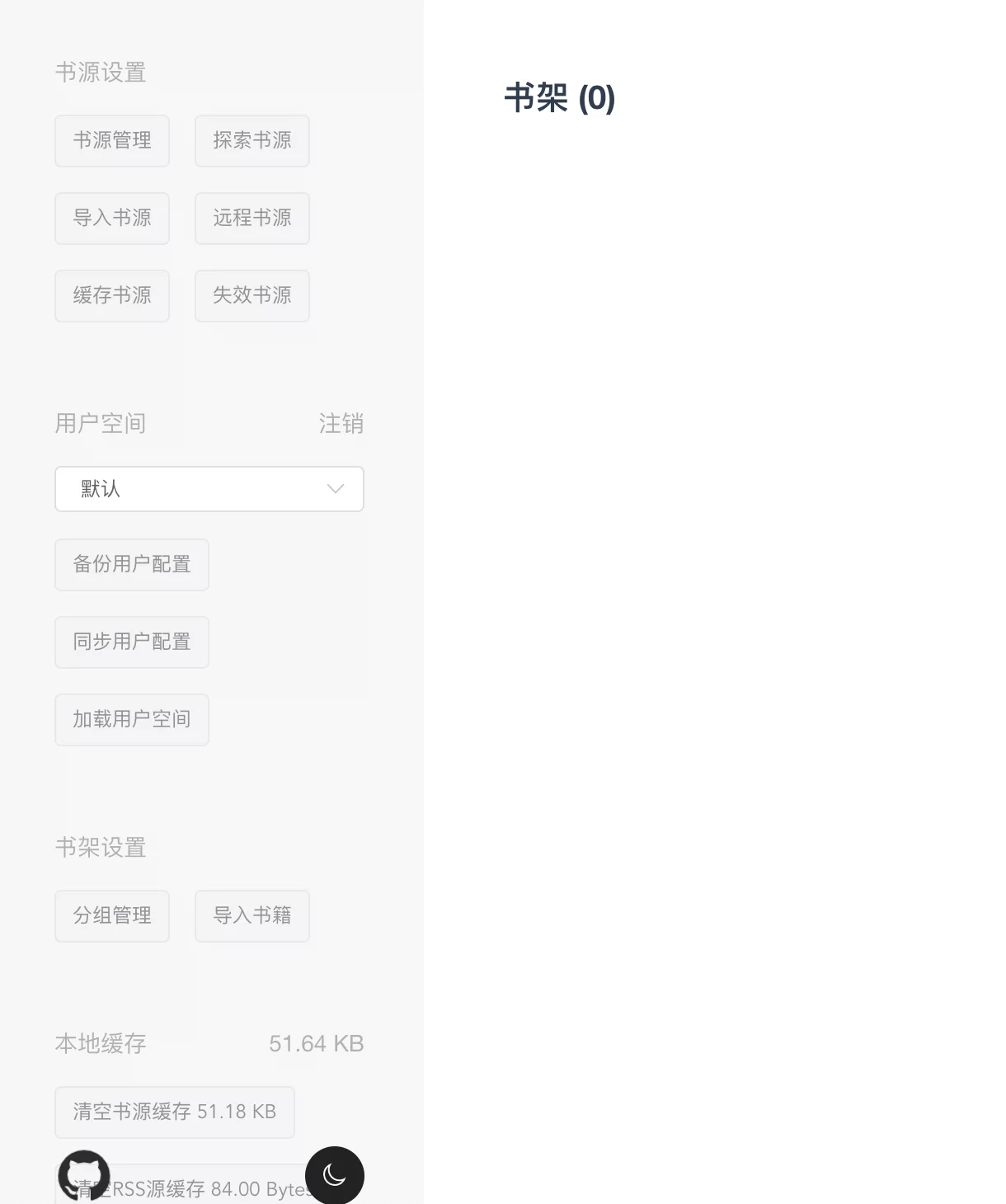
Screenshots



Preparation
A typical deployment needs the following:
- A VPS. A non-mainland China server is recommended.
- Debian 10, or another Linux system that works with Docker.
- A domain name with DNS already pointed to the server.
- Docker and Docker Compose installed.
- Optional: aapanel with Nginx installed.
- Optional and used in this setup: Nginx Proxy Manager.
Memory matters here. The VPS should preferably have more than 1 GB of RAM, and adding another 1 GB of SWAP is recommended because this project stores content in memory.
A SWAP helper script can be run with:
wget -O box.sh https://raw.githubusercontent.com/BlueSkyXN/SKY-BOX/main/box.sh && chmod +x box.sh && clear && ./box.sh
Deployment with Docker Compose
Start by switching to root and installing common tools:
sudo -i # 切换到root用户
apt update -y # 升级packages
apt install wget curl sudo vim git # Debian系统比较干净,安装常用的软件
Create the deployment directory:
mkdir -p /root/data/docker_data/reader
cd /root/data/docker_data/reader
nano docker-compose.yml
Below is the Docker Compose configuration from the official repository, adjusted for a multi-user deployment. The exposed host port is 4396; change it if needed.
version: '3.1'
services:
  # reader 在线阅读
  # 第三方在线演示(服务器位于日本):https://reader.nxnow.top
  # 在线演示测试账号/密码分别为guest/guest123,也可自行创建账号添加书源,不定期删除长期未登录账号
  # 书源参考 : https://github.com/NZESupB/ReadSource,书源合集下选一个合集进入网页后,Ctrl+S 保存至本地后导入网站即可,或者点击远程书源,将链接导入即可

  # 单用户版
  #docker run -d --restart=always --name=reader -e "SPRING_PROFILES_ACTIVE=prod" -v $(pwd)/logs:/logs -v $(pwd)/storage:/storage -p 8080:8080 hectorqin/reader
  # 多用户版
  #docker run -d --restart=always --name=reader -e "SPRING_PROFILES_ACTIVE=prod" -e "READER_APP_SECURE=true" -e "READER_APP_SECUREKEY=管理密码" -e "READER_APP_INVITECODE=注册邀请码" -v $(pwd)/logs:/logs -v $(pwd)/storage:/storage -p 8080:8080 hectorqin/reader

  reader:
    image: hectorqin/reader
    #image: hectorqin/reader:openj9-latest #docker镜像,arm64架构和小内存机器可以使用
    container_name: reader #容器名 可自行修改
    restart: always
    #限制镜像最大资源占用(可选) 低内存(<=2G)可考虑限制 使用此方式启动需加--compatibility,例如 docker-compose --compatibility up -d
    #deploy:
      #resources:
        #limits: #最大限制资源
          #cpus: '0.50' #cpu建议不做限制,保持注释即可,1表示100%
          #memory: 1024M
        #reservations: #保留最小资源
          #cpus: 0.25
          #memory: 256M
    ports:
      - 4396:8080 #4396端口映射可自行修改
    volumes:
      - /root/data/docker_data/reader/logs:/logs #log映射目录 /home/reader/logs 映射目录可自行修改
      - /root/data/docker_data/reader/storage:/storage #数据映射目录 /home/reader/storage 映射目录可自行修改
    #可配置默认书源,默认书源存放于数据映射目录中:storage/data/default/bookSource.json
    #书源参考(大部分可通用):https://www.legado.top/blog/book-source
    #wget -c https://namofree.gitee.io/yuedu3/legado3_booksource_by_Namo.json -O /home/reader/storage/data/default/bookSource.json
    environment:
      - SPRING_PROFILES_ACTIVE=prod
      - READER_APP_USERLIMIT=50 #用户上限,默认50
      - READER_APP_USERBOOKLIMIT=200 #用户书籍上限,默认200
      - READER_APP_CACHECHAPTERCONTENT=true #开启缓存章节内容 V2.0
      # 下面都是多用户模式配置
      - READER_APP_SECURE=true #开启登录鉴权,开启后将支持多用户模式
      - READER_APP_SECUREKEY=adminpwd #管理员密码 建议修改
      - READER_APP_INVITECODE=registercode #注册邀请码 建议修改,如不需要可注释或删除

  # 自动更新docker
  watchtower:
    image: containrrr/watchtower
    container_name: watchtower
    restart: always
    # 环境变量,设置为上海时区
    environment:
      - TZ=Asia/Shanghai
    volumes:
      - /var/run/docker.sock:/var/run/docker.sock
    command: reader watchtower --cleanup --schedule "0 0 4 * * *"
    # 仅更新reader与watchtower容器,如需其他自行添加 '容器名' ,如:reader watchtower nginx
    # --cleanup 更新后清理旧版本镜像
    # --schedule 自动检测更新 crontab定时(限定6位crontab) 此处代表凌晨4点整
After editing, press ctrl+x, then y, then enter to save.
Before starting the container, check whether port 4396 is already in use:
lsof -i:4396 #查看4396端口是否被占用,如果被占用,重新自定义一个端口
If the system returns:
-bash: lsof: command not found
install lsof first:
apt install lsof #安装lsof
If the port is free, start the service:
docker-compose up -d
You can then test it in the browser:
http:服务ip:4396
If you do not know the server IP, run:
curl ip.sb
If the page cannot be reached, check both the server panel firewall and the cloud provider firewall, and make sure the corresponding port is open.
Updating
Docker Compose makes updates straightforward:
cd /root/data/docker_data/reader # 进入docker-compose所在的文件夹
docker-compose pull # 拉取最新的镜像
docker-compose up -d # 重新更新当前镜像
Uninstalling
To remove the deployment:
sudo -i # 切换到root
cd /root/data/docker_data/reader # 进入docker-compose所在的文件夹
docker-compose down # 停止容器,此时不会删除映射到本地的数据
cd ~
rm -rf /root/data/docker_data/reader # 完全删除映射到本地的数据
HTTPS reverse proxy is required
This project is different from many ordinary self-hosted web apps: it must be accessed over https. Otherwise, browser-side encryption will not work and the service cannot be used normally.
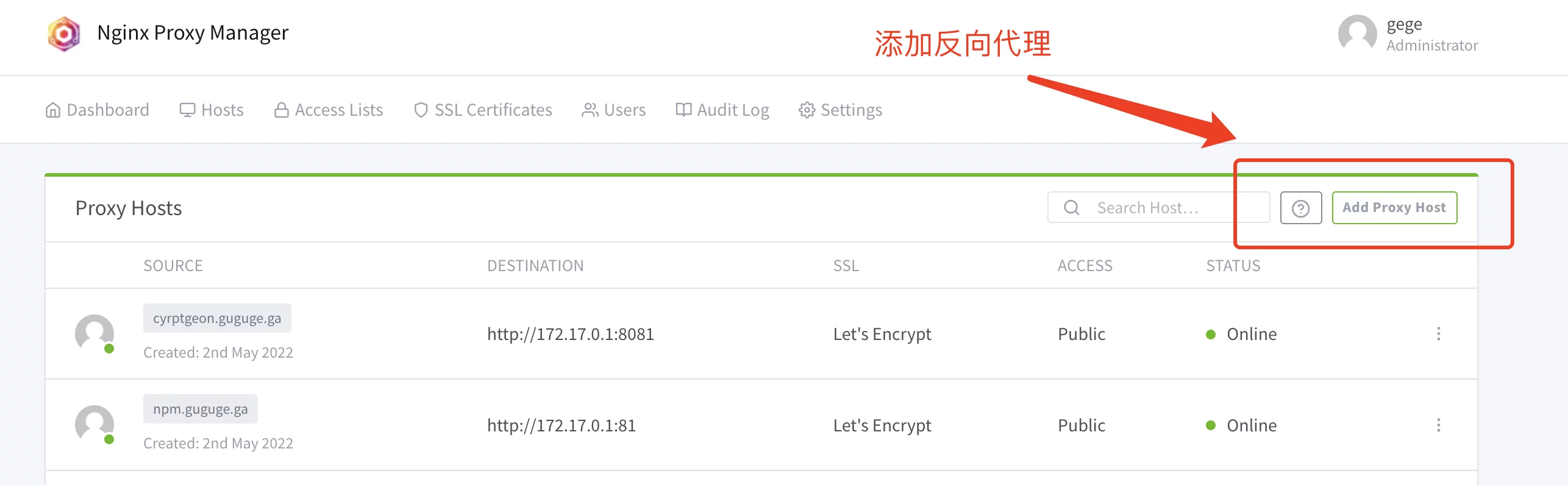
One convenient way is to use Nginx Proxy Manager. Before adding the proxy host, make sure the domain name has already been resolved to the server.
Nginx Proxy Manager uses ports 80 and 443, so they must not already be occupied by another local service such as an existing Nginx installation.
When adding the proxy host, fill in the correct domain name, server IP, and port. If the Compose file above is used unchanged, the port is 4396.
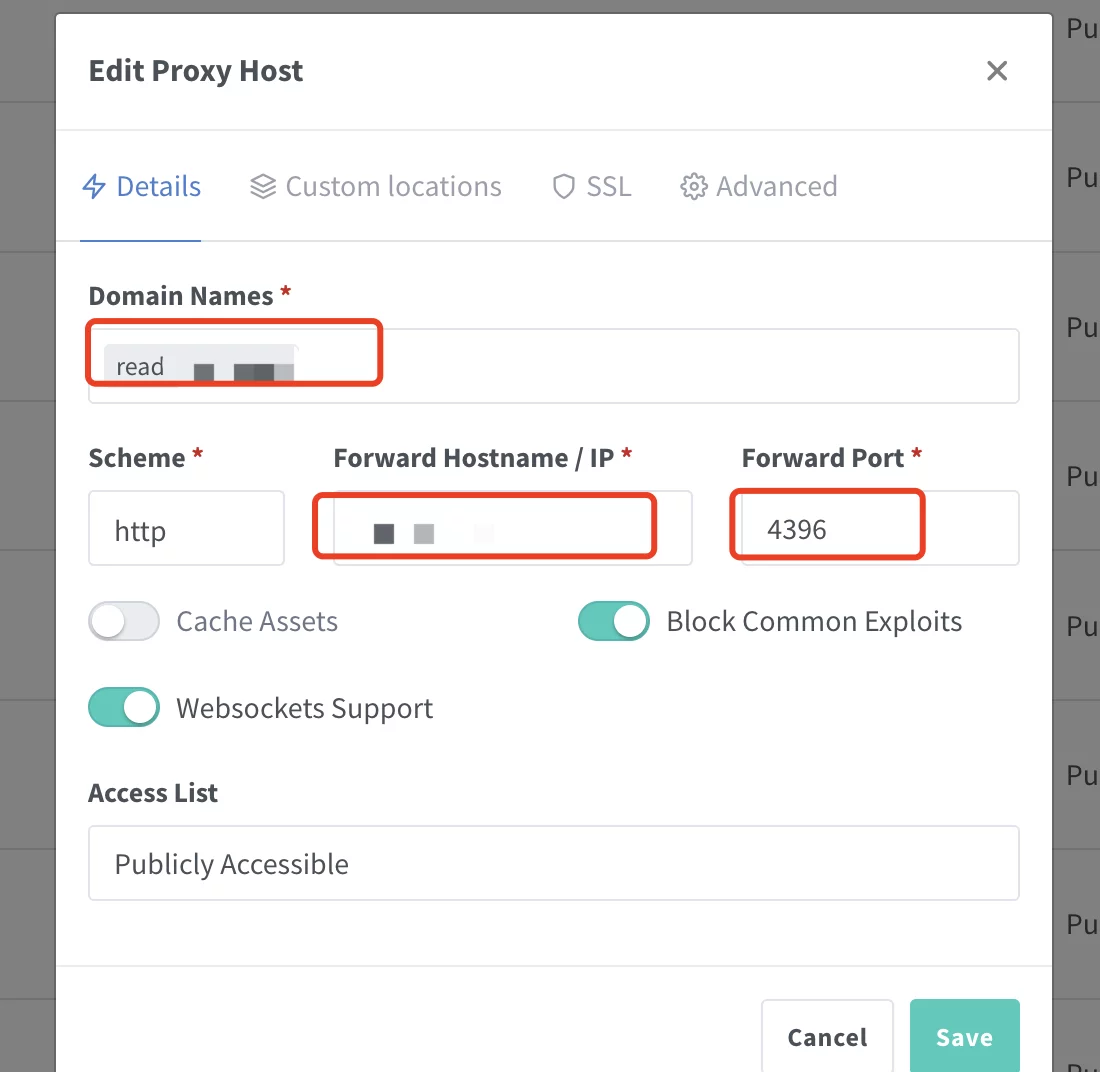
If Nginx Proxy Manager and reader are running on the same server, you can check the internal Docker network address with:
ip addr show docker0
Otherwise, enter the public IP address of the server where reader is running.
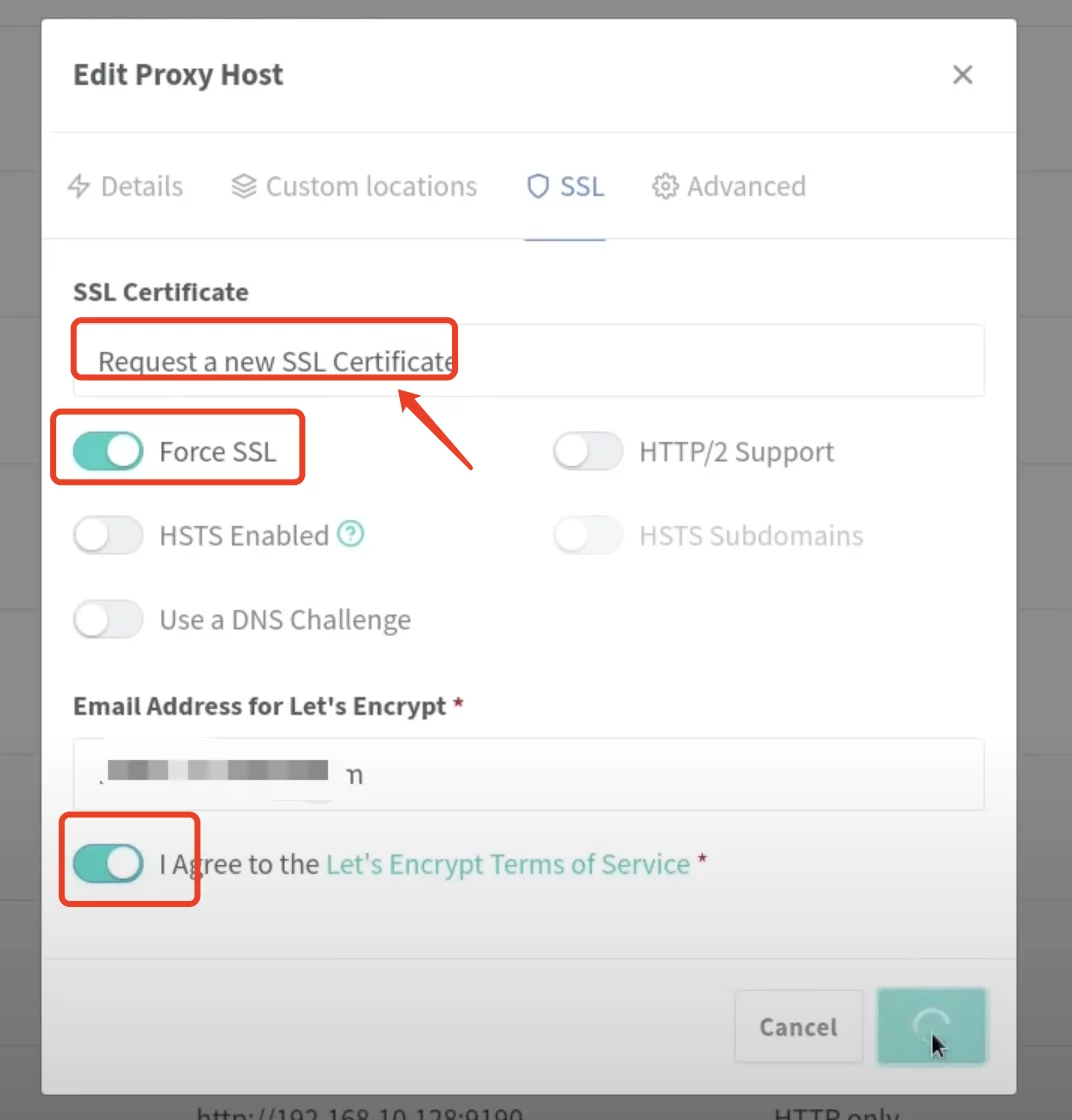
Open the proxy host again and enable the recommended SSL-related options:
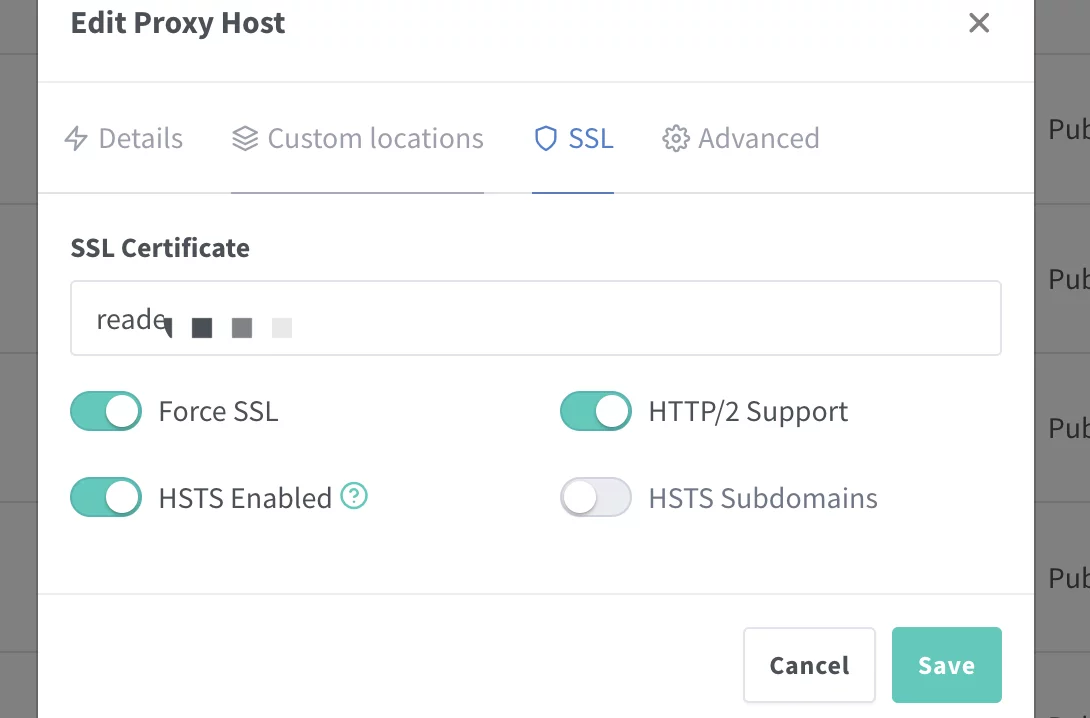
After that, access the reader through the configured domain name.
Book sources
Please support正版 books where possible.
One book source project is:
https://github.com/XIU2/Yuedu
It does not focus on having the largest number of sources; the idea is that quality is usually more useful than sheer quantity. In normal use, most people mainly rely on a few stable sources anyway.
Another collection integrates more than 1000 sources and covers a broad range of sites. For long-term availability, do not abuse it.
Book source:
https://shuyuan.mgz6.cc/shuyuan/84083d2be227881b0e3b90b9cd01c685.json
A .json book source can be imported directly.
There is also a web page with many book sources:
http://yck.mumuceo.com/yuedu/shuyuan/index.html
For source collections that provide a remote URL, you can import the link directly. For collections opened in the browser, save the page locally and then import it into the web reader.
References
- https://github.com/hectorqin/reader
- https://hostloc.com/thread-1010700-1-3.html
- https://github.com/XIU2/Yuedu
- https://blog.3cat.cc/142.html