Anyone who has worked with Kubernetes knows that etcd sits at the center of the cluster. It stores the state that Kubernetes depends on: namespaces, pods, services, routing information, and other cluster metadata. If the etcd cluster is damaged or its data is lost, recovering the Kubernetes cluster becomes difficult or impossible.
That is why etcd backup is not optional. For a Kubernetes disaster recovery plan, it is one of the most important habits to build: back up important data, and then back it up again.
Before doing anything else, it is worth checking the current etcd cluster status. In this example, the cluster has three members:
ETCDCTL_API=3 /opt/kube/bin/etcdctl --endpoints="https://172.17.1.20:2379,https://172.17.1.21:2379,https://172.17.1.22:2379" \
--cacert=/etc/kubernetes/ssl/ca.pem \
--cert=/etc/kubernetes/ssl/etcd.pem \
--key=/etc/kubernetes/ssl/etcd-key.pem \
endpoint status --write-out=table   #状态 (配合替换最后一行使用)
member list --write-out=table       #列表
endpoint health --write-out=table   #健康检查
A sample endpoint status output looks like this:
[root@master01 ~]# ETCDCTL_API=3 /opt/kube/bin/etcdctl --endpoints="https://172.17.1.20:2379,https://172.17.1.21:2379,https://172.17.1.22:2379" --cacert=/etc/kubernetes/ssl/ca.pem --cert=/etc/kubernetes/ssl/etcd.pem --key=/etc/kubernetes/ssl/etcd-key.pem endpoint status --write-out=table
+--------------------------+------------------+---------+---------+-----------+------------+-----------+------------+--------------------+--------+
|         ENDPOINT         |        ID        | VERSION | DB SIZE | IS LEADER | IS LEARNER | RAFT TERM | RAFT INDEX | RAFT APPLIED INDEX | ERRORS |
+--------------------------+------------------+---------+---------+-----------+------------+-----------+------------+--------------------+--------+
| https://172.17.1.20:2379 | 20eec45319ea02e1 |  3.4.13 |  4.3 MB |     false |      false |         5 |      14715 |              14715 |        |
| https://172.17.1.21:2379 |  395af18f6bbef1a |  3.4.13 |  4.3 MB |     false |      false |         5 |      14715 |              14715 |        |
| https://172.17.1.22:2379 | fc24d224af6a71d9 |  3.4.13 |  4.3 MB |      true |      false |         5 |      14715 |              14715 |        |
+--------------------------+------------------+---------+---------+-----------+------------+-----------+------------+--------------------+--------+
Backing up the etcd cluster
The exact etcdctl syntax varies between versions, but the overall process is similar. Here the backup is created with snapshot save.
A few details matter:
- The backup only needs to be run on one etcd node.
- This example uses the etcd v3 API. Starting with Kubernetes 1.13, Kubernetes no longer supports etcd v2, so cluster data is stored in etcd v3. That also means the snapshot only contains data written through the v3 API; data originally added with v2 is not included.
- The environment shown here is a binary-installed Kubernetes v1.20.2 cluster with Calico. In the commands below,
ETCDCTL_API=3 etcdctlis effectively the same as usingetcdctlwith the v3 API selected.
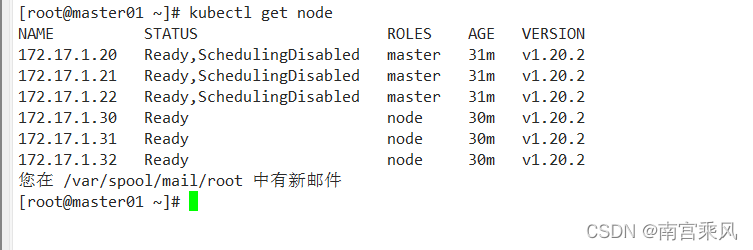
Check the existing etcd data layout
Before creating the snapshot, inspect the etcd service configuration and data directory:
[root@master01 ~]# cat /etc/systemd/system/etcd.service
[Unit]
Description=Etcd Server
After=network.target
After=network-online.target
Wants=network-online.target
Documentation=https://github.com/coreos

[Service]
Type=notify
WorkingDirectory=/var/lib/etcd/
ExecStart=/opt/kube/bin/etcd \
  --name=etcd-172.17.1.20 \
  --cert-file=/etc/kubernetes/ssl/etcd.pem \
  --key-file=/etc/kubernetes/ssl/etcd-key.pem \
  --peer-cert-file=/etc/kubernetes/ssl/etcd.pem \
  --peer-key-file=/etc/kubernetes/ssl/etcd-key.pem \
  --trusted-ca-file=/etc/kubernetes/ssl/ca.pem \
  --peer-trusted-ca-file=/etc/kubernetes/ssl/ca.pem \
  --initial-advertise-peer-urls=https://172.17.1.20:2380 \
  --listen-peer-urls=https://172.17.1.20:2380 \
  --listen-client-urls=https://172.17.1.20:2379,http://127.0.0.1:2379 \
  --advertise-client-urls=https://172.17.1.20:2379 \
  --initial-cluster-token=etcd-cluster-0 \
  --initial-cluster=etcd-172.17.1.20=https://172.17.1.20:2380,etcd-172.17.1.21=https://172.17.1.21:2380,etcd-172.17.1.22=https://172.17.1.22:2380 \
  --initial-cluster-state=new \
  --data-dir=/var/lib/etcd \
  --snapshot-count=50000 \
  --auto-compaction-retention=1 \
  --max-request-bytes=10485760 \
  --auto-compaction-mode=periodic \
  --quota-backend-bytes=8589934592
Restart=always
RestartSec=15
LimitNOFILE=65536
OOMScoreAdjust=-999
[root@master01 ~]# tree /var/lib/etcd
/var/lib/etcd
└── member
    ├── snap
    │   └── db
    └── wal
        ├── 0000000000000000-0000000000000000.wal
        └── 0.tmp

3 directories, 3 files
Create the snapshot
Create a backup directory on every etcd node first:
mkdir -p /data/etcd_backup_dir
Then run the backup on any one etcd node. In this case it is executed on k8s-master01:
ETCDCTL_API=3 /opt/kube/bin/etcdctl \
snapshot save /data/etcd_backup_dir/etcd-snapshot-`date +%Y%m%d`.db \
--endpoints=https://172.17.1.20:2379 \
--cacert=/etc/kubernetes/ssl/ca.pem \
--cert=/etc/kubernetes/ssl/etcd.pem \
--key=/etc/kubernetes/ssl/etcd-key.pem
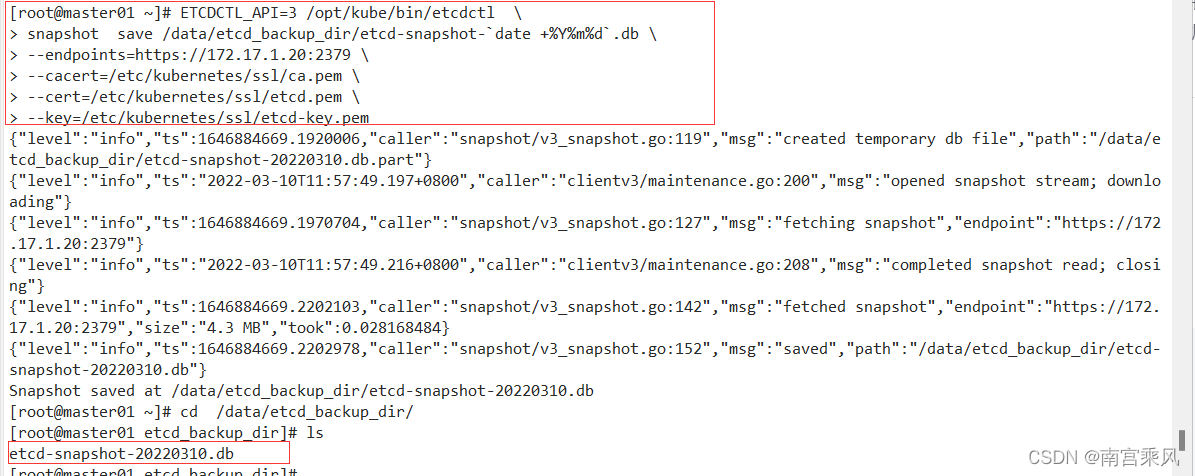
After the snapshot is created, copy it to the other etcd nodes:
[root@master01 ~]# scp /data/etcd_backup_dir/etcd-snapshot-20220310.db 172.17.1.21:/data/etcd_backup_dir/
etcd-snapshot-20220310.db                                            100% 4208KB 158.6MB/s   00:00
您在 /var/spool/mail/root 中有新邮件
[root@master01 ~]# scp /data/etcd_backup_dir/etcd-snapshot-20220310.db 172.17.1.22:/data/etcd_backup_dir/
etcd-snapshot-20220310.db                                            100% 4208KB 158.3MB/s   00:00
[root@master01 ~]#
Automate the backup with a script and cron
It is practical to place the backup command into a script and schedule it with crontab.
[root@k8s-master01 ~]# cat /data/etcd_backup_dir/etcd_backup.sh
#!/usr/bin/bash
date;
ETCDCTL_API=3 /opt/kube/bin/etcdctl \
snapshot save /data/etcd_backup_dir/etcd-snapshot-`date +%Y%m%d`.db \
--endpoints=https://172.17.1.20:2379 \
--cacert=/etc/kubernetes/ssl/ca.pem \
--cert=/etc/kubernetes/ssl/etcd.pem \
--key=/etc/kubernetes/ssl/etcd-key.pem
# 备份保留30天
find /data/etcd_backup_dir/ -name "*.db" -mtime +30 -exec rm -f {} \;
# 同步到其他两个etcd节点
scp /data/etcd_backup_dir/etcd-snapshot-`date +%Y%m%d`.db 172.17.1.21:/data/etcd_backup_dir/
scp /data/etcd_backup_dir/etcd-snapshot-`date +%Y%m%d`.db 172.17.1.22:/data/etcd_backup_dir/
Schedule it to run every day at 5:00 AM:
[root@master01 ~]# chmod 755 /data/etcd_backup_dir/etcd_backup.sh
[root@master01 ~]# crontab -e
crontab: installing new crontab
[root@master01 ~]# crontab -l
*/10 * * * * ntpdate time.windows.com
0 5 * * * /bin/bash -x /data/etcd_backup_dir/etcd_backup.sh > /dev/null 2>&1
Restoring the etcd cluster
Backing up an etcd cluster can be done from a single node, then the snapshot can be distributed to the rest. Restoration is different: every etcd node must be restored.
Simulate etcd data loss
To demonstrate the recovery process, move the member data directory away on all three etcd nodes:
[root@master01 ~]# ls /var/lib/etcd/
member
[root@master01 ~]# ansible master -m shell -a "mv /var/lib/etcd/member /var/lib/etcd/member_bak"
172.17.1.21 | CHANGED | rc=0 >>
172.17.1.22 | CHANGED | rc=0 >>
172.17.1.20 | CHANGED | rc=0 >>
[root@master01 ~]# ls /var/lib/etcd/
member_bak
Now check the Kubernetes cluster state. At first glance, the etcd services are still running and health checks may still look normal after a short while:
[root@master01 ~]# kubectl get cs
Warning: v1 ComponentStatus is deprecated in v1.19+
NAME                 STATUS    MESSAGE             ERROR
controller-manager   Healthy   ok
scheduler            Healthy   ok
etcd-1               Healthy   {"health":"true"}
etcd-0               Healthy   {"health":"true"}
etcd-2               Healthy   {"health":"true"}
您在 /var/spool/mail/root 中有新邮件
[root@master01 ~]#
[root@master01 ~]#
[root@master01 ~]# ETCDCTL_API=3 /opt/kube/bin/etcdctl --endpoints="https://172.17.1.20:2379,https://172.17.1.21:2379,https://172.17.1.22:2379" \
> --cacert=/etc/kubernetes/ssl/ca.pem \
> --cert=/etc/kubernetes/ssl/etcd.pem \
> --key=/etc/kubernetes/ssl/etcd-key.pem \
> endpoint status --write-out=table  #状态
+--------------------------+------------------+---------+---------+-----------+------------+-----------+------------+--------------------+--------+
|         ENDPOINT         |        ID        | VERSION | DB SIZE | IS LEADER | IS LEARNER | RAFT TERM | RAFT INDEX | RAFT APPLIED INDEX | ERRORS |
+--------------------------+------------------+---------+---------+-----------+------------+-----------+------------+--------------------+--------+
| https://172.17.1.20:2379 | 20eec45319ea02e1 |  3.4.13 |  143 kB |     false |      false |         7 |        191 |                191 |        |
| https://172.17.1.21:2379 |  395af18f6bbef1a |  3.4.13 |  143 kB |      true |      false |         7 |        191 |                191 |        |
| https://172.17.1.22:2379 | fc24d224af6a71d9 |  3.4.13 |  152 kB |     false |      false |         7 |        191 |                191 |        |
+--------------------------+------------------+---------+---------+-----------+------------+-----------+------------+--------------------+--------+
[root@master01 ~]# kubectl get svc,pod -A
NAMESPACE   NAME                 TYPE        CLUSTER-IP   EXTERNAL-IP   PORT(S)   AGE
default     service/kubernetes   ClusterIP   10.68.0.1    <none>        443/TCP   18s
But the important detail is that the Kubernetes data is already gone. Namespace resources and pods have disappeared:
[root@master01 ~]# kubectl get ns
NAME              STATUS   AGE
default           Active   2m20s
kube-node-lease   Active   2m20s
kube-public       Active   2m20s
kube-system       Active   2m20s
[root@master01 ~]# kubectl get pod -n kube-system
No resources found in kube-system namespace.
At this point, the only way back is to restore the etcd snapshot.
Restore the etcd snapshot and recover the Kubernetes cluster
Before restoring etcd data, stop the kube-apiserver service on all master nodes and stop the etcd service on all etcd nodes:
[root@master01 ~]# ansible master -m shell -a "systemctl stop kube-apiserver && systemctl stop etcd"
172.17.1.21 | CHANGED | rc=0 >>
172.17.1.22 | CHANGED | rc=0 >>
172.17.1.20 | CHANGED | rc=0 >>
One warning is critical here: before running the restore, delete the old etcd data and wal working directories on every node. If the old data directory is still present, the restore may fail because the target data directory already exists.
Then run the restore on each etcd node.
master01
[root@master01 ~]#
[root@master01 ~]# ETCDCTL_API=3 /opt/kube/bin/etcdctl \
> --name=etcd-172.17.1.20 \
> --endpoints="https://172.17.1.20:2379" \
> --cacert=/etc/kubernetes/ssl/ca.pem \
> --cert=/etc/kubernetes/ssl/etcd.pem \
> --key=/etc/kubernetes/ssl/etcd-key.pem \
> --initial-cluster-token=etcd-cluster-0 \
> --initial-advertise-peer-urls=https://172.17.1.20:2380 \
> --initial-cluster=etcd-172.17.1.20=https://172.17.1.20:2380,etcd-172.17.1.21=https://172.17.1.21:2380,etcd-172.17.1.22=https://172.17.1.22:2380 \
> --data-dir=/var/lib/etcd \
> snapshot restore /data/etcd_backup_dir/etcd-snapshot-20220310.db
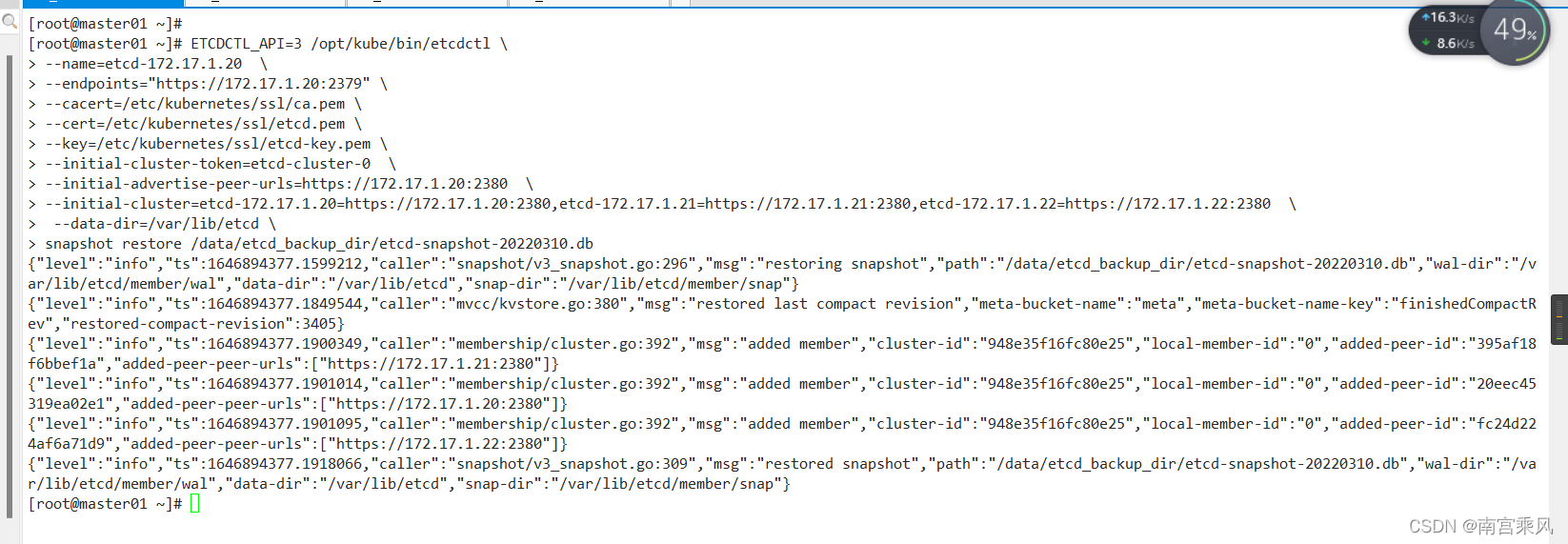
master02
ETCDCTL_API=3 /opt/kube/bin/etcdctl \
--name=etcd-172.17.1.21 \
--endpoints="https://172.17.1.21:2379" \
--cacert=/etc/kubernetes/ssl/ca.pem \
--cert=/etc/kubernetes/ssl/etcd.pem \
--key=/etc/kubernetes/ssl/etcd-key.pem \
--initial-cluster-token=etcd-cluster-0 \
--initial-advertise-peer-urls=https://172.17.1.21:2380 \
--initial-cluster=etcd-172.17.1.20=https://172.17.1.20:2380,etcd-172.17.1.21=https://172.17.1.21:2380,etcd-172.17.1.22=https://172.17.1.22:2380 \
--data-dir=/var/lib/etcd \
snapshot restore /data/etcd_backup_dir/etcd-snapshot-20220310.db
master03
ETCDCTL_API=3 /opt/kube/bin/etcdctl \
--name=etcd-172.17.1.22 \
--endpoints="https://172.17.1.22:2379" \
--cacert=/etc/kubernetes/ssl/ca.pem \
--cert=/etc/kubernetes/ssl/etcd.pem \
--key=/etc/kubernetes/ssl/etcd-key.pem \
--initial-cluster-token=etcd-cluster-0 \
--initial-advertise-peer-urls=https://172.17.1.22:2380 \
--initial-cluster=etcd-172.17.1.20=https://172.17.1.20:2380,etcd-172.17.1.21=https://172.17.1.21:2380,etcd-172.17.1.22=https://172.17.1.22:2380 \
--data-dir=/var/lib/etcd \
snapshot restore /data/etcd_backup_dir/etcd-snapshot-20220310.db
After all three nodes have been restored, start etcd on each node:
# systemctl start etcd
# systemctl status etcd
Example output:
[root@master01 ~]# ansible master -m shell -a "systemctl start etcd"
172.17.1.22 | CHANGED | rc=0 >>
172.17.1.21 | CHANGED | rc=0 >>
172.17.1.20 | CHANGED | rc=0 >>
您在 /var/spool/mail/root 中有新邮件
[root@master01 ~]# ansible master -m shell -a "systemctl status etcd"
172.17.1.21 | CHANGED | rc=0 >>
● etcd.service - Etcd Server
   Loaded: loaded (/etc/systemd/system/etcd.service; enabled; vendor preset: disabled)
   Active: active (running) since 四 2022-03-10 14:43:41 CST; 8s ago
     Docs: https://github.com/coreos
 Main PID: 81855 (etcd)
   Tasks: 13
   Memory: 23.4M
   CGroup: /system.slice/etcd.service
           └─81855 /opt/kube/bin/etcd --name=etcd-172.17.1.21 --cert-file=/etc/kubernetes/ssl/etcd.pem --key-file=/etc/kubernetes/ssl/etcd-key.pem --peer-cert-file=/etc/kubernetes/ssl/etcd.pem --peer-key-file=/etc/kubernetes/ssl/etcd-key.pem --trusted-ca-file=/etc/kubernetes/ssl/ca.pem --peer-trusted-ca-file=/etc/kubernetes/ssl/ca.pem --initial-advertise-peer-urls=https://172.17.1.21:2380 --listen-peer-urls=https://172.17.1.21:2380 --listen-client-urls=https://172.17.1.21:2379,http://127.0.0.1:2379 --advertise-client-urls=https://172.17.1.21:2379 --initial-cluster-token=etcd-cluster-0 --initial-cluster=etcd-172.17.1.20=https://172.17.1.20:2380,etcd-172.17.1.21=https://172.17.1.21:2380,etcd-172.17.1.22=https://172.17.1.22:2380 --initial-cluster-state=new --data-dir=/var/lib/etcd --snapshot-count=50000 --auto-compaction-retention=1 --max-request-bytes=10485760 --auto-compaction-mode=periodic --quota-backend-bytes=8589934592

3月 10 14:43:41 master02 etcd[81855]: published {Name:etcd-172.17.1.21 ClientURLs:[https://172.17.1.21:2379]} to cluster 948e35f16fc80e25
3月 10 14:43:41 master02 etcd[81855]: ready to serve client requests
3月 10 14:43:41 master02 etcd[81855]: ready to serve client requests
3月 10 14:43:41 master02 systemd[1]: Started Etcd Server.
3月 10 14:43:41 master02 etcd[81855]: serving insecure client requests on 127.0.0.1:2379, this is strongly discouraged!
3月 10 14:43:41 master02 etcd[81855]: serving client requests on 172.17.1.21:2379
3月 10 14:43:41 master02 etcd[81855]: set the initial cluster version to 3.4
3月 10 14:43:41 master02 etcd[81855]: enabled capabilities for version 3.4
3月 10 14:43:41 master02 etcd[81855]: established a TCP streaming connection with peer 20eec45319ea02e1 (stream Message reader)
3月 10 14:43:41 master02 etcd[81855]: established a TCP streaming connection with peer 20eec45319ea02e1 (stream MsgApp v2 reader)
172.17.1.22 | CHANGED | rc=0 >>
● etcd.service - Etcd Server
   Loaded: loaded (/etc/systemd/system/etcd.service; enabled; vendor preset: disabled)
   Active: active (running) since 四 2022-03-10 14:43:41 CST; 8s ago
     Docs: https://github.com/coreos
 Main PID: 81803 (etcd)
   Tasks: 13
   Memory: 20.7M
   CGroup: /system.slice/etcd.service
           └─81803 /opt/kube/bin/etcd --name=etcd-172.17.1.22 --cert-file=/etc/kubernetes/ssl/etcd.pem --key-file=/etc/kubernetes/ssl/etcd-key.pem --peer-cert-file=/etc/kubernetes/ssl/etcd.pem --peer-key-file=/etc/kubernetes/ssl/etcd-key.pem --trusted-ca-file=/etc/kubernetes/ssl/ca.pem --peer-trusted-ca-file=/etc/kubernetes/ssl/ca.pem --initial-advertise-peer-urls=https://172.17.1.22:2380 --listen-peer-urls=https://172.17.1.22:2380 --listen-client-urls=https://172.17.1.22:2379,http://127.0.0.1:2379 --advertise-client-urls=https://172.17.1.22:2379 --initial-cluster-token=etcd-cluster-0 --initial-cluster=etcd-172.17.1.20=https://172.17.1.20:2380,etcd-172.17.1.21=https://172.17.1.21:2380,etcd-172.17.1.22=https://172.17.1.22:2380 --initial-cluster-state=new --data-dir=/var/lib/etcd --snapshot-count=50000 --auto-compaction-retention=1 --max-request-bytes=10485760 --auto-compaction-mode=periodic --quota-backend-bytes=8589934592

3月 10 14:43:41 master03 etcd[81803]: ready to serve client requests
3月 10 14:43:41 master03 etcd[81803]: ready to serve client requests
3月 10 14:43:41 master03 systemd[1]: Started Etcd Server.
3月 10 14:43:41 master03 etcd[81803]: serving insecure client requests on 127.0.0.1:2379, this is strongly discouraged!
3月 10 14:43:41 master03 etcd[81803]: serving client requests on 172.17.1.22:2379
3月 10 14:43:41 master03 etcd[81803]: setting up the initial cluster version to 3.4
3月 10 14:43:41 master03 etcd[81803]: set the initial cluster version to 3.4
3月 10 14:43:41 master03 etcd[81803]: enabled capabilities for version 3.4
3月 10 14:43:41 master03 etcd[81803]: established a TCP streaming connection with peer 20eec45319ea02e1 (stream Message reader)
3月 10 14:43:41 master03 etcd[81803]: established a TCP streaming connection with peer 20eec45319ea02e1 (stream MsgApp v2 reader)
172.17.1.20 | CHANGED | rc=0 >>
● etcd.service - Etcd Server
   Loaded: loaded (/etc/systemd/system/etcd.service; enabled; vendor preset: disabled)
   Active: active (running) since 四 2022-03-10 14:43:41 CST; 9s ago
     Docs: https://github.com/coreos
 Main PID: 103123 (etcd)
   Tasks: 13
   Memory: 10.7M
   CGroup: /system.slice/etcd.service
           └─103123 /opt/kube/bin/etcd --name=etcd-172.17.1.20 --cert-file=/etc/kubernetes/ssl/etcd.pem --key-file=/etc/kubernetes/ssl/etcd-key.pem --peer-cert-file=/etc/kubernetes/ssl/etcd.pem --peer-key-file=/etc/kubernetes/ssl/etcd-key.pem --trusted-ca-file=/etc/kubernetes/ssl/ca.pem --peer-trusted-ca-file=/etc/kubernetes/ssl/ca.pem --initial-advertise-peer-urls=https://172.17.1.20:2380 --listen-peer-urls=https://172.17.1.20:2380 --listen-client-urls=https://172.17.1.20:2379,http://127.0.0.1:2379 --advertise-client-urls=https://172.17.1.20:2379 --initial-cluster-token=etcd-cluster-0 --initial-cluster=etcd-172.17.1.20=https://172.17.1.20:2380,etcd-172.17.1.21=https://172.17.1.21:2380,etcd-172.17.1.22=https://172.17.1.22:2380 --initial-cluster-state=new --data-dir=/var/lib/etcd --snapshot-count=50000 --auto-compaction-retention=1 --max-request-bytes=10485760 --auto-compaction-mode=periodic --quota-backend-bytes=8589934592

3月 10 14:43:41 master01 etcd[103123]: serving insecure client requests on 127.0.0.1:2379, this is strongly discouraged!
3月 10 14:43:41 master01 etcd[103123]: serving client requests on 172.17.1.20:2379
3月 10 14:43:41 master01 systemd[1]: Started Etcd Server.
3月 10 14:43:41 master01 etcd[103123]: 20eec45319ea02e1 initialized peer connection; fast-forwarding 8 ticks (election ticks 10) with 2 active peer(s)
3月 10 14:43:41 master01 etcd[103123]: set the initial cluster version to 3.4
3月 10 14:43:41 master01 etcd[103123]: enabled capabilities for version 3.4
3月 10 14:43:41 master01 etcd[103123]: established a TCP streaming connection with peer fc24d224af6a71d9 (stream Message writer)
3月 10 14:43:41 master01 etcd[103123]: established a TCP streaming connection with peer fc24d224af6a71d9 (stream MsgApp v2 writer)
3月 10 14:43:41 master01 etcd[103123]: established a TCP streaming connection with peer 395af18f6bbef1a (stream Message writer)
3月 10 14:43:41 master01 etcd[103123]: established a TCP streaming connection with peer 395af18f6bbef1a (stream MsgApp v2 writer)
Once etcd is back, verify the cluster status and confirm that a leader has been elected.
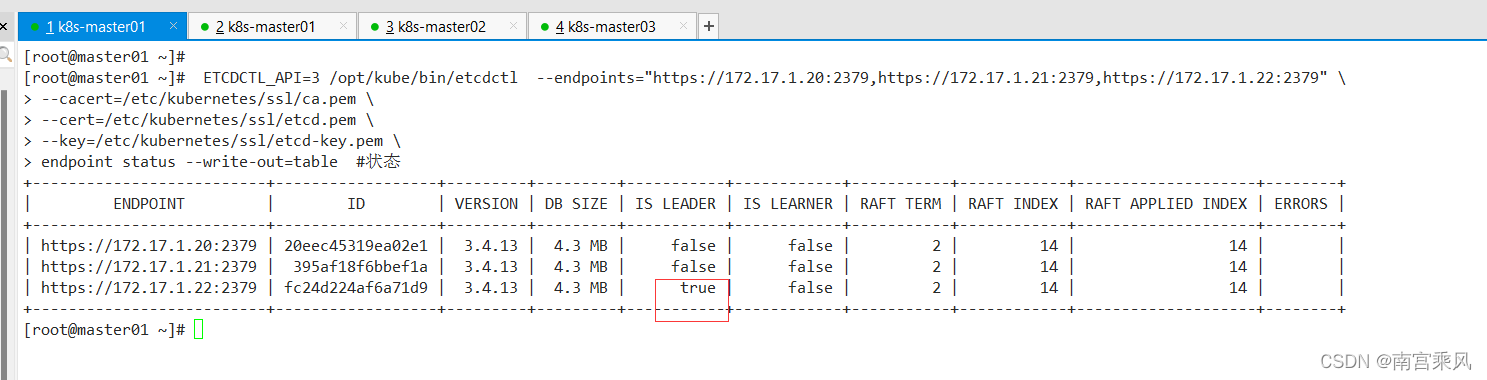
After that, start kube-apiserver again on all master nodes:
# systemctl start kube-apiserver
# systemctl status kube-apiserver
[root@master01 ~]# ansible master -m shell -a "systemctl start kube-apiserver"
172.17.1.22 | CHANGED | rc=0 >>
172.17.1.21 | CHANGED | rc=0 >>
172.17.1.20 | CHANGED | rc=0 >>
Now check Kubernetes again:
[root@master01 ~]# kubectl get cs
Warning: v1 ComponentStatus is deprecated in v1.19+
NAME                 STATUS    MESSAGE             ERROR
scheduler            Healthy   ok
controller-manager   Healthy   ok
etcd-1               Healthy   {"health":"true"}
etcd-2               Healthy   {"health":"true"}
etcd-0               Healthy   {"health":"true"}
And verify that the workload objects have returned:
[root@master01 ~]# kubectl get pod -A
NAMESPACE     NAME                                      READY   STATUS    RESTARTS   AGE
kube-system   calico-kube-controllers-5677ffd49-t7dbx   1/1     Running   0          3h27m
kube-system   calico-node-2hrhv                         1/1     Running   0          3h27m
kube-system   calico-node-5kc79                         1/1     Running   0          3h27m
kube-system   calico-node-6v294                         1/1     Running   0          3h27m
kube-system   calico-node-hkm8l                         1/1     Running   0          3h27m
kube-system   calico-node-kkpmd                         1/1     Running   0          3h27m
kube-system   calico-node-tsmwx                         1/1     Running   0          3h27m
kube-system   coredns-5787695b7f-8ql8q                  1/1     Running   0          3h27m
kube-system   metrics-server-8568cf894b-ztcgf           1/1     Running   1          3h27m
kube-system   node-local-dns-5mbzg                      1/1     Running   0          3h27m
kube-system   node-local-dns-c5d9j                      1/1     Running   0          3h27m
kube-system   node-local-dns-nqnjw                      1/1     Running   0          3h27m
kube-system   node-local-dns-rz565                      1/1     Running   0          3h27m
kube-system   node-local-dns-skmzk                      1/1     Running   0          3h27m
kube-system   node-local-dns-zcncq                      1/1     Running   0          3h27m
kube-system   traefik-79f5f7879c-nwhlq                  1/1     Running   0          3h27m
After etcd data is restored, the pod containers gradually return to Running, and the Kubernetes cluster is effectively recovered from the snapshot.
The recovery order matters
For Kubernetes backup, what you are really protecting is etcd. For restoration, the order is the key point:
Stop kube-apiserver --> Stop ETCD --> Restore data --> Start ETCD --> Start kube-apiserver
A couple of details are easy to forget:
- When backing up an etcd cluster, it is enough to create the snapshot from a single etcd node and copy the file to the others.
- When restoring, the same snapshot file can be used on each node, but the restore process itself must be executed on every etcd member.
In short: if etcd is safe, Kubernetes has a way back. If etcd is not backed up, the cluster state is one failure away from disappearing.