A late-night bug hunt
Last night, the site suddenly showed a front-end error when a QA user tried to submit a question: “Submission failed, please try again later.” After opening a support ticket, the initial guess was that the request itself was failing—possibly timing out or throwing an error—so the first recommendation was to check the mail function.
That turned out to be the right place to look. In the WordPress admin area, outgoing mail was failing with this message:
SMTP Error: Could not connect to SMTP host. Failed to connect to server
The first reaction was to check the business email settings. Nothing looked wrong there. Then DNS records were reviewed and repaired, followed by another round of testing. Still broken. Thinking back, the issue may actually have existed since last year, with mail silently failing the whole time and simply going unnoticed.
So the real troubleshooting began.
Tickets everywhere, but no real answer
From the cloud provider to the server side, support tickets were submitted one after another, but none of them produced a usable fix. After digging around, a fairly detailed troubleshooting document was found, and following that step-by-step process helped narrow things down.
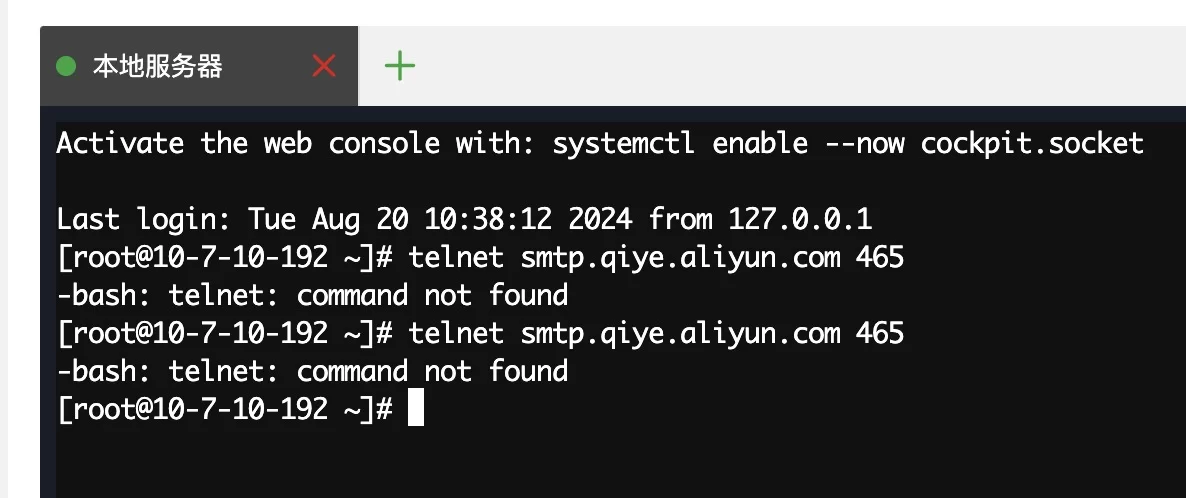
One useful clue: ping smtp.qiye.aliyun.com worked, but telnet smtp.qiye.aliyun.com 465 did not. That strongly suggested port 465 was being blocked by the server firewall.
The firewall was updated to open the port, and testing was repeated. Mail still would not send.
After wasting even more time on it, the next move was to try a workaround by installing the WP Mail SMTP plugin. That should have helped bypass at least part of the original setup. It didn’t. Even with the plugin in place, sending still failed. At that point it was maddening.
The log message that changed the direction
Because port 465 seemed like the most likely culprit, most of the effort had been focused on connectivity and firewall rules. But after installing the third-party plugin and reading the returned logs more carefully, a different error stood out:
failed loading cafile stream: `cacert.pem'
That message opened up an entirely different line of thinking. The problem might not be the SMTP host itself, but the PHP SSL CA certificate configuration.
A possible fix mentioned elsewhere pointed in this direction:
- create a
cacertfolder under the PHP installation directory to store the CA certificate - edit
php.ini - enable the
opensslandcurlextensions by searching forextensionand removing the leading semicolon from the required lines
The relevant lines were:
extension\=curl
extension\=openssl
Those extensions were then enabled on the server by editing the configuration accordingly.
Enabling extensions was not enough
Just turning those extensions on still did not restore normal communication.
The breakthrough came while searching through discussion replies from the plugin author for similar cases. In one reply, someone shared a fix that ended up being the key:
Problem solved.
The source of the problem was the php.ini for PHP 8.1, and a small difference compared to the php.ini for PHP7.4.
Somehow the last row of the following content was missing in the new PHP 8.1 php.ini file causing a certificate error, because OpenSSL didn’t find the cacert.pem.
[openssl]
; The location of a Certificate Authority (CA) file on the local filesystem
; to use when verifying the identity of SSL/TLS peers. Most users should
; not specify a value for this directive as PHP will attempt to use the
; OS-managed cert stores in its absence. If specified, this value may still
; be overridden on a per-stream basis via the "cafile" SSL stream context
; option.
openssl.cafile\=/usr/local/etc/cacert.pemThe Plugin is now functioning normally.
That reply was not a complete explanation of the entire issue, but the last line was crucial. A .pem certificate package (cacert.zip) was downloaded immediately, the certificate was placed into the corresponding directory on the server, and that final configuration line was added into php.ini.
After testing again, mail finally went through.
What actually fixed it
In the end, the real solution was not simply “open port 465” or “install an SMTP plugin.” The decisive step was making sure PHP and OpenSSL could actually find the CA certificate file needed for SSL verification.
So although port 465 still could not be connected to successfully in direct testing afterward, the mail function itself was restored and WordPress was sending normally again. At that stage, that was good enough—a practical win, even if not every suspicious symptom had been fully explained.
For anyone running into the same WordPress error — SMTP Error: Could not connect to SMTP host. Failed to connect to server — it may be worth looking beyond firewall rules and SMTP settings and checking whether the server’s PHP/OpenSSL CA certificate path is missing or misconfigured.