Intro
I had a bit of free time these past few days, so I went ahead and upgraded the theme and wrote down the changes and additions I made along the way. I’m not exactly clever with this stuff, but clumsy methods still count if the feature works in the end.
Update log
- 2026-04-29 — Updated PWA for the new SWPP version
- 2025-11-15 — Added a reward card to the sidebar
- 2025-09-21 — Restored background images after they were removed in a newer version
- 2025-05-16 — Restyled brevity posts to look like WeChat Moments
- 2025-05-11 — Added HTML tag parsing for brevity posts
- 2025-04-07 — Fixed the About button click behavior
- 2025-04-05 — Heavily customized the About page
- 2025-03-30 — Added SWPP and enabled PWA
- 2025-03-29 — Adapted Waline post heat indicator
- 2025-03-28 — Added descriptions for images in brevity posts
- 2025-03-27 — Added a comment agreement link to the comment area
- 2025-03-26 — Changed the Tab tag generation logic
- 2025-03-25 — First draft, based on Solitude v3.0.19
What I changed
1. Loading animation
This shows when switching pages.
Edit themes/solitude/source/css/_layout/fullpage.styl:
// ...
.loading-bg
  display flex
  width 100%
  height 100%
  position fixed
  background var(--loading-bg) // 修改这一行
// ...
.loading-img
  width 100px
  height 100px
  margin auto
  animation-duration 0.5s // 修改这一行,复制完后请删除注释
// ...
Edit themes/solitude/source/css/_mode/index.styl:
[data-theme=dark]
  --loading-bg #000000dd // 添加这一行
// ...
[data-theme=light]
  --loading-bg #ffffffdd // 添加这一行
// ...
2. Tab tags
I changed the Tab tag so a button can jump to a page, and I also made code blocks inside tabs initialize correctly after clicking.
Replace themes/solitude/scripts/tags/tabs.js with:
'use strict';
function postTabs([name, active], content) {
  // 定义正则表达式,用于匹配选项卡块
  const tabBlock = /<!--\s*tab (.*?)(?:\s*\[(.*?)\])?\s*-->\n([\s\S]*?)<!--\s*endtab\s*-->/g;

  // 使用 matchAll 来获取所有匹配的选项卡
  const matches = [...content.matchAll(tabBlock)];

  // 将一个字符串转换为数字,设置默认选中的标签索引
  active = Number(active) || 0;

  // 生成选项卡项函数
  const generateTabItems = (matches, name, active, parentId) => {
    return matches.map((match, tabId) => {
      // 捕获选项卡标题和图标
      const [tabCaption = '', tabIcon = ''] = match[1].split('@');
      // 获取可选的链接,如果有的话
      const link = match[2] ? match[2].trim() : '';
      // 渲染内容,使用 Hexo 的 Markdown 渲染引擎
      const postContent = renderMarkdown(match[3]);
      // 生成唯一的 id,用于对应选项卡内容区域
      const tabHref = `${parentId}-${tabId}`;
      // 处理图标 HTML
      const iconHtml = tabIcon ? `<i class="${tabIcon.trim()} tab solitude"></i>` : '';
      // 判断是否为活动状态(选中状态)
      const isActive = active === tabId ? ' active' : '';
      // 回到顶部按钮的 HTML
      const toTopButton = '<button type="button" class="tab-to-top" aria-label="scroll to top"><i class="solitude fas fa-arrow-up"></i></button>';

      // 根据是否存在链接来生成导航项
      return {
        nav: createNavItem(link, tabHref, iconHtml, tabCaption, isActive, ),
        // 选项卡的内容部分
        content: `<div class="tab-item-content${isActive}" id="${tabHref}">${postContent}${toTopButton}</div>`
      };
    });
  };

  const renderMarkdown = (text) => {
    return hexo.render.renderSync({ text, engine: 'markdown' }).trim();
  };

  const createNavItem = (link, tabHref, iconHtml, tabCaption, isActive) => {
    const buttonContent = `${iconHtml}${tabCaption.trim() || `${name} ${tabHref}`}`;
    return link ?
      `
      <li class="tab${isActive}">
        <button onclick="location.href='${link}'" data-href="#${tabHref}" type="button">
          ${buttonContent}
        </button>
      </li>` :
      `
      <li class="tab${isActive}">
        <button type="button" data-href="#${tabHref}">
          ${buttonContent}
        </button>
      </li>`;
  };

  // 生成选项卡项
  const tabItems = generateTabItems(matches, name, active, name.toLowerCase().replace(/\s+/g, '-'));

  // 回到顶部按钮的 HTML
  const toTopButton = '<button type="button" class="tab-to-top" aria-label="scroll to top"><i class="solitude fas fa-arrow-up"></i></button>';

  // 创建完整选项卡结构(包含导航和内容)
  const createTabStructure = (tabItems) => {
    const tabNav = `<ul class="nav-tabs">${tabItems.map(item => item.nav).join('')}</ul>`;
    const tabContent = `<div class="tab-contents">${tabItems.map(item => item.content).join('')}</div>`;
    return { tabNav, tabContent };
  };

  // 获取生成的选项卡导航和内容
  const { tabNav, tabContent } = createTabStructure(tabItems);

  // 返回最终的选项卡 HTML 结构
  return `<div class="tabs" id="${name.toLowerCase().replace(/\s+/g, '-')}">${tabNav}${tabContent}</div>`;
}

// 注册自定义标签,以便在 Hexo 中使用
hexo.extend.tag.register('tabs', postTabs, { ends: true });
hexo.extend.tag.register('subtabs', postTabs, { ends: true });
hexo.extend.tag.register('subsubtabs', postTabs, { ends: true });
Append this to source/custom/css/custom.css:
/* tab标签的链接跳转 */
.tab-to-top {
  position: relative;
  display: block;
  margin: 16px 0 0 auto;
  color: var(--efu-lighttext);
}
.tabs .nav-tabs .tab button {
  width: 100%;
  padding: 0 0.3rem;
  height: 100%;
  font-size: 14px;
}
.tabs .nav-tabs .tab.active {
  background: var(--light-grey);
}
.tabs .nav-tabs .tab.active i,
.tabs .nav-tabs .tab.active button {
  color: var(--efu-lighttext);
}
.tabs .nav-tabs .tab i {
  font-size: 14px;
  margin-right: 0.3rem;
}
Append this to the end of themes/solitude/source/js/main.js:
const initCodeBlocks = (container) => {
  const { highlight } = GLOBAL_CONFIG;
  if (!highlight?.limit) return;

  const limit = highlight.limit;
  const syntax = highlight.syntax || 'prismjs';
  const selector = syntax === 'highlight.js' ? 'figure.highlight' : 'pre[class*="language-"]';

  container.querySelectorAll(selector).forEach(item => {
    item.style.maxHeight = `${limit}px`;
    item.style.overflow = 'hidden';

    if (item.scrollHeight > limit + 30 && !item.querySelector('.code-expand-btn')) {
      const btn = document.createElement('div');
      btn.className = 'code-expand-btn';
      btn.innerHTML = '<i class="solitude fas fa-angles-down"></i>';
      btn.onclick = () => {
        item.style.maxHeight = 'none';
        btn.remove();
      };

      syntax === 'highlight.js'
        ? item.querySelector('table').appendChild(btn)
        : item.parentNode.insertBefore(btn, item.nextSibling);
    }
  });
};

document.addEventListener('pjax:complete', () => {
  initCodeBlocks(document);
  document.addEventListener('click', handleTabClick);
});

const handleTabClick = (e) => {
  const tab = e.target.closest('.nav-tabs [data-href]');
  if (!tab) return;

  const targetContent = document.querySelector(tab.getAttribute('data-href'));
  targetContent.classList.add('active');
  setTimeout(() => initCodeBlocks(targetContent), 50);
};

document.addEventListener('DOMContentLoaded', () => {
  initCodeBlocks(document);
  document.addEventListener('click', handleTabClick);
});
Usage:
{% tabs 唯一名称, [index] %}
<!-- tab [唯一Tab] [@icon] [链接] -->
任何内容(也支持内联标签)。
<!-- endtab -->
{% endtabs %}

{% tabs test, 1 %}
<!-- tab test @fas fa-book [https://test.com] -->
任何内容(也支持内联标签)。
<!-- endtab -->
{% endtabs %}
3. WeChat official account card in the sidebar
I added a card to the left sidebar so clicking it jumps to wechatOA.
Edit themes/solitude/layout/includes/widgets/aside/asideFlipCard.pug and add this on the first line:
//- 添加这一行,位于第一行
a(href="/rss/wechatOA/",data-pajx)
4. Friend links page and message page
Instead of sending people to the comment area, I switched both pages to button-based page jumps.
In the language files under themes/solitude/languages/, change the text to:
# default.yml
link:
  banner:
    toComment: 申请/修改友链 # 修改这一行
# en.yml
link:
  banner:
    toComment: Application/Modification link
# zh-CN.yml
link:
  banner:
    toComment: 申请/修改友链
# zh-TW.yml
link:
  banner:
    toComment: 申請/修改友鏈
Then modify the relevant banner.pug and message/content.pug templates so the button opens the configured page directly.
5. Waline comment count
I couldn’t get Waline’s comment total the old way because it was returning undefined, so I adjusted it according to the API docs.
Edit themes/solitude/layout/includes/widgets/sidebar/waline.pug:
.length-num#waline_allcount
  i.solitude.fa-solid.fa-spinner.fa-spin
script(pjax).
  (async () => {
    await fetch('!{theme.waline.envId}/api/comment?type=count', {method: 'GET'}).then(async res => res.json())
      .then(async data => {
        document.querySelector('#waline_allcount').innerHTML = data.data
      })
  })()
6. Comment agreement link
I added a visible agreement entry inside the comment area.
Modify themes/solitude/layout/includes/widgets/third-party/comments/comment.pug:
//- ...
//- 评论计数
if count && is_post()
  span.count = ' ('
    each name in use
      +commentCount(name)
    | )
a.plxycss(href="/comment/")
  i.solitude.fas.fa-file-lines
  span 评论协议
//- ...
And add this style to source/custom/css/custom.css:
/* 评论协议样式 */
a.plxycss {
  float: right;
  font-weight: bold;
  font-size: 20px;
}
7. Image descriptions for brevity posts
This lets brevity images use either an explicit alt value or fall back to the post content.
Edit themes/solitude/layout/includes/page/brevity.pug:
//- ...
if item.image
  .bber-content-img
    each img in item.image
      if typeof img === 'string'
        img(src=img, alt=item.content || "图片暂无描述")
      else
        img(src=img.url, alt=(img.alt || item.content || "图片暂无描述"))
//- ...
Both forms work:
- content: 这次做的椰奶冻粉还不错,就是糖放多了,好吃(╯▽╰ )好香~~
  date: 2025-03-27 00:01:00
  location: 家
  image:
    - url: https://images.418121.xyz/file/blog/essay/2025/03/27/01.webp
      alt: 按着教程来的,事不过三,终于成功了
- content: 我弟弟妹妹画的,很有天赋,像我小时候一样 b( ̄▽ ̄)d ~
  date: 2025-03-26 21:30:00
  location: 家
  image:
    - https://images.418121.xyz/file/blog/essay/2025/03/26/01.webp
8. Waline-based post heat indicator
If a post has more than five comments, it shows a “multi-person interaction” style heat marker.
Add Waline handling inside themes/solitude/layout/includes/widgets/third-party/hot/index.pug, then create themes/solitude/layout/includes/widgets/third-party/hot/waline.pug to request counts per post URL and inject the heat badge when the threshold is exceeded.
Also make sure this is enabled in configuration:
# ...
# Hot comment tips # 热评提示
hot_tip:
  enable: true
  # Number of hot comments
  count: 5
# ...
9. Reworked About page
I rebuilt the Solitude About page with ideas from another theme’s structure, mainly to make the hobbies / likes section more expressive and clickable.
The main changes were:
- replacing
themes/solitude/layout/includes/widgets/page/about/hobbies.pug - replacing
themes/solitude/source/css/_page/_about/like.styl - adding a new
comictype tosource/_data/about.yml
Example data format:
# comic 和 like-technology 二选一 你全要也可以
likes:
  - type: "comic"
    tips: 爱好番剧 # 右上角提示
    title: 追番 # 标题
    subtips: "科幻、动漫、喜剧" # 左下小字,可不要
    list: # 最好就是五个或以上,相信你们肯定没那么少的。
      - name: 你的名字 # 动漫或影视名
        href: https://movie.douban.com/subject/26683290/ # B站或豆瓣某个位置
        cover: https://images.418121.xyz/file/blog/covers/p2910701461.webp # 封面图
      - name: 四月是你的谎言
        href: https://www.bilibili.com/bangumi/media/md1699
        cover: https://images.418121.xyz/file/blog/covers/p2232343678.webp
      - name: 流浪地球2
        href: https://movie.douban.com/subject/35267208/
        cover: https://images.418121.xyz/file/blog/covers/p2886653882.webp
      - name: 花束般的恋爱
        href: https://movie.douban.com/subject/34874432/
        cover: https://images.418121.xyz/file/blog/covers/p2868462052.webp
      - name: 天气之子
        href: https://movie.douban.com/subject/30402296/
        cover: https://images.418121.xyz/file/blog/covers/p2558022335.webp
    button: true # false 可以关闭右边按钮
    button_link: "/pyq/" # 跳转路径
    button_text: "观看记录" # 按钮文字
#  - type: "like-technology"
#    bg: "https://images.418121.xyz/file/blog/page/movie.webp"
#    tips: "与她一起看"
#    title: "影视偏好"
#    subtips: "科幻、动漫、喜剧"
#    button: true
#    button_link: "/pyq/"
#    button_text: "观看记录"
  - type: "like-music"
    bg: "https://images.418121.xyz/file/blog/page/yy.webp"
    tips: "粤语、流行"
    title: "私人歌单"
    subtips: "账号密码:ymx"
    button: true
    button_link: "https://music.418121.xyz/app/#/login/"
    button_text: "音乐库"
10. HTML parsing in brevity posts
I wanted line breaks, bold text, and other HTML to render properly in brevity posts.
Change line 19 of themes/solitude/layout/includes/page/brevity.pug to:
p.datacont!= item.content
Change line 7 of themes/solitude/layout/includes/widgets/home/bbTimeList.pug to:
| #{item.content.replace(/<[^>]*>/g, '')}
11. Brevity page styled like WeChat Moments
I rebuilt the brevity page layout so it feels much closer to a Moments feed.
That involved:
- replacing
themes/solitude/layout/includes/page/brevity.pug - adding a large custom CSS block to
source/custom/css/custom.css - updating
_config_solitude.yml
Config example:
# Extend # 扩展
extends:
  # Insert in head # 插入到 head
  head:
    - <link rel="stylesheet" href="/custom/css/custom.css">

# --------------------------- start ---------------------------
# Brevity Page # 即刻短文
brevity:
  enable: true
  home_mini: true
  music: true
  page: /essay/
  style: 1
  strip: 30
# --------------------------- end ---------------------------
12. Restored background images
Newer versions removed background image support, so I brought it back.
Edit themes/solitude/layout/includes/layout.pug and add the background block before the loading animation:
body#body(data-type=page.type)
  //- 背景特效
  if theme.display_mode.universe
    +conditionalWrapper(theme.display_mode.universe)
      canvas#universe
  //- 背景图片(这里添加)
  if theme.background.enable
    #global_bg
  //- 全屏加载动画
  if theme.loading.fullpage
    +conditionalWrapper(theme.loading.fullpage)
      include ./loading.pug
Append this to themes/solitude/source/css/_global/index.styl:
if hexo-config('background.enable')
  #global_bg
    position fixed
    z-index 999
    opacity hexo-config('background.opacity')
    width 100%
    height 100%
    background-image url(hexo-config('background.light'))
    background-size cover
    background-position center
    pointer-events none
    background-repeat no-repeat
    [data-theme=dark] &
      background-image url(hexo-config('background.dark'))
And add this anywhere inside _config_solitude.yml:
# --------------------------- start ---------------------------
# Background # 背景图片
background:
  enable: true #是否开启
  opacity: .3 #透明度
  dark: /images/bg_d.webp #深色模式,可填入url
  light: /images/bg_l.webp #浅色模式,可填入url
# --------------------------- end ---------------------------
What I added
Besides patching the original theme, I also added a bunch of extra pieces.
1. “Do you like me” widget
This appears in the right sidebar and can be clicked. It does not show on mobile.
2. Love wall
Visible on the homepage and clickable.
3. Barrage message board
A note-style message wall, similar in spirit to a letter board layout.
4. Site runtime in the footer
Clicking the left-side comment control can jump to the footer. I used a small custom script to calculate the elapsed time since the site’s start date.
Create source/custom/js/jz.min.js with:
document.addEventListener("DOMContentLoaded",(function(){const startTime=new Date("2024-05-12T00:00:00Z");function padZero(num){return num<10?"0"+num:String(num)}function calculateElapsedTime(start){const elapsedMilliseconds=new Date-start,totalSeconds=Math.floor(elapsedMilliseconds/1e3);return{days:Math.floor(totalSeconds/86400),hours:Math.floor(totalSeconds%86400/3600),minutes:padZero(Math.floor(totalSeconds%3600/60)),seconds:padZero(totalSeconds%60)}}function updateDisplay(){const{days:days,hours:hours,minutes:minutes,seconds:seconds}=calculateElapsedTime(startTime),runtimeElement=document.getElementById("runtime");runtimeElement&&(runtimeElement.textContent=`花期:${days} 天 ${hours} 小时 ${minutes} 分 ${seconds} 秒`),requestAnimationFrame(updateDisplay)}updateDisplay()}));
Then add this to the theme config:
# 页脚信息文字 # 请不要删除主题信息,这是对作者的尊重
links:
  - name: <span id="runtime"></span>
    url: /history/
5. Maps inside posts
I used hexo-tag-map so interactive maps can be inserted directly in articles.
Install it:
npm install hexo-tag-map --save
Usage:
插入一个混合地图的示例:
{% map %}
{% + 标签值 + 经度 + 纬度 + 文本 + 缩放等级 + 宽 + 高 + 默认图层 + %}
{% map 120.101101,30.239119, 这里是西湖灵隐寺,据说求姻缘很灵验哦!, 15, 100%, 360px, 1 %}
6. Footprint map
I added a travel footprint map.
Main setup points:
- Download the zip and extract it into
source/footmap/. - Modify the root
_config.ymlso the files are ignored correctly:
# ...
# Include / Exclude file(s)
## include:/exclude: options only apply to the 'source/' folder
include:
exclude:
ignore:
  - source/footmap/* #添加这一句
#...
- Fill in
source/footmap/data/config.jsonwith coordinates, article links, descriptions, photos, and visit frequency. The format looks like this:
[
 {
  "latLng": [22.354887,110.946866], //为足迹的经纬度,可以通过 https://jingweidu.bmcx.com查询得到
  "name": "广东 · 茂名 · 信宜", //足迹地点的名称
  "articleUrl": "/posts/63e1fc9e.html", //文章地址
  "desc": "老家", //足迹地点的描述, \n 为换行符
  "photos":[
   "https://photo.tuchong.com/20342439/f/1276790136.jpg",
   "https://photo.tuchong.com/20342439/f/712590584.jpg",
   "https://photo.tuchong.com/20342439/f/888292716.jpg",
   "https://photo.tuchong.com/20342439/f/1184318812.jpg"
  ], //足迹地点的照片链接,为一组图片 url 数据
  "freq": 2 //足迹地点的到访次数,范围为 [1, 10]
 }
 // 写下一个的时候记得加逗号,最后一个不要加。
]
7. Subscription pages
I built a dedicated subscription page and a separate WeChat public account page.
source/rss/index.mdbecomes the main subscription hub.source/rss/wechatOA/index.mdbecomes a standalone QR page.source/custom/css/custom.cssgets the card-based subscription styles.
The main subscription page includes options for:
- WeChat official account subscription
- RSS / Atom subscription
- Follow client subscription
- email subscription via GitHub Issue
8. Rebuilt the 404 page
Create source/404.md:
---
layout: false
---
<!-- <script src="//cdn.dnpw.org/404/v1.min.js" maincolor="#000" jumptime="-1" jumptarget="/" tips="404" error="" charset="utf-8"></script> -->
<script src="//cdn.zhaolinlang.com/cdn.dnpw.org/404/v1.min.js" maincolor="#000" jumptime="-1" jumptarget="/" tips="404" error="" charset="utf-8"></script>
And disable the default theme 404 page:
# Page default settings # 页面默认设置
page:
  # 404 page # 404 页面
  error: false
9. Custom link tag
I wrote a custom {% link %} tag that creates a card, chooses an avatar based on the root domain, and shows a safety tip depending on whether the domain is in a whitelist.
Create themes/solitude/scripts/tags/link.js:
'use strict';
const { parse } = require('psl');

// 定义不同域名对应的头像URL
const avatarMap = new Map([
  ['418121.xyz', '/images/avatar.webp'],
  ['github.com', 'https://images.418121.xyz/file/blog/page/git.webp']
]);

// 定义白名单域名
const whitelist = new Set([
  '418121.xyz',
  'yeminxi.github.io'
]);

// 获取URL的根域名
function getRootDomain(url) {
  try {
    const hostname = new URL(url).hostname;
    const parsed = parse(hostname);
    return parsed.domain || hostname;
  } catch {
    return url.split('/')[0]; // Fallback
  }
}

function link(args) {
  try {
    // 参数解析(支持转义逗号)
    const parsedArgs = args.join(' ')
      .split(/(?<!\\),/)
      .map(s => s.replace(/\\,/g, ',').trim());

    const [title = '', sitename = '', rawLink = ''] = parsedArgs;
    const link = rawLink.startsWith('http') ? rawLink : `https://${rawLink}`;

    // 域名处理
    const rootDomain = getRootDomain(link);
    const imgUrl = avatarMap.get(rootDomain) || `https://api.xinac.net/icon/?url=${encodeURIComponent(rootDomain)}`; //使用api获取网站的ico

    // 白名单校验
    const isSafe = whitelist.has(rootDomain) || rootDomain.endsWith('.418121.xyz');
    const tipMessage = isSafe
      ? '🛡️ 来自本站地址,本站可确保其安全性,请放心点击跳转'
      : '⚠️ 引用站外地址,不保证站点的可用性和安全性,慎重点';

    return `
      <div class="liushen-tag-link">
        <a class="tag-Link" target="_blank" rel="noopener" href="${link}">
          <div class="tag-link-tips">${tipMessage}</div>
          <div class="tag-link-bottom">
            <div class="tag-link-left" style="background-image: url(${imgUrl})" onerror="this.style.backgroundImage='url(/images/default-avatar.webp)'"></div>
            <div class="tag-link-right">
              <div class="tag-link-title">${hexo.extend.helper.get('escape_html')(title)}</div>
              <div class="tag-link-sitename">${hexo.extend.helper.get('escape_html')(sitename)}</div>
            </div>
            <i class="fa-solid fa-angle-right"></i>
          </div>
        </a>
      </div>`;
  } catch (error) {
    console.error('Link tag error:', error);
    return `<div class="liushen-error">链接卡片生成失败:${error.message}</div>`;
  }
}

hexo.extend.tag.register('link', link, { ends: false });
Usage:
{% link 标题,描述,链接 %}
10. Safe redirect page
I set up hexo-safego so external links go through a warning page.
Install:
npm install cheerio --save
npm install hexo-safego --save
Then add the config block to the root _config.yml and define the whitelist, redirect page filename, subtitle text, and page scope.
11. Safe redirects for links inside Waline comments
I also added link interception to Waline itself by modifying the forked Waline deployment.
In the Waline repo’s index.cjs:
const Application = require('@waline/vercel');
const LinkInterceptor = require('waline-link-interceptor'); // 添加这一行

module.exports = Application({
  forbiddenWords: ['唱跳', 'rap篮球'], //词汇限制
  disallowIPList: ['8.8.8.8', '4.4.4.4'],//黑名单IP
  plugins: [
    LinkInterceptor({
      whiteList: [
        'yeminxi.github.io',
        '418121.xyz'
      ],
      // blackList: [],
      // interceptorTemplate: `hello __URL__ `, // 如果下面自定义了跳转地址,那么此处模板不生效
      redirectUrl: "https://blog.418121.xyz/go.html", // 填写中间页的具体 html 地址。
      encodeFunc: (url) =>{
        return "u="+Buffer.from(url).toString('base64'); // 填入一个外链 url 的处理函数
      }
    })
  ],
  async postSave(comment) {
    // do what ever you want after comment saved
  },
});
And in package.json:
{
  "name": "template",
  "version": "1.32.3",
  "private": true,
  "dependencies": {
    "@waline/vercel": "latest",
    "waline-link-interceptor": "^0.1.2" //添加这一句
  }
}
12. Statistics page
I added chart support so pages can render:
- post publishing statistics
- top tags chart
- category chart
This requires a custom helper, ECharts in head, and page-level containers such as:
<!-- 文章发布时间统计图 -->
<div id="posts-chart" data-start="2021-01" style="border-radius: 8px; height: 300px; padding: 10px;"></div>
<!-- 文章标签统计图 -->
<div id="tags-chart" data-length="10" style="border-radius: 8px; height: 300px; padding: 10px;"></div>
<!-- 文章分类统计图 -->
<div id="categories-chart" data-parent="true" style="border-radius: 8px; height: 300px; padding: 10px;"></div>
13. Page preloading
I enabled page preloading using Instant.page. Hovering over internal links will start preloading.
Add to theme config head:
# Extend # 扩展
extends:
  # Insert in head # 插入到 head
  head:
    - <script src="//instant.page/5.2.0" type="module"></script>
14. Vercel acceleration
I added cache headers through source/vercel.json:
{
  "headers": [
    {
      "source": "/sw.js",
      "headers": [
        {
          "key": "Cache-Control",
          "value": "public, max-age=0, must-revalidate"
        }
      ]
    },
    {
      "source": "(.*)",
      "headers": [
        {
          "key": "Cache-Control",
          "value": "public, s-maxage=86400, max-age=86400"
        },
        {
          "key": "Vercel-CDN-Cache-Control",
          "value": "max-age=31536000"
        }
      ]
    }
  ]
}
15. Friend link status checks
I only handled the frontend adaptation here. The idea was to fetch status JSON dynamically, generate friend.json, and display latency tags on friend cards.
The flow I used:
- create
link.jsin the project root to fetch JSON and buildsource/friend.json - run
node link.js - add it into GitHub Actions before build
- inject status tag logic into
/links/index.md
The status color rules were based on latency ranges, with cached data stored in localStorage for half an hour.
16. Friend circle
I also added a friend circle page using Friend-Circle-Lite.
Main steps:
- create
links.jsin the root to fetch JSON and outputsource/flink_count.json - run
node links.js - add it into GitHub Actions
- create
/pyq/index.mdwith a root container and the required CSS/JS from the Friend-Circle-Lite service
17. Dynamic friend links integrated with status checks and friend circle
This part tied together dynamic friend links, status checks, and the friend circle pipeline.
The rough mechanism was:
fetch Issue content -> generate JSON by label -> push to the
outputbranch and a CDN repo -> dispatch another workflow in the same repo -> that workflow triggers the build workflow in another repo/account -> the site updates dynamic friend links automatically
I used:
autolinks.jsto convert multiple remote JSON sources intosource/_data/links.yml- generator configuration changes to output JSON into a
linksdirectory - multiple GitHub Actions workflows to synchronize everything
- environment variables for usernames, emails, and tokens
The same idea could be extended to dynamic brevity posts as well.
18. Quote the original comment when replying
This only applies to Waline. Clicking reply inserts a cleaned excerpt of the target comment into the editor.
Create source/custom/js/replycontent.js and load it through theme head with data-pjax.
The script listens for reply button clicks inside #waline-wrap, extracts the comment text, removes noisy elements, converts links to Markdown, filters mentions, and inserts the result as a blockquote.
19. Popup welcome screen
On the first visit, I show a welcome popup with links to the privacy agreement, disclaimer, copyright notice, comment agreement, and cookies page.
This uses SweetAlert plus a cookie named agreementAccepted.
Theme config additions:
# Extend # 扩展
extends:
  # Insert in head # 插入到 head
  head:
    - <link rel="stylesheet" href="/custom/css/custom.css">
    - <script src="https://unpkg.com/sweetalert/dist/sweetalert.min.js"></script>
    - <script src="/custom/js/welcome.js"></script>
20. MiSans font
I switched the site font to MiSans.
# Font # 字体
font:
  font-size: 20px
  code-font-size: 16px
  # Global font # 全局字体
  font-family: "MiSans, sans-serif"

# Extend # 扩展
extends:
  # Insert in head # 插入到 head
  head:
    - <link rel="stylesheet" href="https://font.sec.miui.com/font/css?family=MiSans:400,700:MiSans">
21. SWPP and PWA
I first configured SWPP on the older theme generation, then adapted it later for the newer version.
Install:
npm install swpp-backends --save
npm install hexo-swpp --save
Then append the SWPP config to the root _config.yml, create swpp.config.js, run:
hexo swpp
and add it to GitHub Actions before compression:
# ...
- name: 缓存swpp
  run: |
    hexo swpp
- name: 压缩文件
  run: |
    gulp
# ...
PWA config in _config_solitude.yml:
# ...
# --------------------------- start ---------------------------
# PWA # Progressive Web App
pwa:
  enable: true
  manifest: /manifest.json # manifest.json
  theme_color: "#ff8080" # Theme colort
  mask_icon: /img/pwa/favicon.png # Mask icon
  apple_touch_icon: /img/pwa/favicon.png # Apple touch icon
  bookmark_icon: /img/pwa/favicon.png # Bookmark icon
  favicon_32_32: /img/pwa/favicon_32.png # 32x32 icon
  favicon_16_16: /img/pwa/favicon_16.png # 16x16 icon
# --------------------------- end ---------------------------
# ...
Then create source/manifest.json and prepare the icon and screenshot assets. When the browser shows the install option, it’s working.
22. Reward sidebar card
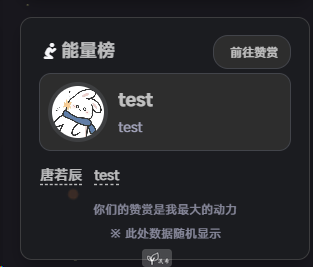
I added a reward widget to the sidebar and a full reward page.
This required:
- extra CSS in
source/custom/css/custom.css - reward data added into
source/_data/about.yml - a new
asideRewards.pug asideSwitch.pugupdated to supportrewards- a new
themes/solitude/layout/includes/page/reward.pug themes/solitude/layout/page.pugupdated withwhen 'reward'source/reward/index.mdcreated_config_solitude.ymlupdated for both aside layout and reward settings
Reward data example:
award:
  enable: true
  description: 感谢那些欣赏和支持我的人。因为你,我觉得写博客可以为你创造价值。这将使我在这条道路上走得更远。
  tips: 总金额: ¥ {sum} , 将用于博客的维护和更新。 # Must include {sum}, otherwise the total amount will not be displayed
rewardList:
  # Bottom donations
  - name: 唐若辰
    money: 10
    time: 2024-05-24
    icon: fab fa-weixin
    # icon: fab fa-alipay
    # icon: fab fa-gratipay
    color: green
    #以下是新添加
    avatar: https://images.418121.xyz/file/blog/page/qt.webp
    website: /
    description: 执子之手
  - name: test
    money: 10
    time: 2024-05-24
    icon: fab fa-weixin
    # icon: fab fa-alipay
    # icon: fab fa-gratipay
    color: green
    avatar: https://images.418121.xyz/file/blog/page/qtn.webp
    website: /
    description: test
Page file:
---
title: 致谢赞赏
date: 2025-11-15 16:17:49
type: reward
data: about
aside: false
banner: true
desc: 感谢每一份慷慨的赞赏
leftend: 感谢赞赏,请在评论区留下您的备注,谢谢!
---
And the config block for the aside + reward section:
# ...
# Aside # 侧边栏
aside:
  # Values: about (info card), newestPost (latest article), allInfo (website information), flip (official account QR code), newest_comment (latest comment)
  # 值: about(信息卡), newestPost(最新文章), allInfo(网站信息), flip(官方账号二维码), newest_comment(最新评论),rewards(赞赏)
  # Sticky: Fixed position / noSticky: Not fixed position
  # Sticky: 固定位置 / noSticky: 不固定位置
  home: # on the homepage
    noSticky: "about,rewards"
    Sticky: "love,likeme,allInfo"
  post: # on the article page
    noSticky: "about"
    Sticky: "rewards,flip,newestPost,likeme"
  page: # on the page
    noSticky: "about"
    Sticky: "rewards,flip,likeme"
  # 菜单栏位置(0: 左 1: 右)
  position: 0 # Sidebar positioning(0: left 1: right)
# ...
# Reward # 打赏
award:
  enable: true
  appreciators: /reward/ # Reward page
  # Reward Title # 打赏标题
  title: 感谢您的赞赏 # Thanks for your appreciation. / 感谢您的赞赏
  desc: 由于您的支持,我才能够实现写作的价值。 # Because of your support, I realize the value of writing articles. / 由于您的支持,我才能够实现写作的价值。
  # Reward list # 打赏列表
  list:
    # - name: Github Sponsor
    #   qcode: https://s3.qjqq.cn/47/661ba900c4bc1.webp!color
    #   url: https://github.com/sponsors/everfu
    #   color: var(--efu-black)
    - name: 微信
      qcode: /images/wxm.webp
      url: /images/wxm_l.webp
      color: var(--efu-green)
    - name: 支付宝
      qcode: /images/zfbm.webp
      url: /images/zfbm_l.webp
      color: var(--efu-blue)
That’s basically the full mess of what I changed. If something here saves you time, then all this trial-and-error was worth it.