After a fresh Windows installation, there is usually a long list of small adjustments waiting to be done. You may want to put “This PC” and the Recycle Bin back on the desktop, turn off features that consume resources but are never used, clean up system junk, manage backups, or deal with Windows updates.
The problem is that these settings are scattered everywhere. Some are easy to find, while others are buried deep in Group Policy, Services, or even the Registry. Disabling Windows Defender or HomeGroup, for example, can take far more clicking around than it should.
Dism++ brings many of these frequently used Windows management and optimization options into one place, making routine setup and maintenance much more convenient.
A compact Windows management toolbox
Dism++ is a Windows system management and optimization utility focused on one of the most common pain points after installing or maintaining a system: customization and cleanup. It works like a one-stop toolbox for adjusting Windows without having to dig through different control panels, hidden settings pages, system services, and registry entries one by one.
Its value is not that it invents completely new Windows functions, but that it gathers commonly used options in a clear interface. For users who often reinstall systems, optimize new machines, or maintain their own computers, this can save a lot of repetitive work.
Easy to use, but don’t change what you don’t understand
Dism++ includes a large number of functions, and most items come with fairly clear explanations. Even users without much technical background can understand the basic operations.
That said, there is one important rule: if you do not understand an option, leave it at its default setting. System optimization tools can be convenient, but changing unfamiliar system-level settings blindly may cause unnecessary problems.
Freeing up disk space
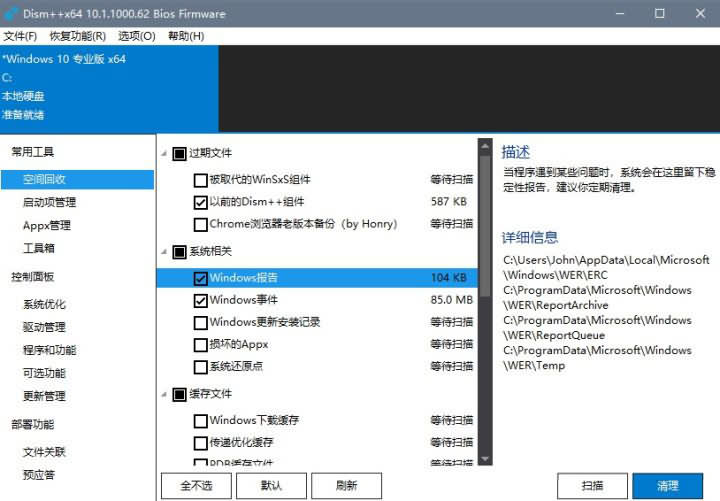
The “Space Recovery” section is used to clean junk and redundant files from the C drive. When you click an item, the right side of the interface shows a description and details about the files that will be cleaned.
This is useful for reclaiming system drive space, but it is not something that needs to be run constantly. Cleaning once a month is generally enough for normal use.
Common Windows tweaks in one place
The optimization settings section collects many frequently used Windows customization switches. For example, it can be used to disable Cortana, turn off HomeGroup, or enable the classic Windows Photo Viewer.
These are exactly the kinds of settings that are often available somewhere in Windows, but not always easy to locate. Dism++ makes them accessible from a single interface, so system setup becomes faster and less frustrating.
Backup, restore, and repair features
Beyond ordinary optimization, Dism++ can back up the current system directly as WIM or ESD files. It also supports checking whether the system is damaged and provides repair-related functions through the recovery menu.
In addition to these features, it also includes tools for junk cleanup, startup item management, software uninstallation, file association management, driver management, Windows update management, system backup, restore, repair, and general maintenance.
Why use it instead of a typical “PC manager” suite?
At first glance, some of these features may sound similar to the all-in-one security guards or PC manager tools many Windows users have seen before. The difference is in how clean and focused Dism++ is.
Many large “manager” suites look helpful on the surface, but often come bundled with unwanted software recommendations, aggressive download prompts, bundled installers, and annoying pop-up ads. Dism++ is much more lightweight and straightforward. It was previously an open-source project, offers a rich set of powerful functions, and remains compact, with a software package only a few megabytes in size.
It is also portable, so there is no installation required. Open it and it can be used directly. It supports Windows 7 and later systems.