Querying Data in MySQL
In MySQL, data retrieval is done with the SELECT statement. You can run these queries directly from the mysql> command line after connecting to a database.
Basic SELECT syntax
A common form of a query looks like this:
SELECT column_name,column_name
FROM table_name
[WHERE Clause]
[LIMIT N][ OFFSET M]
A few core points about SELECT:
- A query can read from one table or from multiple tables.
- When multiple tables are involved, they can be separated by commas and filtered with
WHEREconditions. SELECTcan return one row or many rows.- You can use
*to fetch all columns from a table. WHEREis used to apply conditions.LIMITcontrols how many rows are returned.OFFSETsets the starting position for returned rows, and defaults to0.
Test table and sample data
To demonstrate the examples below, create this table:
create table student (
    ids int auto_increment primary key,
    name varchar(20),
    chinese float,
    english float,
    math float
);
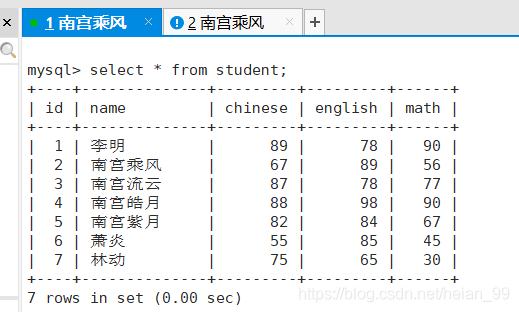
Then insert the following records:
insert into student values(1,'李明',89,78,90);
insert into student values(2,'乘风',67,89,56);
insert into student values(3,'南宫流云',87,78,77);
insert into student values(4,'南宫皓月',88,98,90);
insert into student values(5,'南宫紫月',82,84,67);
insert into student values(6,'萧炎',55,85,45);
insert into student values(7,'林动',75,65,30);
Selecting specific columns
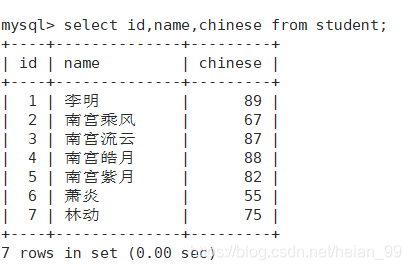
If you only need certain fields, list them explicitly:
mysql> select id,name,chinese from student;
Removing duplicate rows with distinct
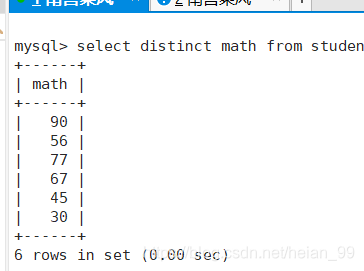
Use distinct when you want duplicate result rows removed. In this example, repeated math scores are returned only once:
mysql> select distinct math from student;
Doing calculations inside a SELECT
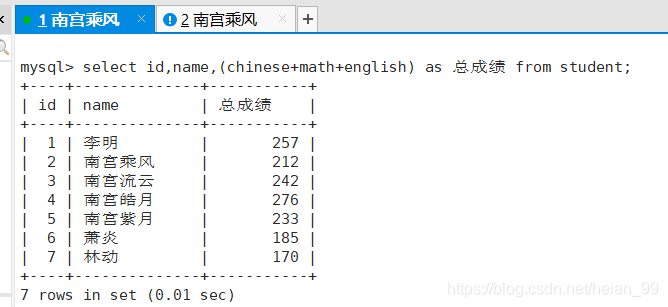
Expressions can be calculated directly in the query. For example, to get each student's total score:
mysql> select id,name,(chinese+math+english) as 总成绩 from student;
You can combine calculation with filtering as well. To find the total score of everyone whose surname is 南宫:
mysql> select id,name,(chinese+math+english) as 总成绩 from student
    -> where name like '南宫%';

Filtering rows with where
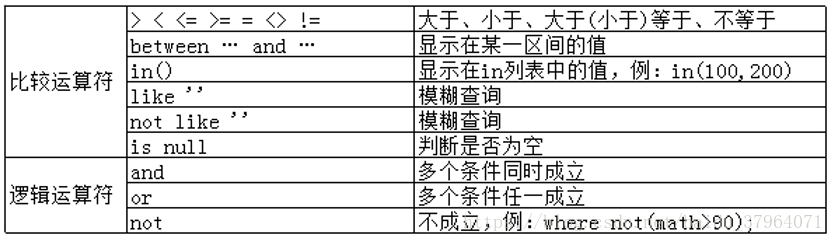
WHERE is the main clause used to filter query results. MySQL supports many operators here, such as comparison operators, logical operators, pattern matching, and range checks.
1) Students whose English score is greater than 90
mysql> select id,name,english as 英语 from student
    -> where english > 90;

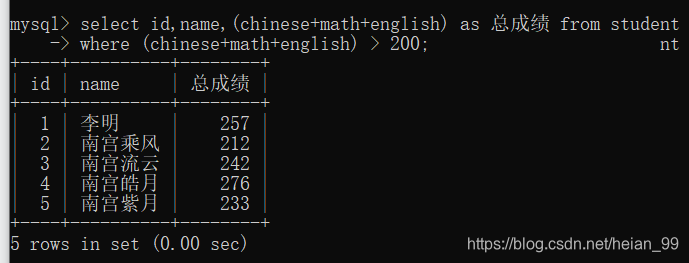
2) Students whose total score is above 200
One thing to note: you cannot use the alias in the where clause.
That is because the database evaluates WHERE before it evaluates the SELECT list.
mysql> select id,name,(chinese+math+english) as 总成绩 from student
    -> where (chinese+math+english) > 200;
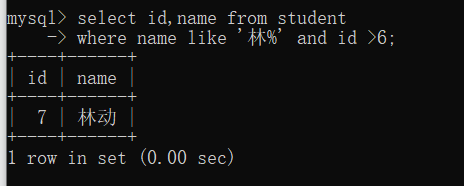
3) Students whose surname is 林 and whose id is greater than 6
mysql> select id,name from student
    -> where name like '林%' and id >6;
4) Students whose English score is higher than their Chinese score
mysql> select id,name from student
    -> where english > chinese;

5) Students whose total score is above 200 and whose math score is lower than their Chinese score
mysql> select id,name from student
    -> where (chinese+math+english) >200 and math < chinese;

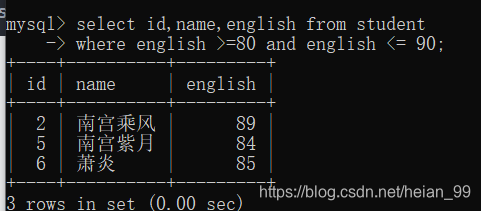
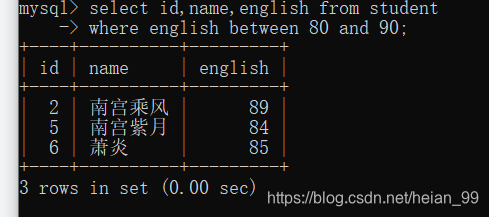
6) Students whose English score is between 80 and 90
Method 1:
mysql> select id,name,english from student
    -> where english >=80 and english <= 90;
Method 2:
Important: between uses a closed interval, so both endpoints are included.
mysql> select id,name,english from student
    -> where english between 80 and 90;
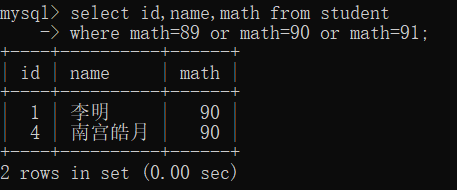
7) Students whose math score is 89, 90, or 91
Using or:
mysql> select id,name,math from student
    -> where math=89 or math=90 or math=91;
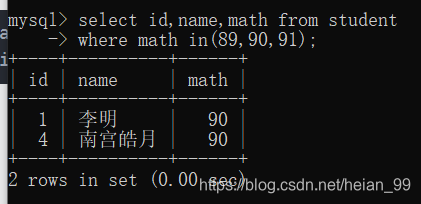
Using in:
mysql> select id,name,math from student
    -> where math in(89,90,91);
Sorting results with order by
order by is used to sort query results.
ascmeans ascending order and is the default.descmeans descending order.- The
order byclause should appear at the end of theselectstatement.
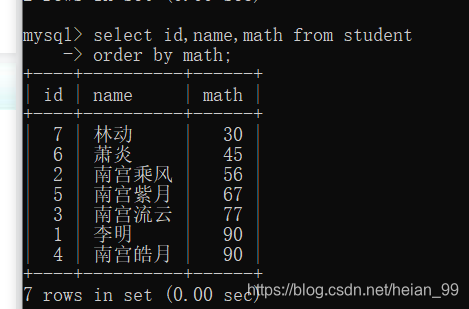
For example, sorting by math score in ascending order:
mysql> select id,name,math from student
    -> order by math;
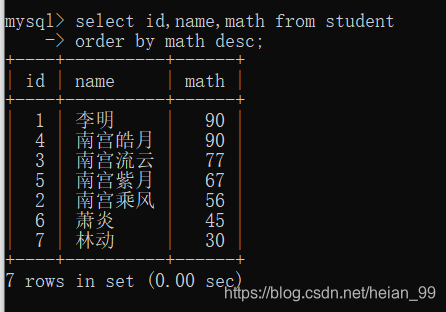
Sorting by math score in descending order:
mysql> select id,name,math from student
    -> order by math desc;
Sorting total score from highest to lowest:
mysql> select (chinese+math+english) as 总成绩 from student
    -> order by 总成绩 desc;

Common aggregate functions
count()
count(*) counts rows, including rows with NULL values present in other columns. count(column_name) ignores NULL in that specific column.
To count how many students are currently in the student table:
mysql> select count(*) as 人数 from student;

sum()
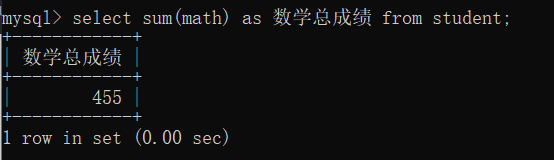
To calculate the total math score of the whole class:
mysql> select sum(math) as 数学总成绩 from student;
avg()
To calculate the average math score, you can either divide the sum by the count yourself:
mysql> select sum(math)/count(*) as 数学平均值 from student;
Or use the built-in average function directly:
mysql> select avg(math) as 数学平均值 from student;
Using group by
Now consider an employee table with fields like these:
- Table name:
EMP - Department:
deptno - Salary:
sal - Job:
job
Show the average and maximum salary for each department
select deptno,avg(sal),max(sal) from EMP group by deptno;
Show the average and minimum salary for each job within each department
select avg(sal),min(sal),job, deptno from EMP group by deptno, job;
This means the data is grouped by deptno first, and then within each department it is grouped again by job.
Show departments whose average salary is below 2000
A common way to approach this is:
- First compute the average salary for each department:
select avg(sal) from EMP group by deptno
- Then use
havingto filter grouped results.havingis often paired withgroup byfor exactly this purpose:
select avg(sal) as myavg from EMP group by deptno having myavg<2000;