MongoDB and LVM snapshots at a glance
MongoDB is a high-performance, open-source, schemaless document database valued for scalability and flexibility. Its document model suits scattered, fast-changing data, especially when applications need frequent iteration and structural changes. But no matter how capable the database is, backup and recovery planning still matters.
LVM snapshots capture the state of a logical volume at a point in time. Used carefully, they can support backup, test environments, and reporting copies without making a long-running operation interfere with the production database.
That idea maps to several common tasks:
- Backup and recovery. Hardware failure, software failure, or human error can be costly. Regular backups reduce that risk and shorten recovery time.
- Test and development copies. A snapshot can provide a database copy with the same data and structure as production, which makes testing and development more realistic.
- Analytics and reporting. Offline analysis and report generation can run against a snapshot copy instead of the production database, so production performance is not affected.
The main advantages of using LVM snapshots as part of a MongoDB backup strategy are fast capture, minimal downtime, and the ability to restore to a precise point in time. The low-downtime property matters for services that need to run continuously.
Preparing the storage layout
Before taking MongoDB snapshots, install LVM and configure storage correctly. A basic setup looks like this:
sudo yum install lvm2
sudo pvcreate /dev/sdb
sudo vgcreate vg0 /dev/sdb
sudo lvcreate -L 10G -n mongo_data vg0
Next, make MongoDB use the logical volume. Edit the MongoDB configuration file, usually /etc/mongod.conf, and point the data path to a directory on the new volume:
storage:
  dbPath: "/mnt/mongo_data"
Then move the data directory and set ownership:
sudo mkdir /mnt/mongo_data
sudo mount /dev/vg0/mongo_data /mnt/mongo_data
sudo rsync -av /var/lib/mongo/ /mnt/mongo_data
sudo chown -R mongodb:mongodb /mnt/mongo_data
Check performance and free space before relying on snapshots. htop shows CPU and memory use in real time, so you can confirm that snapshot creation will not saturate those resources. Also make sure there is enough space for the snapshot itself.
htop
Manual snapshot and backup procedure
First, identify the logical volume that holds MongoDB data:
lvdisplay
The command lists logical volumes on the system. Find the volume associated with MongoDB, including its volume name and volume group name.
For the manual procedure, stop MongoDB before creating the snapshot so no writes continue:
sudo systemctl stop mongod
Then create a snapshot volume. If MongoDB data is on mongo_data in volume group vg0, the command could be:
sudo lvcreate --size 1G --snapshot --name mongo_backup /dev/vg0/mongo_data
This creates a snapshot named mongo_backup with a size of 1GB. The automated workflow described later avoids a full stop by using fsyncLock, which blocks writes while allowing reads to continue.
Next, mount the snapshot and back it up. Create a mount point first:
sudo mkdir /mnt/mongo_backup
sudo mount /dev/vg0/mongo_backup /mnt/mongo_backup
After mounting, use a standard backup tool such as tar or rsync. For example:
sudo tar czf /path/to/backup/mongo_backup.tar.gz /mnt/mongo_backup
When the backup finishes, unmount the snapshot and remove it to release space:
sudo umount /mnt/mongo_backup
sudo lvremove /dev/vg0/mongo_backup
The system asks for confirmation before deleting the snapshot volume; enter y to continue.
Restoring from the snapshot
Before restoring, make sure the target location has enough space for the recovered data. Use df -h to check disk space, then clean up or add storage as needed.
Stop MongoDB before restoring to avoid conflicts:
sudo systemctl stop mongod
Restore the snapshot data into the MongoDB data directory. If the snapshot is mounted at /mnt/mongo_backup and MongoDB uses /var/lib/mongo, rsync can copy the data back:
sudo rsync -av /mnt/mongo_backup/ /var/lib/mongo/
Keep the trailing slash after the source path so the command copies the directory contents rather than the directory itself.
After the restore, start MongoDB again:
sudo systemctl start mongod
Check the MongoDB logs for startup errors, then verify data consistency and access with a MongoDB client or application.
A reporting pipeline built on snapshots
Financial reports need accuracy because they feed timely company decisions. In the scenario that motivated this workflow, reports ran directly against the business database. They were slow, and at the start of each month they often failed, which affected the finance department and company decisions. As the business grew, that reporting approach stopped being workable.
Business data was synchronized from several business databases into a data warehouse in the early morning. The synchronization itself took a long time, which meant the completed copy was no longer a precise point-in-time snapshot: the source databases kept changing during the process.
The requirement was a simple, reliable way to synchronize data precisely from a MongoDB business database to an Alibaba Cloud MaxCompute data warehouse. Simplicity matters because it improves reliability. The ideal approach avoids complex custom scripts that handle replication details such as binlog position or timing; it should rely on well-packaged technology instead. Precision is critical because any error can have irreversible consequences.
The approach: use the operating system's LVM snapshot capability to freeze MongoDB business data at a specific moment and synchronize that data to another MongoDB instance. MaxCompute can then pull from the second MongoDB instance for its synchronization tasks. The following example uses the core system's MongoDB database to show how to provide a reliable data base for financial report generation.
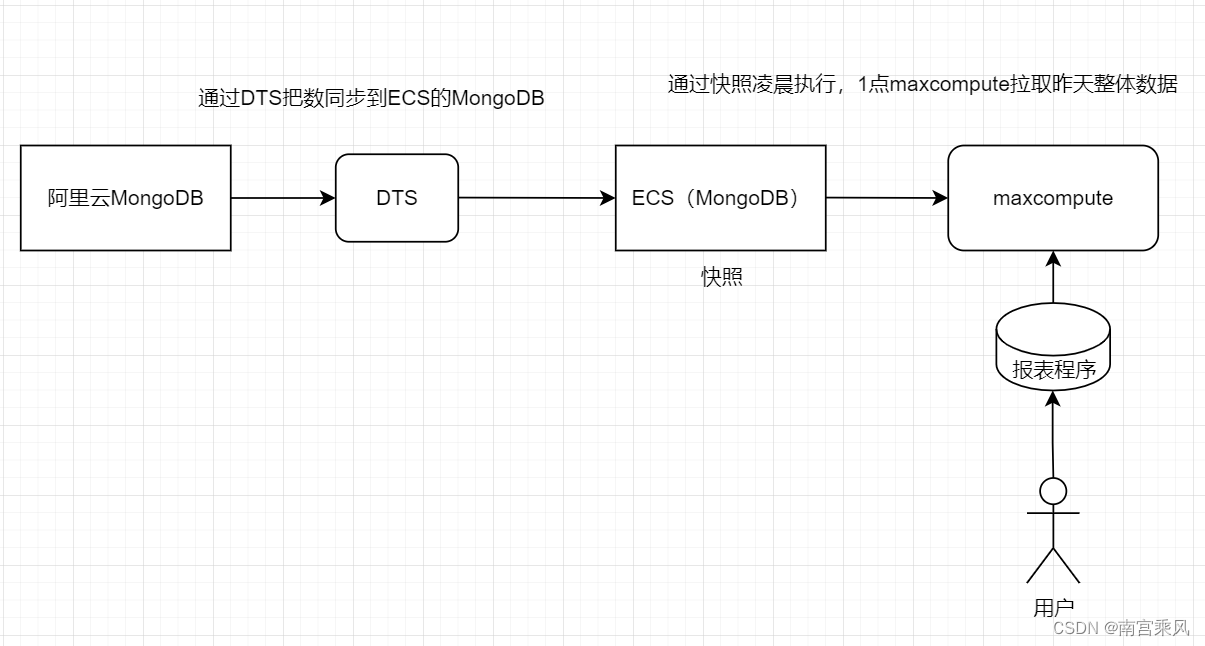
Automation
Make sure MongoDB is installed and configured on the server, and that there is enough disk space for snapshot creation.
To automate the process, use a MongoDB script and a shell script. The MongoDB script locks the database, triggers snapshot creation, and then unlocks the database. The shell script creates the LVM snapshot.
The MongoDB script is designed to create a data snapshot while preserving consistency, without fully stopping the database service:
conn = new Mongo();
db = conn.getDB("admin");
db.auth('root','xxx');
db = db.getSiblingDB('数据库名称');
session = db.getMongo().startSession();
session.startTransaction();
db.fsyncLock();
run('/opt/mongodb_snap.sh');
db.fsyncUnlock();
session.commitTransaction();
session.endSession();
conn.close();
The script opens a connection, authenticates against admin, and switches to the target database that will be snapshotted. It starts a session and a transaction, then calls fsyncLock() to block writes while allowing reads to continue. That keeps data consistent without a full service stop. The script then triggers the snapshot shell script. Note that run is not a built-in MongoDB shell function in this context; in a real implementation, the snapshot script would need to be triggered through another mechanism, such as a system command or an external scheduler. After that, the script calls fsyncUnlock(), commits the transaction, ends the session, and closes the connection.
The shell script creates the snapshot volume:
#!/bin/bash
name=mongodb-$(date +%Y%m%d%H%M%S)
/usr/sbin/lvcreate -s -L 100G -n $name /dev/mapper/data-mongodb
The scripts can be scheduled with cron. To run the MongoDB script automatically in the early morning, edit the crontab with crontab -e and add an entry such as:
0 1 * * * /usr/bin/mongo --nodb /path/to/mongodb_snap.js
This example runs at 1:00 AM every day. Replace /usr/bin/mongo and /path/to/mongodb_snap.js with the actual paths in the environment.
Data synchronization
After the LVM snapshot is created, the snapshot data can be synchronized to another MongoDB instance. That instance serves as the data source for warehouse synchronization tasks, so the warehouse receives accurate data from the desired point in time.
A snapshot is not a substitute for every backup layer, but it provides a useful point-in-time copy that can be mounted, backed up, or used as a reporting source without touching the production database.