I first ran into the word "Fediverse" in the second half of 2025. It's a portmanteau of "federation" and "universe": a collection of free-software servers—some self-hosted, some run by third parties—that together offer publishing of all kinds, from social networks and microblogs to blogs and file hosting. Each instance runs on its own, but because the software speaks one or more open-standard protocols, instances can talk to each other, and you can hold accounts on more than one server while still reaching people across the boundary. Compared with a single-server social network, this dispersed setup is more open, and the fact that nothing hinges on one machine tends to make it more resilient and safer.
That idea grabbed me right away, so I started spinning up my own servers. By late December I'd worked my way through all three of the big options: Mastodon first (the heaviest and most complex), then Misskey, then GoToSocial (the lightest and most frugal). Each has real trade-offs. Add to the pile a memos 0.18.2 instance I'd set up back in June 2025—not federated, but the same microblog/status-update genre—and I simply couldn't decide which system to settle on.
Around the same time I came across n8n, which pointed to a way out: use Misskey as the publishing end—lighter than Mastodon, more feature-rich than GoToSocial—and let the automation workflow fan the content out to the rest.
What follows is how I deployed n8n through 1Panel, plus a record of the platform-specific issues the sync workflow ran into.
Deploying n8n on 1Panel
I installed n8n from the 1Panel app store. One-click deployment is convenient, but I'd still suggest customizing the docker-compose.yml before installing—both so n8n's webhooks can be recognized correctly from the outside and to keep system resource usage in check.
Why the default install isn't enough
Out of the box, the URL generated by a Webhook node tends to be an internal IP or localhost, which means Misskey can't complete the callback. The WEBHOOK_URL environment variable fixes that by telling n8n its public-facing domain explicitly. I also turned off diagnostic data upload—less noisy error output in the console, and a bit of privacy preserved.
The docker-compose snippet
This is the config I'm running now; the environment variables are the part worth noting:
networks:
    1panel-network:
        external: true
services:
    n8n:
        container_name: ${CONTAINER_NAME}
        deploy:
            resources:
                limits:
                    cpus: ${CPUS}
                    memory: ${MEMORY_LIMIT}
        environment:
            # Must be false when sitting behind a reverse proxy
            N8N_SECURE_COOKIE: false
            # Public domain so webhooks can be triggered correctly
            WEBHOOK_URL: https://n8n.xiaoten.com/
            # Disable diagnostics to cut down log noise
            N8N_DIAGNOSTICS_ENABLED: false
        image: n8nio/n8n:2.2.2
        labels:
            createdBy: Apps
        networks:
            - 1panel-network
        ports:
            - ${HOST_IP}:${PANEL_APP_PORT_HTTP}:5678
        restart: always
        volumes:
            - ./data:/home/node/.n8n
Once the container restarts, the Webhook nodes generate URLs under the custom domain (https://n8n.xiaoten.com/...) instead of local addresses.
How the workflow actually runs
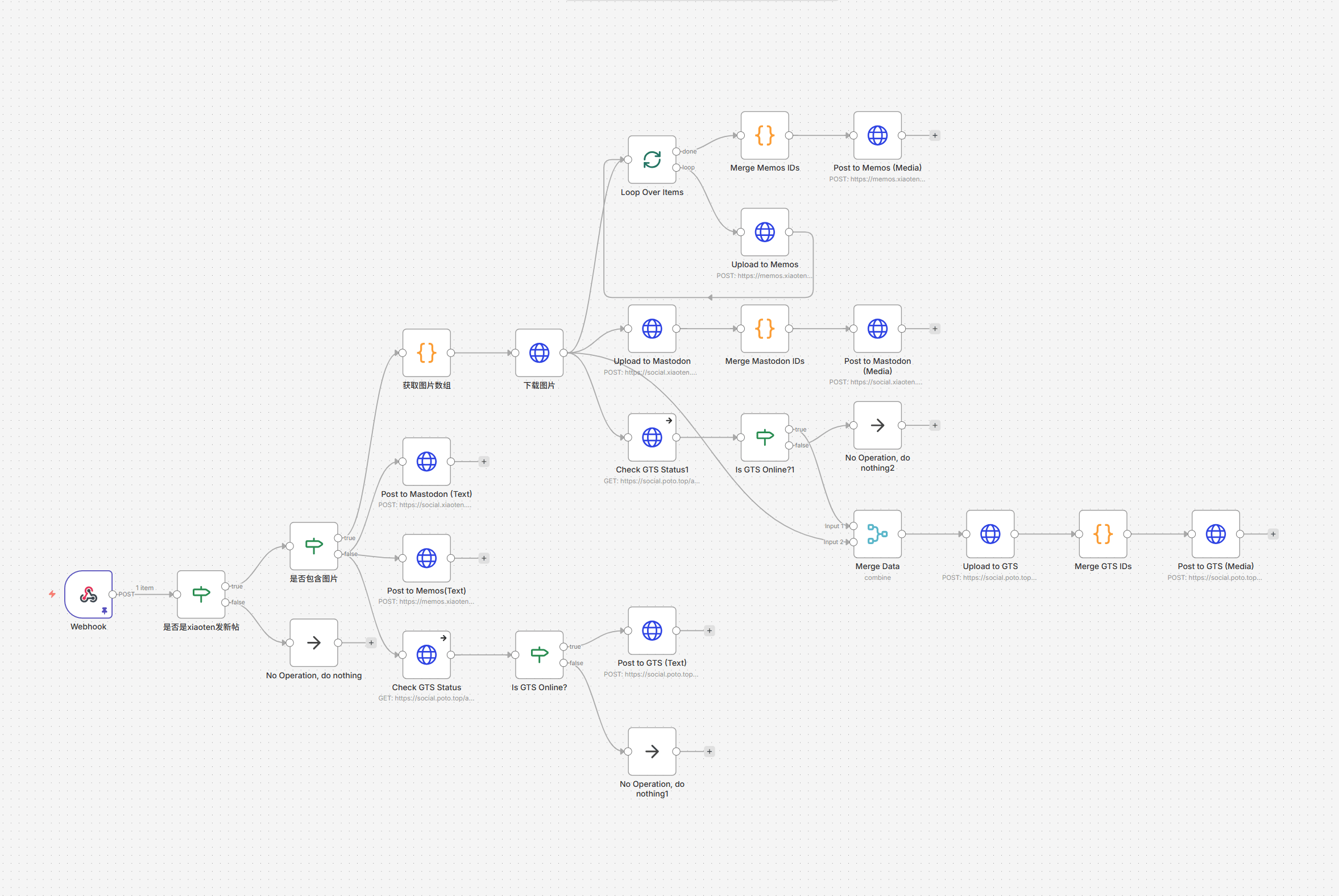
The core logic isn't complicated: Webhook receives → filter → download images → fan out to each platform.
Filtering: catch only your own posts
Misskey's webhook pushes every activity, so an If node handles the filtering. In n8n's JSON structure, I set up conditions like this:
{
  "parameters": {
    "conditions": {
      "combinator": "and",
      "conditions": [
        {
          // make sure the userId is mine
          "leftValue": "={{ $json.body.body.note.user.id }}",
          "rightValue": "YOUR_MISSKEY_USER_ID",
          "operator": {
            "type": "string",
            "operation": "equals"
          }
        },
        {
          // make sure it is not a reply
          "leftValue": "={{ $json.body.body.note.replyId }}",
          "rightValue": "",
          "operator": {
            "type": "string",
            "operation": "empty",
            "singleValue": true
          }
        },
        {
          // make sure it is not a renote (boost)
          "leftValue": "={{ $json.body.body.note.renoteId }}",
          "rightValue": "",
          "operator": {
            "type": "string",
            "operation": "empty",
            "singleValue": true
          }
        }
      ]
    }
  },
  "type": "n8n-nodes-base.if",
  "name": "Is this a new post from xiaoten"
}
In the visual editor it looks like this:
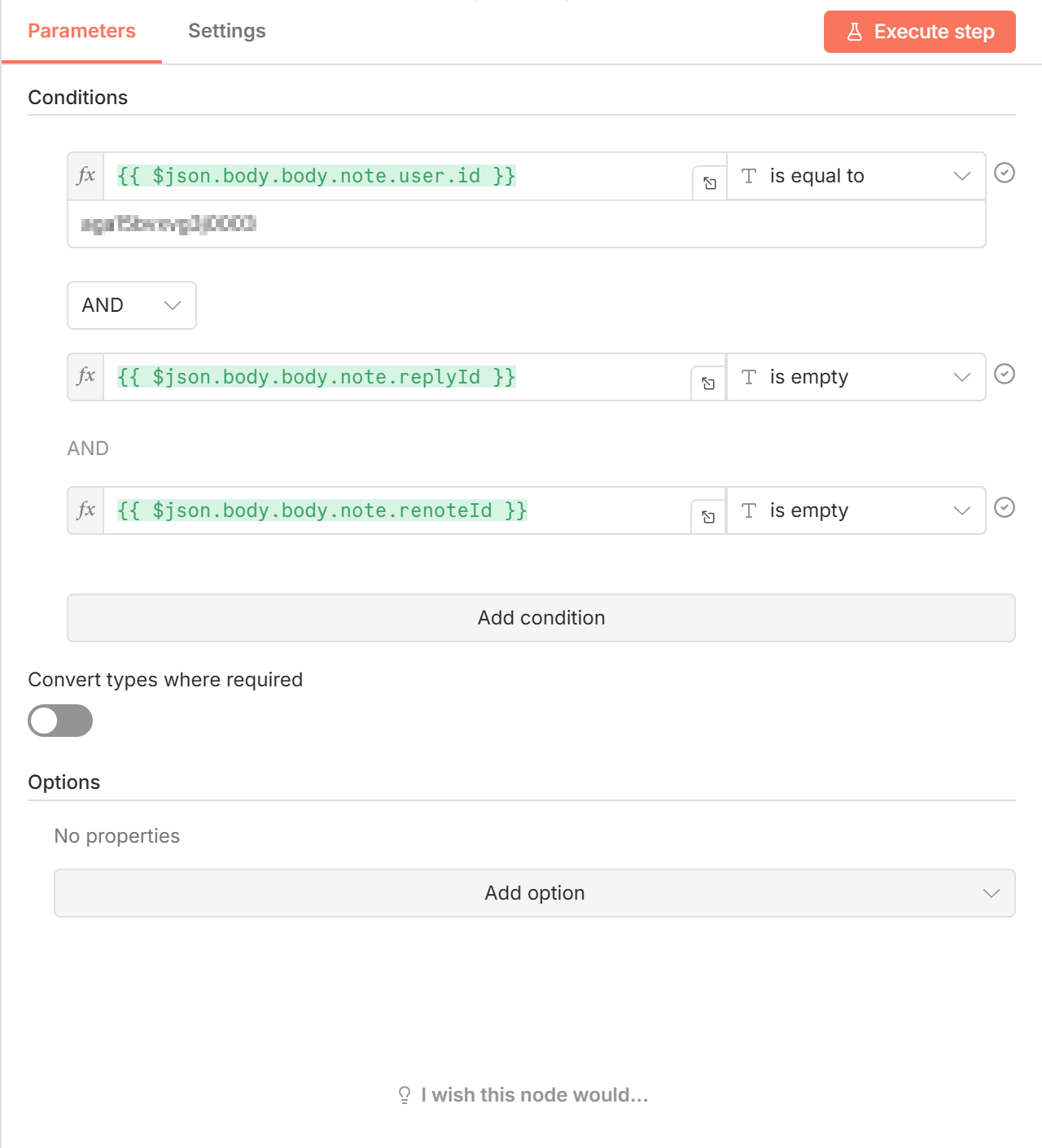
The effect is straightforward: only posts from the specified user ID get pushed out.
Sending to Mastodon
Mastodon's API is fairly conventional. Plain text can just be posted directly; for image posts the flow is:
- Download the images — n8n pulls the Misskey images into memory.
- Upload the media — call Mastodon's
/api/v2/mediaendpoint to obtain amedia_id. - Merge the IDs — with multiple images, several IDs need to be combined into a single array.
- Publish the status — call
/api/v1/statuseswith the body text andmedia_idstogether.
This part went smoothly. The tricky bit was the ID merge: each image causes the upload node to run again, so a Code node has to gather the scattered run results:
// Merge Mastodon IDs (Code node)
const items = $input.all();
// extract IDs in their original order
const sortedIds = items
  .map(item => ({
    id: item.json.id,
    index: item.pairedItem.item
  }))
  .sort((a, b) => a.index - b.index)
  .map(data => data.id);

return { json: { media_ids: sortedIds } };
Sending to GoToSocial
At first I ran the GoToSocial instance on a server that wasn't on 24 hours a day. Left unhandled, the moment GTS went offline the whole n8n flow would error out and stop. I've since moved the instance to a machine that stays up, but I kept the safeguard anyway to keep the parts from interfering with each other.
I borrowed the idea from uptime probes: check whether the GTS instance is alive, then route into the appropriate branch, so the overall workflow doesn't die on its account.
- Check GTS Status — before sending anything, an HTTP Request node pings the instance info endpoint
/api/v1/instance. Key setting: turn on "continue on error."
// node config snippet
{
  "url": "https://social.poto.top/api/v1/instance",
  "options": {
    "timeout": 3000 // 3s timeout so it cannot hang
  },
  "onError": "continueRegularOutput" // keep going on error!
}
- Is GTS Online? — an If node reads the result of the previous step. The condition checks whether the returned
urifield is not empty. True means GTS is up, so the image/post flow proceeds. False means it's down, and aNoOpbranch skips the GTS sync entirely.
With that small check in place, GTS going offline doesn't hold up the other syncs.
Sending to Memos
Memos (v0.18.2) has a quirk: when multiple images upload concurrently, the returned Resource IDs tend to come back in arbitrary order. Post "image 1, image 2, image 3" in Misskey and it can arrive in Memos as "image 2, image 1, image 3." To keep the sequence, I brought in a Loop Over Items (SplitInBatches) node:
- Slice the loop — split the image array so n8n is forced to process one image at a time.
- Upload in order — call the Memos upload endpoint inside the loop.
- Rebuild the Markdown — the most important step. After the loop finishes, a Code node re-extracts every successfully uploaded ID and stitches them into the Markdown format Memos expects, in original order:
// Code node logic snippet
const mediaMarkdown = items.map(item => {
const filename = item.json.filename || 'image';
const id = item.json.id;
// build standard Memos image syntax 
return ``;
}).join("\n");
That queued-upload approach fixes the out-of-order problem.
Wrapping up
Using Misskey as the content source and distributing through n8n is a clean enough idea, but each platform needs its own particular handling. None of it was hard to implement with AI's help. This was really just a feasibility test of the concept—under normal circumstances nobody would maintain this many platforms at once.
It also served as a very basic introduction to n8n, since I only touched the fundamental features and haven't even reached the core stuff (AI Agent) yet. There's a lot more n8n can do, and a lot more for me to learn.