“Which is better, a hammer or a screwdriver?” The only honest answer is: it depends on the job. You use a hammer for nails and a screwdriver for screws. And if you have both, many jobs become faster and easier.
At the beginning of 2026, a familiar kind of anxiety spread through the developer community: which AI tool should I choose?
OpenClaw had just gone open source and passed 100,000 GitHub stars, and the comparison started almost immediately: “Is OpenClaw better than Claude Code?” Similar questions appeared daily in developer discussions: “Should I use OpenClaw or Claude Code?”
The problem is that the question assumes the wrong relationship. OpenClaw and Claude Code are not really fighting for the same seat. They are better understood as complementary tools — two very different teammates in the same AI development workflow.
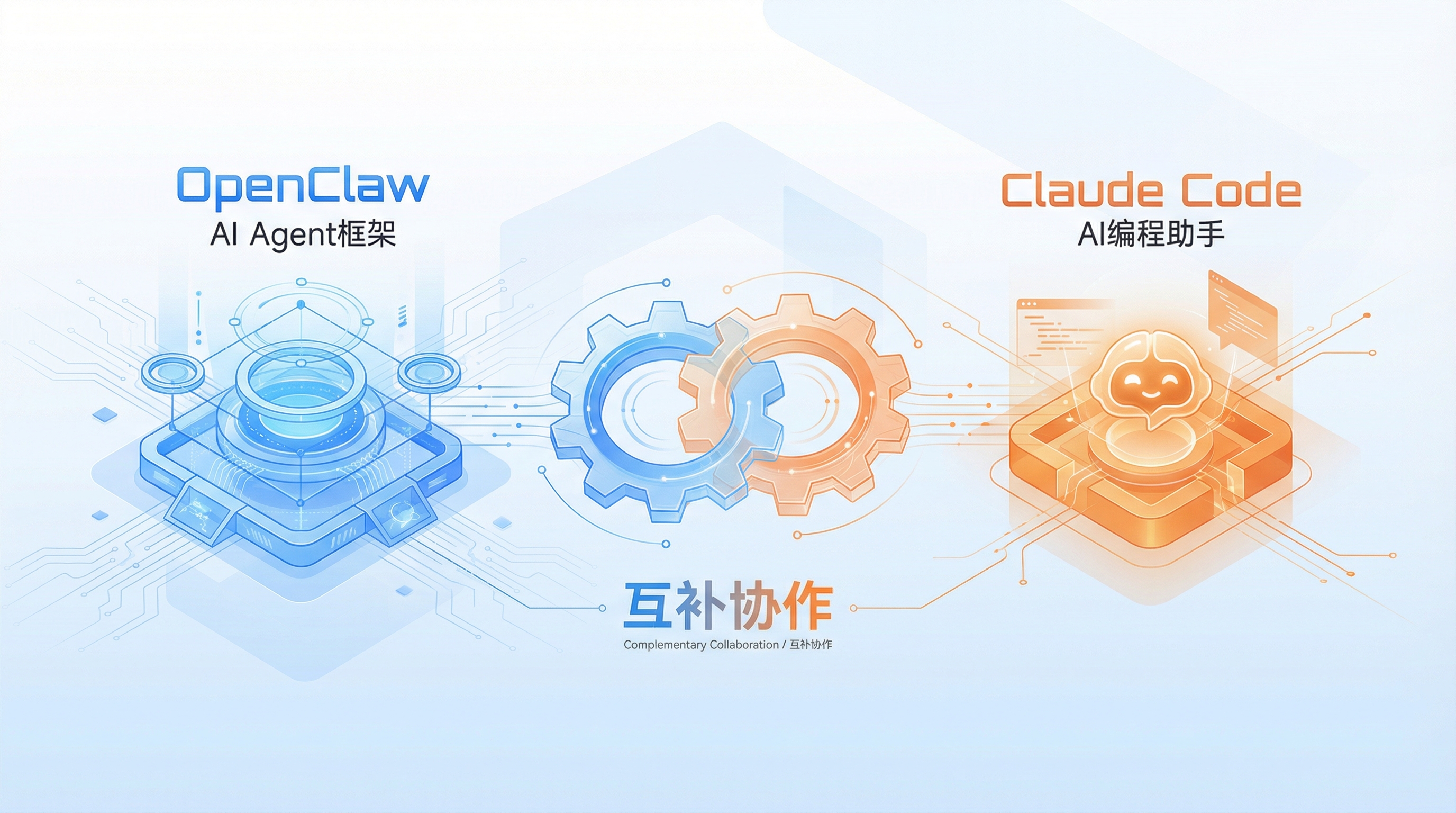
What OpenClaw and Claude Code actually are
Before comparing them, it helps to separate their identities. They may both sit in the broad category of AI developer tools, but they start from different assumptions and solve different layers of the problem.
OpenClaw: a framework for building AI agents
OpenClaw is an open-source framework for developing AI agents. Its center of gravity is architecture: it gives you the pieces to build, coordinate, and extend a team of specialized agents.
Its defining features include:
- Multi-agent architecture: you can create and manage multiple AI agents, each with a focused role.
- Skills and tools as first-class concepts: extensibility is built into the framework rather than treated as an afterthought.
- Gateway-based multi-channel integration: it can connect to different LLMs, including Claude, GPT, local models, and others.
- Persistent memory: agents can share and retain memory across workflows.
- Automation through browser, file system, and shell access: it is designed to interact with real working environments, not just chat about them.
Its philosophy is architecture first: build an AI agent team, then let that team handle larger processes.
That makes OpenClaw especially suitable for:
- complex tasks that require several agents to cooperate;
- enterprise projects where agent behavior needs to be customized;
- data-sensitive environments that require local or self-hosted deployment;
- automation workflows that need deep customization and long-running execution.
Claude Code: a conversational AI coding assistant
Claude Code is a conversational AI programming assistant with a CLI-first experience. It is not primarily a framework for assembling agent systems. Its strength is understanding a developer’s intent, reading code in context, and helping modify or reason about a codebase quickly.
Its core features include:
- Conversational interaction: you can describe what you want in natural language, and it can work from project context.
- Codebase understanding: it can quickly grasp the structure of a project and reason across files.
- Fast iteration: it supports a write-review-adjust loop with immediate feedback.
- Skill system: it includes multiple programming-oriented capabilities.
- Cross-file operations: it can help with refactoring and changes that span more than one file.
Its philosophy is conversation first: let the AI understand what you mean, then help execute it in code.
Claude Code fits naturally into:
- everyday programming, debugging, and refactoring;
- rapid prototyping;
- code review and optimization;
- learning a new technology stack.
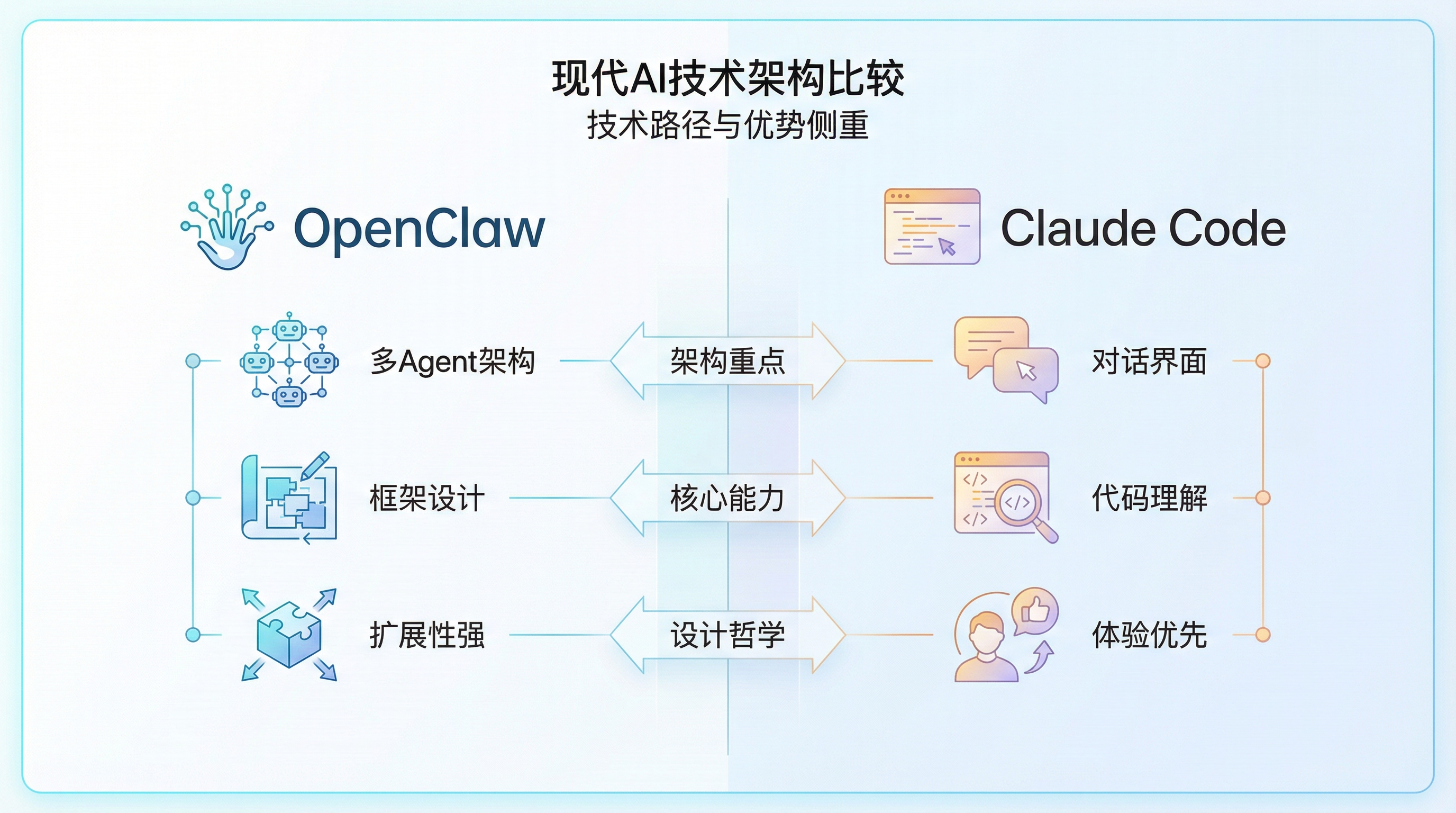
The practical difference in one view
<table> <thead> <tr> <th>Dimension</th> <th>OpenClaw</th> <th>Claude Code</th> </tr> </thead> <tbody> <tr> <td>Positioning</td> <td>AI agent framework</td> <td>AI programming assistant</td> </tr> <tr> <td>Main strength</td> <td>Multi-agent collaboration and architectural extensibility</td> <td>Code understanding and conversational experience</td> </tr> <tr> <td>Learning curve</td> <td>Steeper, because you need to understand the framework</td> <td>Gentler, because interaction is natural-language based</td> </tr> <tr> <td>Deployment</td> <td>Local or self-hosted</td> <td>Cloud service</td> </tr> <tr> <td>Best suited for</td> <td>Complex automation and long-running workflows</td> <td>Daily coding and fast iteration</td> </tr> <tr> <td>Customization</td> <td>Very high, at the framework level</td> <td>Moderate, mainly at the skill level</td> </tr> <tr> <td>Cost model</td> <td>Free and open source</td> <td>Subscription-based</td> </tr> </tbody> </table>Why they complement each other
The relationship becomes clearer when you look at three dimensions: complexity, time horizon, and team workflow.
Task complexity
For simple development tasks, Claude Code is usually the faster choice. You ask, it reads the code, and it helps you make changes.
For complicated workflows, OpenClaw’s multi-agent model becomes more useful. It can split responsibilities, coordinate agents, and keep a process moving.
Used together, the workflow can be stronger than either tool alone: Claude Code analyzes the code, while OpenClaw executes the broader automation pipeline.
Time horizon
Claude Code is excellent when the need is immediate: fix this bug, explain this module, refactor this function, review this change.
OpenClaw is more suitable when the work needs to continue over time: monitoring, scheduled tasks, repeated checks, or agent workflows that should keep running without constant manual prompting.
A natural combination is to use Claude Code to shape the prototype or implementation plan, then hand long-term maintenance or automation to OpenClaw agents.
Team collaboration
For an individual developer, Claude Code feels like a capable programming partner.
For a team project, OpenClaw can act as a coordination layer for multiple agents: testing agents, deployment agents, review agents, and other specialized roles.
In a combined workflow, team members can use Claude Code for development while OpenClaw manages shared automation such as tests, deployment checks, or recurring project tasks.
Three ways to use them together
1. OpenClaw schedules, Claude Code executes code-level improvements
Suppose you are building a new feature and want automated testing plus intelligent code optimization.
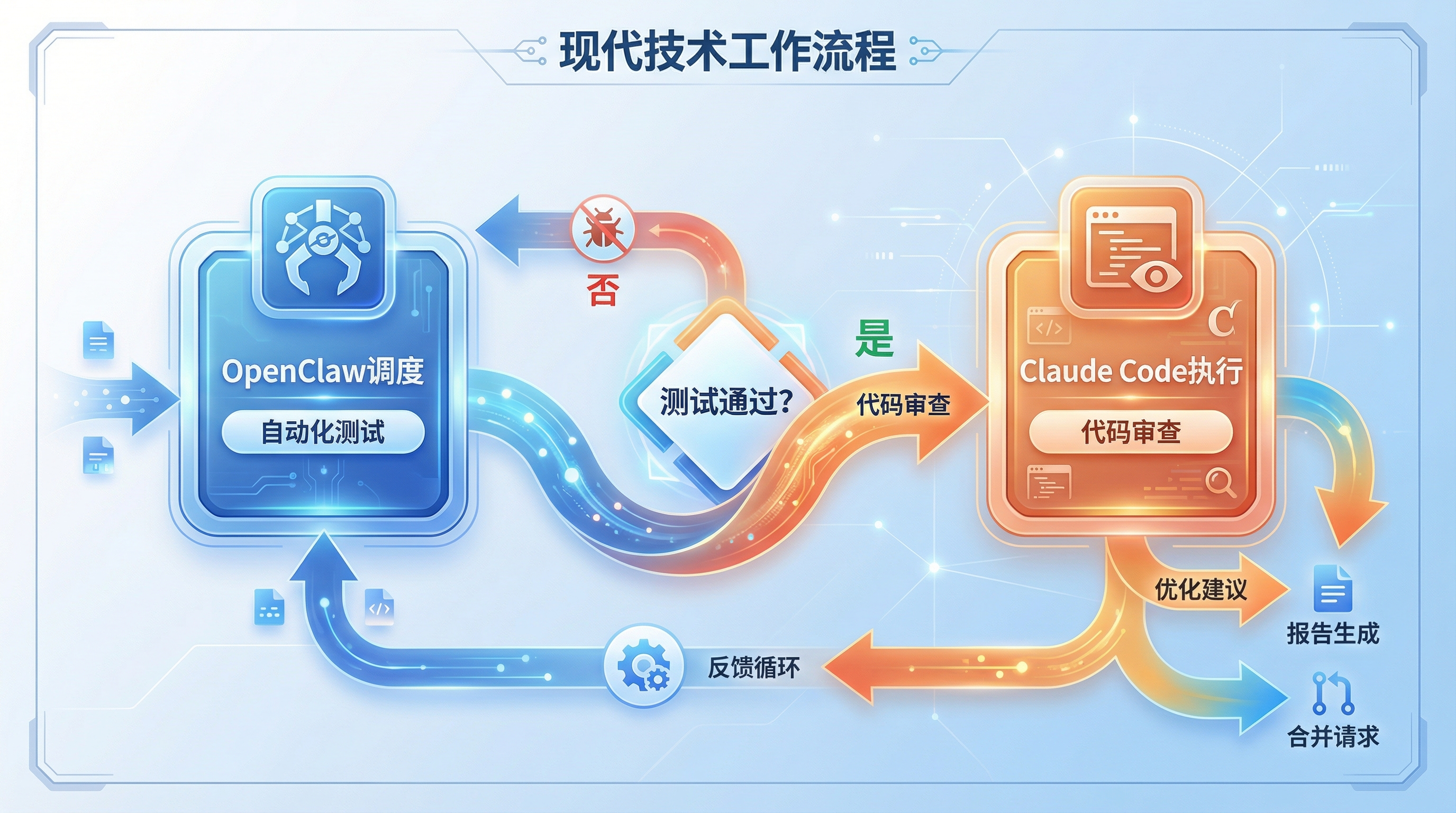
One possible setup looks like this:
OpenClaw agent as the dispatcher:
- watches Git commits;
- automatically triggers a testing agent;
- reports failures when tests do not pass;
- moves the workflow forward when tests succeed.
Claude Code as the executor:
- receives the code after it passes tests;
- performs code review;
- suggests optimizations;
- helps apply the necessary changes.
The result is a workflow that combines automation with code intelligence: OpenClaw keeps the process moving, while Claude Code improves the quality of the code itself.
2. Claude Code analyzes, OpenClaw automates the large-scale work
Now imagine a project with 100 files that need refactoring.
In this case, Claude Code can first act as the analyst:
- scan the entire codebase;
- identify patterns that need to be refactored;
- produce a refactoring plan;
- decide which changes should be prioritized.
Then OpenClaw can take over as the execution layer:
- receive the refactoring plan;
- create multiple worker agents;
- process different files in parallel;
- automatically submit the resulting changes.
Claude Code can return at the end as the validator:
- check the refactoring results;
- verify that behavior has not been broken.
The value of this combination is straightforward: Claude Code is good at understanding and planning across a codebase; OpenClaw is good at organizing parallel agent work. Together, they make large-scale refactoring less painful.
3. A dual-agent collaboration model for full-stack work
Consider a web application where frontend and backend work are happening at the same time.
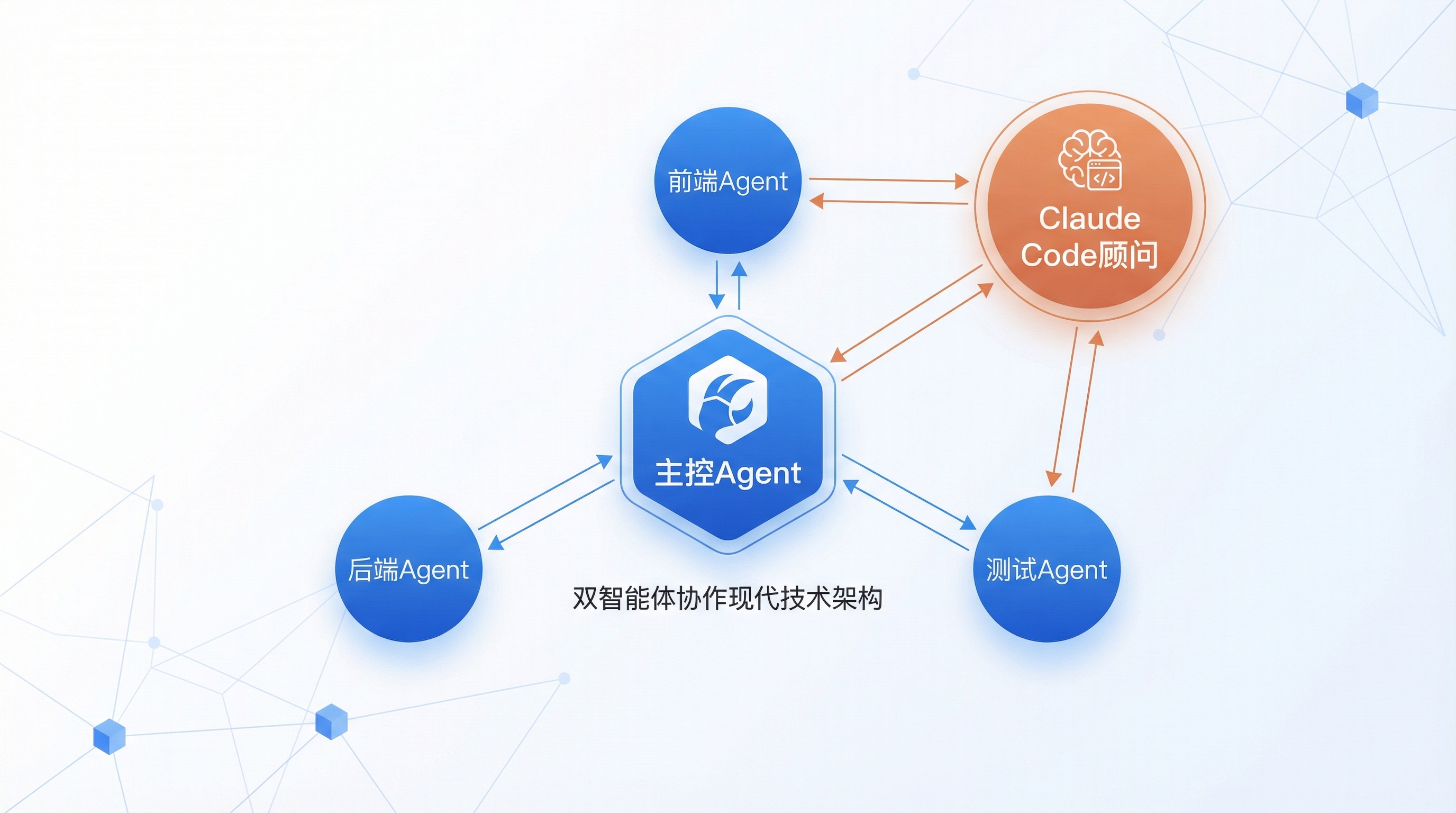
A multi-agent setup might include:
OpenClaw main controller agent:
- coordinates frontend, backend, and testing agents;
- manages the task queue;
- handles communication between agents.
OpenClaw frontend agent:
- works on UI components;
- manages state-related logic.
OpenClaw backend agent:
- handles API development;
- works with database operations.
Claude Code as a flexible senior advisor:
- talks with the main controller agent to understand overall progress;
- steps into any agent’s area when code needs optimization;
- offers architectural suggestions when needed.
This arrangement gives you specialized agent division of labor, with Claude Code available as a high-context coding partner. For a small team, that can make larger projects feel more manageable.
When to use OpenClaw, Claude Code, or both
There are situations where using only one tool is perfectly reasonable.
Use OpenClaw alone when:
- you need to build a long-running automation system;
- multiple AI agents need to work together;
- local deployment matters because of data security;
- the workflow requires deep customization.
Use Claude Code alone when:
- you are doing everyday coding or debugging;
- you need to build a prototype quickly;
- you are learning a new technology;
- you want code review or optimization support.
Use both together when the project benefits from orchestration plus code intelligence:
- Complex project development: OpenClaw manages the process, Claude Code handles code-level work.
- CI/CD automation: OpenClaw schedules agents, Claude Code reviews code.
- Multi-file refactoring: Claude Code analyzes the codebase, OpenClaw runs parallel execution.
- Testing and optimization: OpenClaw automates testing, Claude Code helps improve the implementation.
A practical way to start combining them
The easiest path is not to build a complicated agent system on day one.
Start with Claude Code. Its learning curve is lower, it fits naturally into daily development, and it can deliver productivity gains almost immediately.
As you use it, pay attention to repeated patterns:
- Which tasks do you perform again and again?
- Which steps could be automated?
- Which processes need to run for a long time without constant manual attention?
Those are the places where OpenClaw starts to make sense. Introduce it gradually:
- begin with a single agent;
- add complexity only when the workflow needs it;
- keep Claude Code in the loop for coding, review, and architectural judgment.
Over time, the useful boundary between the two tools becomes clearer. Some tasks belong to OpenClaw because they are repetitive, long-running, or coordination-heavy. Others belong to Claude Code because they require conversational problem-solving, codebase understanding, and fast iteration.
The point is not to pick a permanent winner. OpenClaw is the AI team manager: it schedules, coordinates, and keeps workflows organized. Claude Code is the AI programming partner: it understands intent and helps turn that intent into working code.
In a mature AI development workflow, they are not enemies. They are different tools for different parts of the job — and often, the best results come from using both.