If you want to measure network speed directly in a terminal, speedtest-cli provides a simple way to run bandwidth tests against speedtest.net without opening a browser.
Installing speedtest-cli
There are several ways to install it, depending on your environment.
    sudo apt-get install python-pip
    sudo pip install speedtest-cli
Or:
pip install git+https://github.com/sivel/speedtest-cli.git
Or:
    git clone https://github.com/sivel/speedtest-cli.git
    python speedtest-cli/setup.py install
Or download the script directly with wget:
    wget -O speedtest-cli https://raw.githubusercontent.com/sivel/speedtest-cli/master/speedtest_cli.py
    chmod +x speedtest-cli
Or use curl instead:
    curl -Lo speedtest-cli https://raw.githubusercontent.com/sivel/speedtest-cli/master/speedtest_cli.py
    chmod +x speedtest-cli
Basic usage
Running the help command shows the available options:
    root@MyUbuntuCloud:~# speedtest-cli -h
    usage: speedtest-cli [-h] [--bytes] [--share] [--simple] [--list]
                     [--server SERVER] [--mini MINI] [--source SOURCE]
                     [--timeout TIMEOUT] [--version]

    Command line interface for testing internet bandwidth using speedtest.net.
    --------------------------------------------------------------------------
    https://github.com/sivel/speedtest-cli

    optional arguments:
      -h, --help         show this help message and exit
      --bytes            Display values in bytes instead of bits. Does not affect
                         the image generated by --share
      --share            Generate and provide a URL to the speedtest.net share
                         results image
      --simple           Suppress verbose output, only show basic information
      --list             Display a list of speedtest.net servers sorted by
                         distance
      --server SERVER    Specify a server ID to test against
      --mini MINI        URL of the Speedtest Mini server
      --source SOURCE    Source IP address to bind to
      --timeout TIMEOUT  HTTP timeout in seconds. Default 10
      --version          Show the version number and exit
A few of the more useful options are --simple for shorter output, --list to view available test servers, --server to choose a specific server, and --share to generate a shareable result image.
Example results
HKVPS
    root@MyUbuntuCloud:~# speedtest-cli --share
    Retrieving speedtest.net configuration...
    Retrieving speedtest.net server list...
    Testing from Shanghai Anchnet Network Technology (118.193.151.193)...
    Selecting best server based on latency...
    Hosted by ChinaTelecom (Guangzhou) [2.51 km]: 6.646 ms
    Testing download speed........................................
    Download: 19.66 Mbit/s
    Testing upload speed..................................................
    Upload: 0.81 Mbit/s
    Share results: https://www.speedtest.net/result/4242720179.png

speedtestresult
Raspberry Pi
    pi@araspi ~ $ ./speedtest-cli --share
    Retrieving speedtest.net configuration...
    Retrieving speedtest.net server list...
    Testing from China Unicom Shannxi (123.138.35.2)...
    Selecting best server based on latency...
    Hosted by Xi'an branch,Chinaunicom (Xian) [2.79 km]: 14.556 ms
    Testing download speed........................................
    Download: 38.05 Mbit/s
    Testing upload speed..................................................
    Upload: 7.34 Mbit/s
    Share results: https://www.speedtest.net/result/4242749590.png
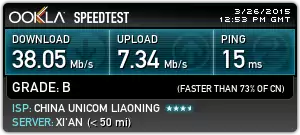
speedtestresult