If you want to add music playback to a Hexo blog, APlayer is one of the easiest ways to do it. I ended up setting it up while tweaking the blog anyway, so here’s a cleaner walkthrough of what actually matters — including the part that looks optional at first, but really isn’t.
Start with the theme-side config
If you’re using the Butterfly theme, there’s already a built-in inject mechanism in the theme config file, so you can let the theme load the required assets for you.
Edit _config.butterfly.yml and enable APlayer injection:
1 2 3 4</th>
<th># Inject the css and script (aplayer/meting) aplayerInject: enable: true per_page: true</th>
</tr>
</thead>
<tbody>
<tr>
<td></td>
<td></td>
</tr>
</tbody>
</table>
Just turn both options on. That will automatically bring in the JS resources for you. One thing to watch out for: don’t also configure another inject method below, or you’ll end up duplicating the resource loading.
If you want a fixed bottom player that keeps playing across page switches without resetting progress, it’s worth enabling pjax in the theme config as well:
1 2 3 4 5 6</th>
<th># https://github.com/MoOx/pjax pjax: enable: true # Exclude the specified pages from pjax, such as '/music/' exclude: # - /xxxxxx/</th>
</tr>
</thead>
<tbody>
<tr>
<td></td>
<td></td>
</tr>
</tbody>
</table>
Setting enable to true is enough. It’s convenient, and more importantly, it keeps page transitions from doing a full reload. With pjax, only the changed part of the page is refreshed when navigating. The Butterfly theme also handles things like analytics script reloading properly, so scripts such as busuanzi can still reload as expected.
Add the Hexo-level config too
Theme config alone is not the full setup. You also need to declare APlayer in Hexo’s own _config.yml:
1 2 3 4</th>
<th># 音乐播放器 aplayer: meting: true asset_inject: false</th>
</tr>
</thead>
<tbody>
<tr>
<td></td>
<td></td>
</tr>
</tbody>
</table>
If those fields aren’t there, add them manually. In most cases they won’t exist by default.
As for asset_inject: if you are not using Butterfly and don’t want to manually include the JS files yourself, you can set it to true here. That lets the plugin inject the assets automatically.
No matter which route you choose, the result is that aplayer.js and meing.js get loaded.
MetingJS is the piece that extends APlayer through the Meting API, and once it’s available, the player can pull music from platforms such as QQ Music, NetEase Cloud Music, Xiami, Kugou, and Baidu.
There is one limitation worth noting: for some songs that require VIP access, only the first 30 seconds of the audio stream may be returned, similar to the preview mode in official music apps.
The package still has to be installed locally
After configuration, you still need to install the dependency locally:
npm install --save hexo-tag-aplayer
It’s very easy to assume the install step is unnecessary. After all, if enabling the config already injects the CSS and JS into the site, shouldn’t that be enough?
That assumption is exactly where things go wrong.
The config only declares how the resources should be loaded. The package itself is responsible for generating the tag-based syntax used inside Markdown templates. If you skip the install and then try to use a tag like this:
{% meting "7422861869" "netease" "playlist" "autoplay" "mutex:false" "listmaxheight:400px" "preload:none" "theme:#ad7a86"%}
Hexo will fail during generation and throw an error like this:
<table> <thead> <tr> <th>1 2 3 4 5 6 7 8 9 10 11 12 13 14 15 16 17 18 19 20 21 22 23 24 25 26 27 28 29 30 31 32 33</th>
<th>C:\others\hexo\b23.kim>hexo g && hexo s INFO Validating config INFO =================================================================== ##### # # ##### ##### ###### ##### ###### # # # # # # # # # # # # # # # ##### # # # # ##### # # ##### # # # # # # # # # ##### # # # # # # # # # # # # # # # ##### #### # # ###### # # # ###### # 5.3.5 =================================================================== INFO Start processing FATAL Something's wrong. Maybe you can find the solution here: https://hexo.io/docs/troubleshooting.html Nunjucks Error: music/index.md [Line 1, Column 4] unknown block tag: meting ===== Context Dump ===== === (line number probably different from source) === 1 | {% meting "7422861869" "netease" "playlist" "autoplay" "mutex:false" "listmaxheight:400px" "preload:none" "theme:#ad7a86"%} 2 | ===== Context Dump Ends ===== at formatNunjucksError (C:\others\hexo\b23.kim\node_modules\hexo\dist\extend\tag.js:145:15) at C:\others\hexo\b23.kim\node_modules\hexo\dist\extend\tag.js:213:46 at tryCatcher (C:\others\hexo\b23.kim\node_modules\bluebird\js\release\util.js:16:23) at Promise._settlePromiseFromHandler (C:\others\hexo\b23.kim\node_modules\bluebird\js\release\promise.js:547:31) at Promise._settlePromise (C:\others\hexo\b23.kim\node_modules\bluebird\js\release\promise.js:604:18) at Promise._settlePromise0 (C:\others\hexo\b23.kim\node_modules\bluebird\js\release\promise.js:649:10) at Promise._settlePromises (C:\others\hexo\b23.kim\node_modules\bluebird\js\release\promise.js:725:18) at _drainQueueStep (C:\others\hexo\b23.kim\node_modules\bluebird\js\release\async.js:93:12) at _drainQueue (C:\others\hexo\b23.kim\node_modules\bluebird\js\release\async.js:86:9) at Async._drainQueues (C:\others\hexo\b23.kim\node_modules\bluebird\js\release\async.js:102:5) at Async.drainQueues [as _onImmediate] (C:\others\hexo\b23.kim\node_modules\bluebird\js\release\async.js:15:14) at process.processImmediate (node:internal/timers:485:21)</th>
</tr>
</thead>
<tbody>
<tr>
<td></td>
<td></td>
</tr>
</tbody>
</table>
So yes, it will fail exactly like that if the relevant package is missing.
That’s why simply loading the JS files is not enough when you want template-style usage. If you plan to use the {% meting %} syntax, the dependency has to be installed. The package can also handle automatic asset injection, but its main job here is to provide the template tags and the automation around them.
If you are doing everything manually in HTML and directly embedding the markup yourself, then no, you do not strictly need this package. In that setup, metingJS and aplayerJS are the actual core pieces, and hexo-tag-aplayer is mostly a convenience layer for template generation and asset management.
Don’t be surprised by the dependency tree
Once you install the npm package, the console output can look a bit wild:
<table> <thead> <tr> <th>1 2 3 4 5 6 7 8 9 10 11 12 13 14 15 16</th>
<th>C:\others\hexo\b23.kim>npm install --save hexo-tag-aplayer npm warn deprecated [email protected]: See https://github.com/lydell/source-map-url#deprecated npm warn deprecated [email protected]: Please see https://github.com/lydell/urix#deprecated npm warn deprecated [email protected]: See https://github.com/lydell/source-map-resolve#deprecated npm warn deprecated [email protected]: Rimraf versions prior to v4 are no longer supported npm warn deprecated [email protected]: https://github.com/lydell/resolve-url#deprecated npm warn deprecated [email protected]: Glob versions prior to v9 are no longer supported npm warn deprecated [email protected]: Please see https://github.com/hexojs/hexo-bunyan/issues/17 npm warn deprecated [email protected]: Version no longer supported. Upgrade to @latest npm warn deprecated [email protected]: core-js@<3.23.3 is no longer maintained and not recommended for usage due to the number of issues. Because of the V8 engine whims, feature detection in old core-js versions could cause a slowdown up to 100x even if nothing is polyfilled. Some versions have web compatibility issues. Please, upgrade your dependencies to the actual version of core-js. added 193 packages in 8s 44 packages are looking for funding run `npm fund` for details</th>
</tr>
</thead>
<tbody>
<tr>
<td></td>
<td></td>
</tr>
</tbody>
</table>
Seeing 193 packages added for one install is a bit shocking the first time. It feels excessive, but that’s often what happens with mature npm tooling: a simple, ready-to-use feature sits on top of a much larger dependency chain.
Messy? Maybe. Convenient? Definitely.
Basic ways to use it
The earlier template example is the standard page-mode player. Visually, it looks like this:
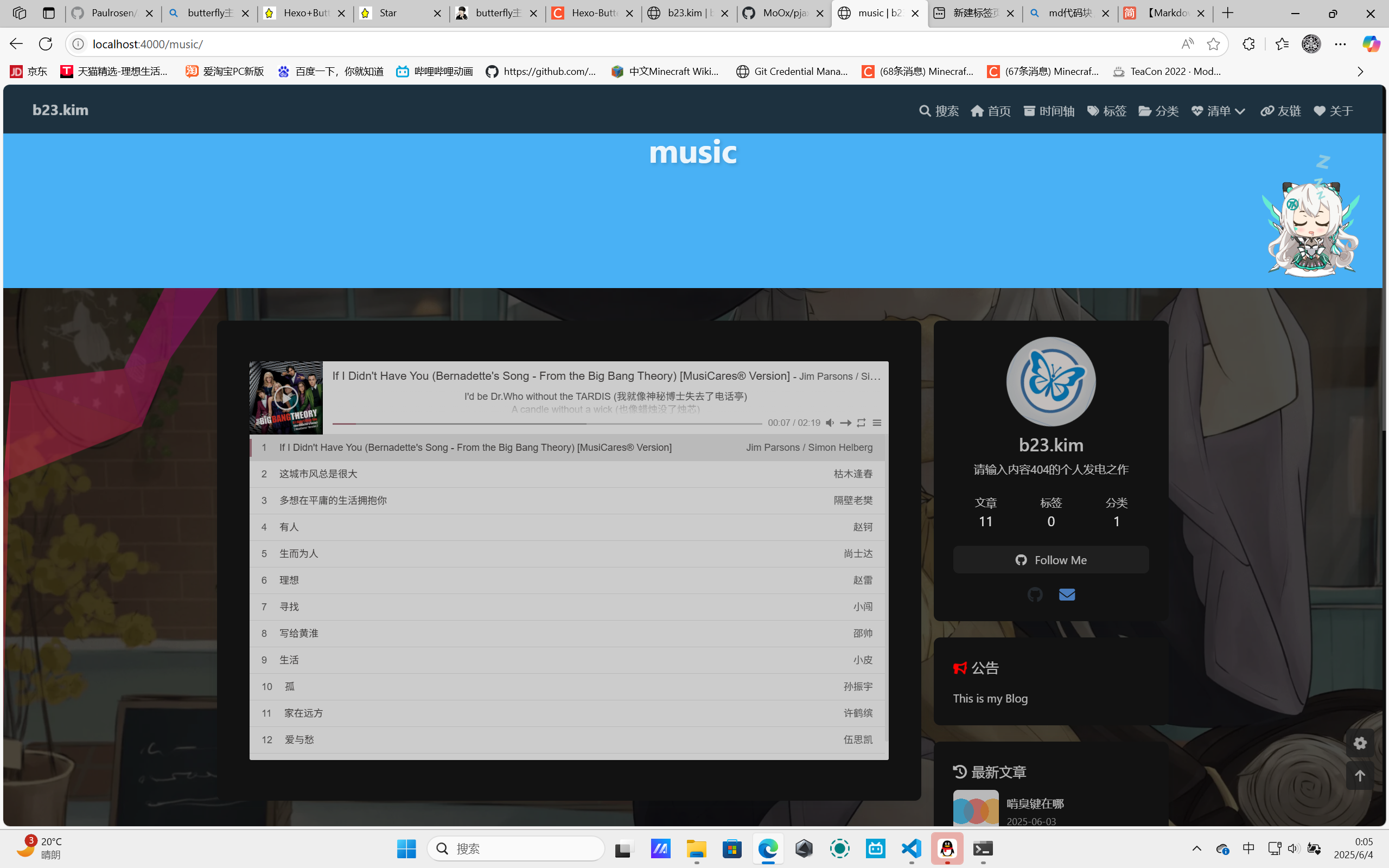
That’s the general idea of the normal embedded player.
And you’re not limited to the template syntax from aplayer-tag. Native HTML markup works too.
For example, this creates a single-song player fixed to one track:
<div class="aplayer no-destroy" data-id="1441758494" data-server="netease" data-type="song" data-autoplay="true" data-lrcType="-1"> </div>
There’s also a mini player version, which is especially suitable for pinning near the bottom of a blog. A lot of blogs already do exactly that.
<div class="aplayer no-destroy" data-id="547187496" data-server="netease" data-type="playlist" data-fixed="true" data-mini="true" data-listFolded="false" data-order="random" data-preload="none" data-autoplay="true" data-volume="0.5" muted></div>
These are only example snippets. There are more parameters available, along with callback events and API support, if you want to go deeper into customization.