I might as well call this a bug-fix diary. These were all small issues that had been sitting around for ages, and I finally got the chance to deal with them.
Fixing a redirect loop
I had written about my blog redirect setup before, but I missed one detail at the time: some automatically translated PostName values were uppercase. Once those URLs were entered in the browser, they were converted to lowercase, and the Redirection plugin would trigger yet another redirect. In practice, this sometimes led to repeated redirects and the familiar “too many redirects” error, leaving the page inaccessible.
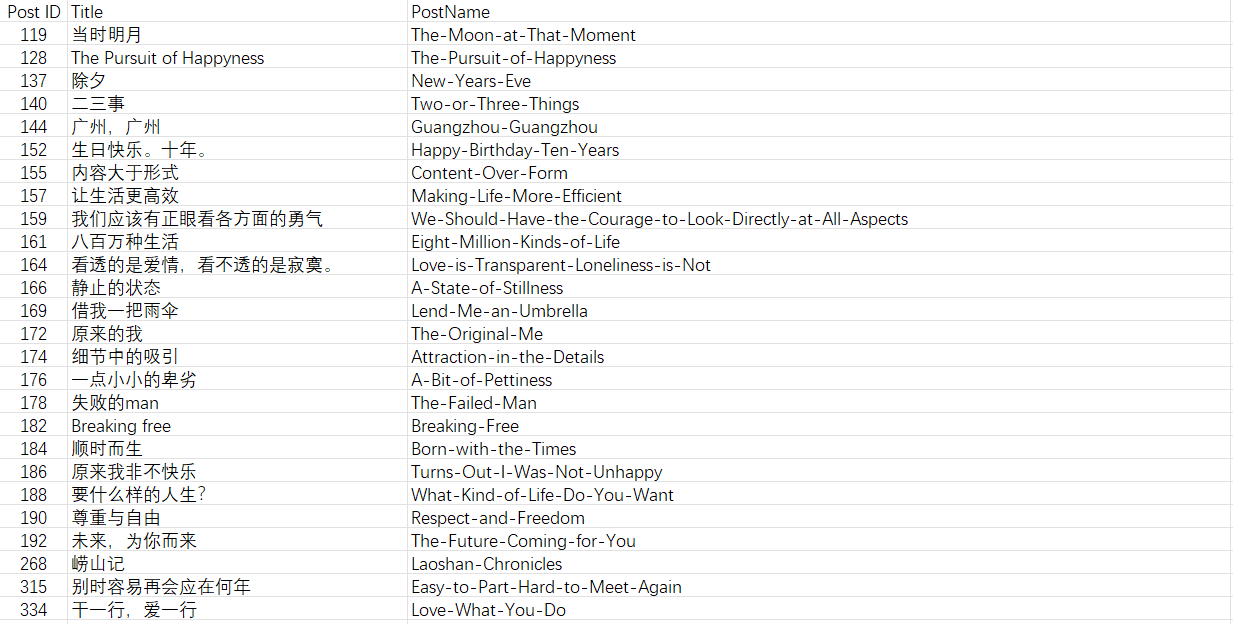
The fix was straightforward. Open the WordPress database—using phpMyAdmin, for example—and run this in SQL:
UPDATE wp_posts
SET post_name = LOWER(post_name)
WHERE BINARY post_name != LOWER(post_name);
After everything is updated, go back to Permalinks in the WordPress admin and click Save Changes at the bottom so WordPress refreshes the rewrite rules and the update can take effect.
The friend icon showing up where it shouldn’t
While checking articles during the redirect fix, I ran straight into another theme bug. The theme has a built-in option called “Friend icon - Show icon when comment author url is in blogroll”, but it turns out pingback comments were getting the icon too, which clearly wasn’t intended.
After digging through the code, the relevant part seemed to be in modules/comment.php. Adding one extra condition solved it cleanly:
 function show_friend_icon($comment_author, $comment_id, $comment)
    {
        // 🛑 新增逻辑:检查评论类型
        // 如果是 pingback 或 trackback,直接返回作者名,不加图标
        if (in_array($comment->comment_type, ['pingback', 'trackback'])) {
            return $comment_author;
        }

        $comment_author_url = $comment->comment_author_url;

        // 如果 URL 为空(有些评论可能没有留网址),也直接返回,避免报错
        if (empty($comment_author_url)) {
            return $comment_author;
        }

        // get domain name
        $comment_author_url = parse_url($comment_author_url, PHP_URL_HOST);
The key point is simply to skip the icon entirely for pingback and trackback comment types, and also avoid errors when there is no author URL.
Broken permalinks on Pages
Then there was one more issue with Page permalinks.

This one was probably caused by the earlier SQL operation: the PostName values from a CSV had been written into the database field post_name, and some duplicated path segments ended up in there. To locate the bad entries, I ran this query against post_name:
SELECT ID, post_name FROM wp_hidezemberposts WHERE post_name LIKE '%/%';
That immediately turned up several problematic records:
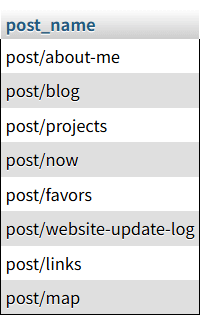
Then I fixed them with another SQL statement. SUBSTRING_INDEX here is used to keep only the part after the last slash.
UPDATE wp_hidezemberposts
SET post_name = SUBSTRING_INDEX(post_name, '/', -1)
WHERE post_name LIKE '%/%';
After that, it was the same final step again: return to Permalinks in the WordPress admin, save the settings, and wait for the change to take effect.
One last note: Gemini 3 has been surprisingly helpful lately. It handled a lot of these little code issues for me, and next time I might throw that heatmap feature at it and see what happens.