When you need persistent storage in Kubernetes, the usual building blocks are PVs and PVCs. That works, but creating them manually quickly becomes tedious. The pain is even more obvious with StatefulSet workloads, where each Pod may need its own PVC and matching PV. In that kind of setup, managing storage by hand is cumbersome, which is exactly where StorageClass becomes useful.
What StorageClass solves
A simple way to think about this setup is:
- NFS is the actual backend storage.
nfs-clientacts as the provisioner that dynamically creates PVs and PVCs.- A
StorageClasspoints to that provisioner. - A
StatefulSetor another workload can then use it throughstorageClassName.
In this example, NFS is used as the storage backend, but the same idea applies if you are using another storage system.
Preparation
Before deploying anything, you need a working NFS service or another storage backend. Here the configuration is based on NFS.
Deploying the provisioner
Create the ServiceAccount and RBAC
Because the provisioner needs to work with PVs and PVCs, it needs the appropriate permissions first:
apiVersion: v1
kind: ServiceAccount
metadata:
  name: nfs-client-provisioner
  namespace: my-system
---
kind: ClusterRole
apiVersion: rbac.authorization.k8s.io/v1
metadata:
  name: nfs-client-provisioner-runner
  namespace: my-system
rules:
  - apiGroups: [""]
    resources: ["persistentvolumes"]
    verbs: ["get", "list", "watch", "create", "delete"]
  - apiGroups: [""]
    resources: ["persistentvolumeclaims"]
    verbs: ["get", "list", "watch", "update"]
  - apiGroups: ["storage.k8s.io"]
    resources: ["storageclasses"]
    verbs: ["get", "list", "watch"]
  - apiGroups: [""]
    resources: ["events"]
    verbs: ["list", "watch", "create", "update", "patch"]
  - apiGroups: [""]
    resources: ["endpoints"]
    verbs: ["create", "delete", "get", "list", "watch", "patch", "update"]
---
kind: ClusterRoleBinding
apiVersion: rbac.authorization.k8s.io/v1
metadata:
  name: run-nfs-client-provisioner
subjects:
  - kind: ServiceAccount
    name: nfs-client-provisioner
    namespace: my-system
roleRef:
  kind: ClusterRole
  name: nfs-client-provisioner-runner
  apiGroup: rbac.authorization.k8s.io
Deploy nfs-client
Next, create a Deployment for the provisioner. Its job is to allocate the storage resources that workloads request dynamically.
The important part here is that NFS_SERVER and NFS_PATH must be changed to match your own NFS server.
Also note the image choice in this example: using quay.io/external_storage/nfs-client-provisioner:latest can trigger the error unexpected error getting claim reference: selfLink was empty, can't make reference, so the following image is used instead.
kind: Deployment
apiVersion: apps/v1
metadata:
  name: nfs-client-provisioner
  namespace: my-system
spec:
  replicas: 1
  strategy:
    type: Recreate
  selector:
    matchLabels:
      app: nfs-client-provisioner
  template:
    metadata:
      labels:
        app: nfs-client-provisioner
    spec:
      serviceAccountName: nfs-client-provisioner
      containers:
        - name: nfs-client-provisioner
          #image: quay.io/external_storage/nfs-client-provisioner:latest,使用这个会报错 unexpected error getting claim reference: selfLink was empty, can't make reference,故使用下面的镜像
          image: registry.cn-beijing.aliyuncs.com/mydlq/nfs-subdir-external-provisioner:v4.0.0
          volumeMounts:
            - name: nfs-client-root
              mountPath: /persistentvolumes
          env:
            - name: PROVISIONER_NAME
              # 这个名称你可以自定义,需要记住,下面还要用
              value: linkinstars.com/nfs
            - name: NFS_SERVER
              value: 172.16.1.1
            - name: NFS_PATH
              value: /kubernetes/test
          resources:
            requests:
              cpu: 100m
              memory: 256Mi
            limits:
              cpu: 200m
              memory: 512Mi
      volumes:
        - name: nfs-client-root
          nfs:
            server: 172.16.1.1
            path: /kubernetes/test
PROVISIONER_NAME can be customized, but you need to remember it because the StorageClass must use the same value.
Create the StorageClass
Once the provisioner is running, define a StorageClass that points to it:
apiVersion: storage.k8s.io/v1
kind: StorageClass
metadata:
  name: my-nfs-storage
  namespace: my-system
provisioner: linkinstars.com/nfs # 这里的名字需要和上面配置的 PROVISIONER_NAME 名称一致
The value of provisioner must match the PROVISIONER_NAME configured in the Deployment.
Verify that it works
A quick way to test the setup is to create a PVC. If the PVC is created successfully and a PV is provisioned automatically without errors, the deployment is working as expected.
apiVersion: v1
kind: PersistentVolumeClaim
metadata:
  name: test-pvc
  namespace: my-system
spec:
  accessModes:
    - ReadWriteMany
  resources:
    requests:
      storage: 1Mi
  storageClassName: my-nfs-storage
Using StorageClass with StatefulSet
StorageClass is especially useful with StatefulSet, because StatefulSet commonly relies on volumeClaimTemplates to generate the PVCs it needs dynamically.
volumeClaimTemplates:
  - metadata:
      name: data
    spec:
      accessModes:
        - ReadWriteOnce
      resources:
        requests:
          storage: 32Mi
      storageClassName: my-nfs-storage
The configuration is straightforward: in practice, you mainly need to set storageClassName.
In the example here, Consul is deployed with a StatefulSet.
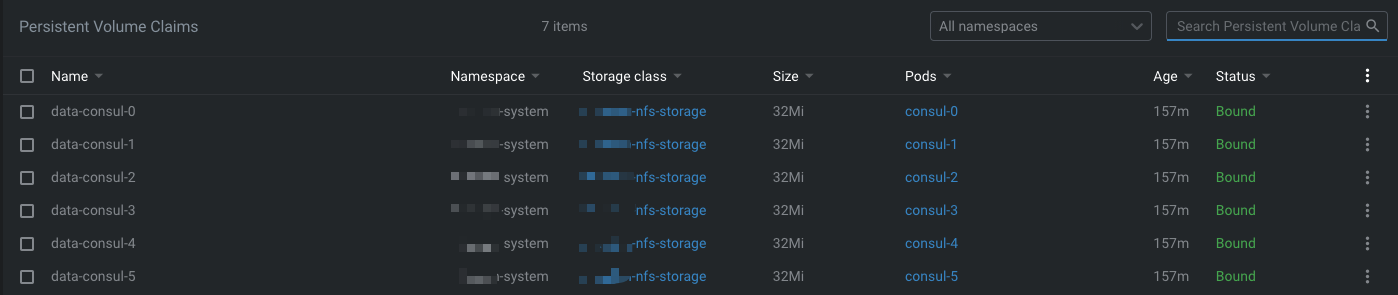
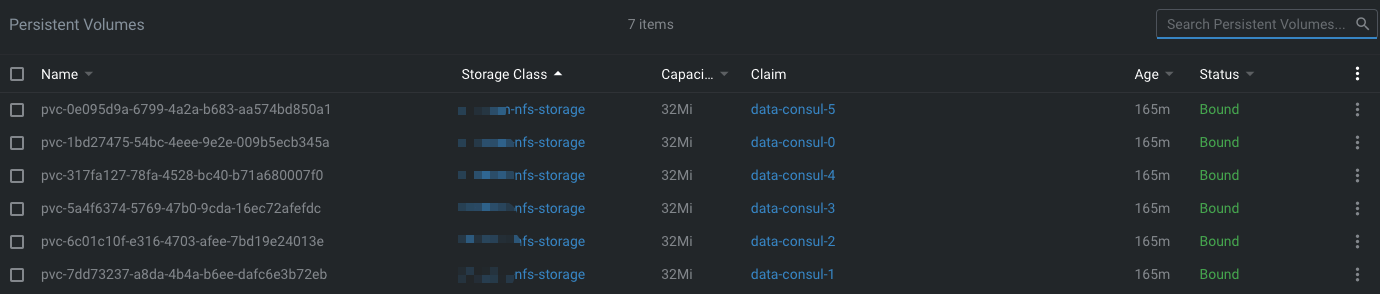
From the result, you can see that the PVs and PVCs are created automatically, which makes storage management much easier. With that in place, Consul's data-dir can be persisted without manually preparing a PV and PVC for every Pod.
StorageClass is one of those Kubernetes features that saves a lot of repetitive operational work. For stateful workloads in particular, letting the cluster create storage dynamically is far more practical than provisioning each PV by hand.